FACIAL ANIMATION WITHOUT KEYFRAMING-Tutorial
 wolf359
Posts: 3,955
wolf359
Posts: 3,955
Hi,
Just a brief 7 minute tutorial on using the Puppeteer procedural animation tool
for animating facial expressions ,in Daz studio ,without any paid plugins or key framing .
https://drive.google.com/file/d/1ME6qMhLjfVCnGcuHIZPrrlQwKNP5WvQ7/view

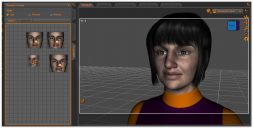
puppeteer layout.PNG
1234 x 625 - 370K
Post edited by wolf359 on

Daz 3D is part of 
Connect
DAZ Productions, Inc.
7533 S Center View Ct #4664
West Jordan, UT 84084
Licensing Agreement | Terms of Service | Privacy Policy | EULA
© 2026 Daz Productions Inc. All Rights Reserved.
Comments
That is awesome info thanks wolf
Puppeteer is one of those greatly under utilised tools, I use it on hair and clothing movement a lot too, one can orchestrate it to match movements, the only issue I do have with it is it seems to slow down in key frames it creates as it progresses so have to do it much longer than my original animation, it also goes too fast for fine tuning.
Puppeteer is the single best tool for storing poses/shaping new characters, as well for short animations! it's my most used tool!
thanks
Double post deleted
Glad you found it helpful
Indeed it very quickly bakes hundreds of keyframes
that are not really "edit friendly" unless you use the free
Mass culling script from Mcasual to reduce them down for managable fine tuning with graphMate.