best way to remove this clothing problem?
 Toobis
Posts: 993
Toobis
Posts: 993
in The Commons
Am using V4 and an outft I'm putting on her (meant for V4) I notice has a lot of these flesh spots on her body where the outfit does obviously not cover the body. Is there a best way to fix this? I thought about scaling up the clothing so it expands and covers the flesh spots but then it would look slightly off during the final render. How is this problem normally dealt with pls. :)
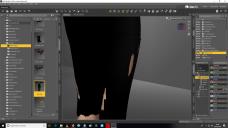
prob.jpg
1920 x 1080 - 301K

Daz 3D is part of 
Connect
DAZ Productions, Inc.
7533 S Center View Ct #4664
West Jordan, UT 84084
Licensing Agreement | Terms of Service | Privacy Policy | EULA
© 2026 Daz Productions Inc. All Rights Reserved.
Comments
1 Apply a smoothing modifyer to the clothing and possibly increase smoothing/collision iterations.
2 The clothing most likely has some fitting/styling morphs to deal with this sort of issues (expand all or legs adjust or similar)
3 Use a push modifyer to slightly expand the geometry of the clothing.
The option to add a smoothing/push modifyer...select the clothing figure, go to edit/figure/geometry.
Apply smoothing and set V4 as the collision.
Select clothing
Edit>Object>Geometry>Add Smoothng Modifier.
The properties for smoothing can be found in the Parameters tab.
Also right clicking on the clothing brings up a menu where you can transfer active morphs, the shaping morphs for v4 will be transfered to the clothing, which might fix the problem.
If the mesh deforms when applying the smoothing modifyer, change from base shape matching to generic;)
wow thankyou guys! :)
Yea I know that, thanks, but bear in mind that it doesn't always work.
Yup I know that you know, and yes I know=)
I had the same issue when I first started: https://www.daz3d.com/forums/discussion/112816/victoria-4-and-poke-through#latest
V4 is quite different than the Genesis line and requires a bit more time and patience to set up with clothing and poses. I found it funny that V4's clothing fit G2F so well, but I had massive poke-through when the clothes where on V4 (unless I was using the default V4 shape).
The tips in that thread really helped - particularly adding the smoothing modifier and push modifier. That's a big help.
I like V4 but don't use her as often due to the added time and patience it takes to set up scenes with her. Clothing can be a pain on anything other than the default V4 shape. I see now why SO MANY of the V4 characters don't have much body diversity and have very similar body shapes to the base Victoria 4. Deviating too much from the base shape definitely can cause more work for the user in trying to get things to fit right. I'm glad the Genesis line doesn't have that issue (well, at least not to the extent that V4, A3, and older figures have).
You can also get the Elite addons shapes for V4 and unimesh fits but although that works well in Poser, the workarounds with smoothing added can work too with autofit in DS.
AWWWW @divamakeup, you were such a little baby then look how you've grown