anyone know how to correct this?
 Toobis
Posts: 993
Toobis
Posts: 993
Not sure what's happened but its a V4 figure and I was playing with expressions and this seemed to happen to her eyelids where they are apparently transparent?! (in pic) I've tried to use other expressions in the hope of correcting it but it doesn't seem to change. Any info on how to correct this with screenshots would be appreciated.
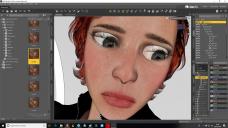
correct.jpg
1920 x 1080 - 532K
Post edited by Toobis on

Daz 3D is part of 
Connect
DAZ Productions, Inc.
7533 S Center View Ct #4664
West Jordan, UT 84084
Licensing Agreement | Terms of Service | Privacy Policy | EULA
© 2026 Daz Productions Inc. All Rights Reserved.
Comments
I can't do anything to provide screenshots, particularly as I'm not certain it's the problem, but it looks to me like you may have somehow moved the eyeballs forwards. Check the Translate coordinates of the reye and leye in the parameters tab and make sure that they're set to zero.
yeh you'd be right! thx a lot.
Looks like your character involves lager than normal eyeballs. The eyelids are not transparent, what you are seeing is the eyeballs sticking out past the eyelids.
To remedy this problem you can try scaling down the eyes until the pokethrough goes away, or set DazStudio to show hidden dials and adjust the z-translation of the eyes to move them back into the skull.
Either the eyes have been moved or scaled by the expression file. Used to see this a lot with V4 in my Poser days. (Sloppy venders making bad pose files.) What I did to get around this was to open the parameters for the eys and set the minimum and maximum values for scales and translations to the "at rest" values of the figure. I think in Studio you'd select those values and lock them with the litte padlock icons.
Something like this happened to me once with a Genesis 8 figure. This is what solcved it for me:
- Click on the figure, save as pose preset
- When the box appears that lets you decide which parts of the pose you want to save, go through the entire menu and unclick anything that looks like a hidden pose.
- After saving, zero the pose of your figure. The eyes should go back to normal.
- Apply the pose you just saved.
Hope this helps!