Select surface covered by another surface
 others1
Posts: 26
others1
Posts: 26
Hello,
Is there a way to select PART of the specific surface which is covered by another surface?
Here is few pictures to show you what I mean...
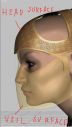
1 picture - top part of veil surface is covered by head surface
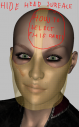
2 picture - if I want to select top part of veil surface I still select head surface even if it is hidden (opacity 0)
Question: How to select top part of veil surface??
I want to create new surface for this part and make it invisible (that is the easy part but how to select it??)

Daz 3D is part of 
Connect
DAZ Productions, Inc.
7533 S Center View Ct #4664
West Jordan, UT 84084
Licensing Agreement | Terms of Service | Privacy Policy | EULA
© 2026 Daz Productions Inc. All Rights Reserved.
Comments
If you are using the Geometry Editor tool select the top layer, right-click>Geometry Visibilty>Hide Selected, then you can go on to work on the under layer.