viewport "shrinks" when changing activities. Studio 4.11
 twitchew
Posts: 127
twitchew
Posts: 127
This just seemed to start happening in 4.11 (windows).
I have configured my studio to use a single viewport pane with viewport as the tab. I keep the tools out in other undocked panes in separate monitors. I have a few activities that i have confgured the same way (single viewport, and custim floating panes).
when i switch between activies (like from advanced, to content or rendering) the main viewport shinks to about 1/4 of the screens' height. (see image).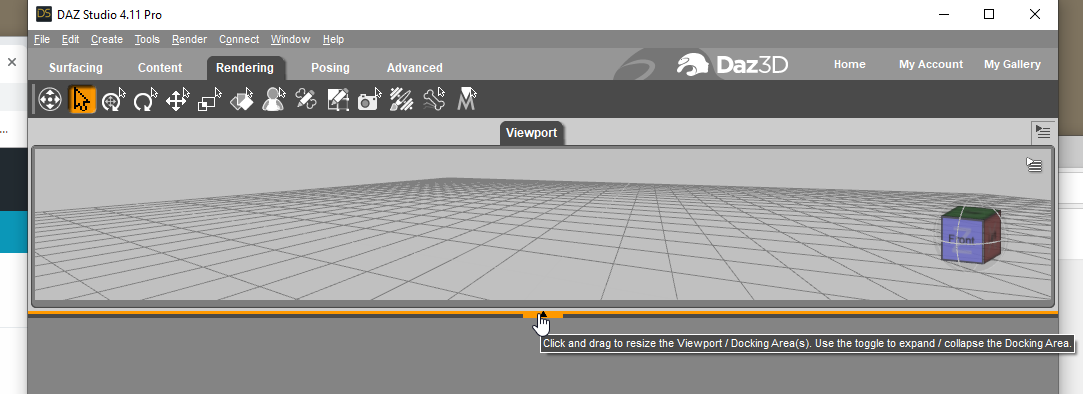
if i resize the application window everything refreshes and i am back to a full view. but if i switch activities (from rendering to content for example) the reduced height viewport reappears and sticks till i resize the application itself. has anyone got any ideas?
i am was on older nvidia video drivers, and i upgraded to the lastest creator dirivers and still the issue persists.

Daz 3D is part of 
Connect
DAZ Productions, Inc.
7533 S Center View Ct #4664
West Jordan, UT 84084
Licensing Agreement | Terms of Service | Privacy Policy | EULA
© 2026 Daz Productions Inc. All Rights Reserved.
Comments
What is your render size, and especially the aspect ratio, set to?
the renser size is set to "active viewport "
ration seems to be 284 to 139
these numbers don't change when the frame is shrunken or when it restores to a normal size.
if i change the aspect ratio (to display wide for example) the viewport does not 'unshrink' . I also have the aux viewport in an undocked area and the view and render area accuratly displays the dimension prset
I used to pull off the panels to a separate window, but Daz never really behaved well. Now I span two windows and redock all non-viewport panes together. Everything stays put that way.
thanks, i am going to give that a try. it is maddening right now to have things not working as they are.
Given yur other post on menu issues it does sound as if something is interfering with or corrupting the UI save when DS closes.