PhilW - dForce Longdrape Hair
 Twilight76
Posts: 318
Twilight76
Posts: 318
I love realy the new Hair but i got a missing Texture Error when i click All Styles Reset.
Log Entries:
2019-06-14 12:23:52.974 Loaded file: All Styles Reset.duf
2019-06-14 12:23:53.103 Could not resolve : "/Runtime/Textures/PhilW/LongdrapeB/Hair Density/Bust.png"
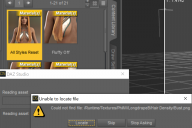
error.png
1288 x 857 - 435K
Post edited by Twilight76 on

Daz 3D is part of 
Connect
DAZ Productions, Inc.
7533 S Center View Ct #4664
West Jordan, UT 84084
Licensing Agreement | Terms of Service | Privacy Policy | EULA
© 2026 Daz Productions Inc. All Rights Reserved.
Comments
I am having the same issue as well. Plus I can not see the hair in Iray mode and when I render. Any help will be great. Thanks.
Which version of DS are you using? dForce hair requires 4.11.0.383 (or one of the later 4.11.x.x betas).
Does this make any difference to the hair (it would affect the density of the hairs, most likely).
I am using 4.11.0.383. I was able to get rid of the error: "/Runtime/Textures/PhilW/LongdrapeB/Hair Density/Bust.png" by creating the folder for it but still no hair is visible in the renders.
I was able to get the hair to show up both in Iray and the renders by selecting the surface selection tool then clicking on the hair strands. How odd is that!!
Never used it, but will try now.
... Watch thsi space.
Edit:
I get the same error.
Dose the hair show on load, just not after the preset? Or is it not showing at all (I wa assuming the latter on first read through)?
I had that error, I think, but there was an update to the product that fixed it.
The hair (strands) showed up but just didn't render. All is good now.