Message-Shirt-Magic - Testers wanted for new features [Commercial]

3D Universe3D Universe Posts: 335
edited May 2019 in The Commons

Hi All,

We've added a few new features to our Message-Shirt-Magic product and would like to get a few folk that have the product to test it in the wild. The main update is the ability to use any fonts installed on your system, instead of the few standard Mac/PC fonts.

You will need to have the existing M-S-M product with at least one plugin and you will need to be able to test the product soon, and give feedback promptly. The update will be made available for free to all customers who have purchased the product, so this isn't a way of getting a free upgrade ;-)

Please let me know here, or via private message...

Steve
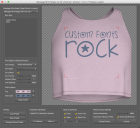
Screen Shot 2019-05-28 at 12.37.52.png
1800 x 1648 - 964K
Post edited by 3D Universe on

Comments

  • TaozTaoz Posts: 10,307

    Seems to be working fine with all those fonts I've tried so far.

    I've noticed that if you save a preset with Font Style set to Normal, it defaults to Bold when you load it. The other font styles seems to save OK. And it will overwrite a preset without warning if you create a new one with the same name. Otherwise I haven't noticed any problems.

    I still wonder how you made some of those presets which don't work correctly on my system with the shared system fonts. Tahoma e.g. doesn't seem to contain the recycle symbol used so how did you actually apply it? I did however find some other fonts on my system which supports the recycle symbols, like Kozuka Gothic Pr6N L, and the preset works fine with these. But the character still appears as a square in the text window.

    I found a small tool which can apply unicode characters (if supported by the selected font) by entering the character's hex code: https://www.fileformat.info/tool/unicodeinput/index.htm  And a list of all the unicode characters and their hex/dec codes: https://unicode-table.com/ 


    msm_alien_encounters.png
    947 x 850 - 347K
    msm_almonte_snow.png
    947 x 850 - 365K
    msm_pacifico.png
    947 x 850 - 356K
    msm_kozuka_gothic.png
    947 x 850 - 311K
  • 3D Universe3D Universe Posts: 335

    Fonts are complex and do differ on some operating systems and languages. While all of the presets we included worked perfectly on our MacOS and the tester’s Windows versions, we can’t say why they don’t work on your system. 

    Some fonts also use different naming for the different styles instead of sticking to standards which is probably why saving a specific font as “normal” is getting the utility confused. The standard naming for a normal font is “regular”. 

    We will add a warning when over-writing an existing preset. 

  • 3D Universe3D Universe Posts: 335
    edited May 2019

    I've noticed that if you save a preset with Font Style set to Normal, it defaults to Bold when you load it. The other font styles seems to save OK. And it will overwrite a preset without warning if you create a new one with the same name. Otherwise I haven't noticed any problems.

    What font did you save with the font style "Normal", all my fonts don't have a "Normal" style, only "Regular" which loads fine. I'd like to try replicate the load issue you had.

    Post edited by 3D Universe on
  • 3D Universe3D Universe Posts: 335
    Taoz said:

    I still wonder how you made some of those presets which don't work correctly on my system with the shared system fonts. Tahoma e.g. doesn't seem to contain the recycle symbol used so how did you actually apply it? I did however find some other fonts on my system which supports the recycle symbols, like Kozuka Gothic Pr6N L, and the preset works fine with these. But the character still appears as a square in the text window.

    Here's a link explaining the possible reason you are seeing blocks instead of Unicode symbols:  https://support.microsoft.com/en-hk/help/3083806/why-does-some-text-display-with-square-boxes-in-some-apps-on-windows-1

  • TaozTaoz Posts: 10,307
    edited May 2019

    I've noticed that if you save a preset with Font Style set to Normal, it defaults to Bold when you load it. The other font styles seems to save OK. And it will overwrite a preset without warning if you create a new one with the same name. Otherwise I haven't noticed any problems.

    What font did you save with the font style "Normal", all my fonts don't have a "Normal" style, only "Regular" which loads fine. I'd like to try replicate the load issue you had.

    The standard Windows font dialog also uses "Regular", but for some reason it's called "Normal" in the Windows version of the MSM app. It my have to do with DAZ Studio setup or the programming language you're using (QT?). 


    windows8_font_dialog.png
    447 x 553 - 26K
    Post edited by Taoz on
  • TaozTaoz Posts: 10,307
    Taoz said:

    I still wonder how you made some of those presets which don't work correctly on my system with the shared system fonts. Tahoma e.g. doesn't seem to contain the recycle symbol used so how did you actually apply it? I did however find some other fonts on my system which supports the recycle symbols, like Kozuka Gothic Pr6N L, and the preset works fine with these. But the character still appears as a square in the text window.

    Here's a link explaining the possible reason you are seeing blocks instead of Unicode symbols:  https://support.microsoft.com/en-hk/help/3083806/why-does-some-text-display-with-square-boxes-in-some-apps-on-windows-1

    Thanks. In this case I believe the fonts are simply different. You're using the Tahoma font for the Recycle preset, but the Recycle symbols set (Unicode 2627 - 267D) is not present in the Tahoma font in my Windows systems. The Tahoma font in my Windows 8.1 also has a different set of symbols that the one in Windows 10, so there may be several versions of that and other systems fonts among Windows versions.

  • ArtiniArtini Posts: 10,621

    Hi All,

    We've added a few new features to our Message-Shirt-Magic product and would like to get a few folk that have the product to test it in the wild. The main update is the ability to use any fonts installed on your system, instead of the few standard Mac/PC fonts.

    You will need to have the existing M-S-M product with at least one plugin and you will need to be able to test the product soon, and give feedback promptly. The update will be made available for free to all customers who have purchased the product, so this isn't a way of getting a free upgrade ;-)

    Please let me know here, or via private message...

    Steve

    Wow. That will be a biggie for me, while released. I have bought a big pack of fonts from Smith Micro in the past

    and spotted a lot of free fonts, that I would like to use.

    Although, I have not so much free time to do tests now, I will really appreciate such update, when released.

    Wish you all the best.


  • 3D Universe3D Universe Posts: 335
    Taoz said:

    The standard Windows font dialog also uses "Regular", but for some reason it's called "Normal" in the Windows version of the MSM app. It my have to do with DAZ Studio setup or the programming language you're using (QT?).  

    In the latest update (link PM'ed to you), we've created a translator that converts the font style names saved in the font to the three standard names, so:

    • Bold, Thick, Dark, Heavy, Black and Solid all becomes "Bold"
    • Italic, Oblique, Inclined, Slanted and Sloped all become "Italic"
    • Regular, Normal, Plain, Regural (can you believe this one!?!) and Medium all become "Regular"

    Hopefully, that makes things a litlle simpler as far as font styles go.

  • 3D Universe3D Universe Posts: 335
    Wow. That will be a biggie for me, while released. I have bought a big pack of fonts from Smith Micro in the past and spotted a lot of free fonts, that I would like to use.

    As long as no issues are found in the current test version, it will be rolled live in the next few days. It will be a free update to the original utility.

  • ArtiniArtini Posts: 10,621

    Great. Will wait patiently for the update, then.


  • TaozTaoz Posts: 10,307
    Taoz said:

    The standard Windows font dialog also uses "Regular", but for some reason it's called "Normal" in the Windows version of the MSM app. It my have to do with DAZ Studio setup or the programming language you're using (QT?).  

    In the latest update (link PM'ed to you), we've created a translator that converts the font style names saved in the font to the three standard names, so:

    • Bold, Thick, Dark, Heavy, Black and Solid all becomes "Bold"
    • Italic, Oblique, Inclined, Slanted and Sloped all become "Italic"
    • Regular, Normal, Plain, Regural (can you believe this one!?!) and Medium all become "Regular"

    Hopefully, that makes things a litlle simpler as far as font styles go.

    OK, tested and works fine here.

  • TaozTaoz Posts: 10,307
    edited May 2019

    I've found a way to link fonts in Windows which means that you can add any Unicode symbol or character to any font that doesn't have it, from a fonts that does. That could be very useful. And it does work, attached a screenshot from Xara Designer. Before, the Tahoma font (which doesn't contain the Recycle symbols) only showed a square when I entered the code for them, but after linking Tahoma to a font which contains them, it now shows these symbols. It should be possible to make registry presets which can link different fonts together this way.

    However, I doesn't seem to work in SMS on my system, I still just get squares in both the text field and on the shirt. But I believe it might work on Windows systems that doesn't have this problem.


    font_linking_tahoma.png
    443 x 339 - 37K
    Post edited by Taoz on
  • 3D Universe3D Universe Posts: 335
    Taoz said:

    I've found a way to link fonts in Windows which means that you can add any Unicode symbol or character to any font that doesn't have it, from a fonts that does. That could be very useful. And it does work, attached a screenshot from Xara Designer. Before, the Tahoma font (which doesn't contain the Recycle symbols) only showed a square when I entered the code for them, but after linking Tahoma to a font which contains them, it now shows these symbols. It should be possible to make registry presets which can link different fonts together this way.

    However, I doesn't seem to work in SMS on my system, I still just get squares in both the text field and on the shirt. But I believe it might work on Windows systems that doesn't have this problem.


    The DAZ Scripting Engine (which MSM is built on) is limited to what DAZ Studio exposes in it's API. I did find that when adding custom fonts to the system, they only showed in MSM after restarting DAZ Studio. You could try that to see if the linked fonts appear in MSM...

  • TaozTaoz Posts: 10,307
    Taoz said:

    I've found a way to link fonts in Windows which means that you can add any Unicode symbol or character to any font that doesn't have it, from a fonts that does. That could be very useful. And it does work, attached a screenshot from Xara Designer. Before, the Tahoma font (which doesn't contain the Recycle symbols) only showed a square when I entered the code for them, but after linking Tahoma to a font which contains them, it now shows these symbols. It should be possible to make registry presets which can link different fonts together this way.

    However, I doesn't seem to work in SMS on my system, I still just get squares in both the text field and on the shirt. But I believe it might work on Windows systems that doesn't have this problem.


    The DAZ Scripting Engine (which MSM is built on) is limited to what DAZ Studio exposes in it's API. I did find that when adding custom fonts to the system, they only showed in MSM after restarting DAZ Studio. You could try that to see if the linked fonts appear in MSM...

    I've already tried that, unfortunately no.

  • 3D Universe3D Universe Posts: 335
    edited May 2019

    After some research, it seem that a Windows 10 update in October 2018 messed up the Unicode fonts:

    https://answers.microsoft.com/en-us/windows/forum/windows_10-performance/missing-unicode-star-after-update-to-2018-october/aa912568-6893-4788-9ce0-7f85c28df51e?page=2

    Supposedly it has been fixed in an update on 22 Jan 2019, but I'm on a Mac so I have no way of checking that 

    • Addresses an issue that causes some symbols to appear in a square box on a text control. 

    all the best,
    Steve

    Post edited by 3D Universe on
  • TaozTaoz Posts: 10,307
    edited May 2019

    After some research, it seem that a Windows 10 update in October 2018 messed up the Unicode fonts:

    https://answers.microsoft.com/en-us/windows/forum/windows_10-performance/missing-unicode-star-after-update-to-2018-october/aa912568-6893-4788-9ce0-7f85c28df51e?page=2

    Supposedly it has been fixed in an update on 22 Jan 2019, but I'm on a Mac so I have no way of checking that 

    • Addresses an issue that causes some symbols to appear in a square box on a text control. 

    all the best,
    Steve

    Yes, I read somewhere else that the 1809 update broke some Unicode functions, but the Win 10 I'm testing on is 1607 so I concluded that it wasn't that. I do have a Win 10 version 1809 PC I use for programming, but I guess it won't help testing on that if Unicode is broken there, so I'll have to update it first which may take a whole day where I can't do any work on it.

    I'm am also having the exact same problem on a recently updated Win 8.1 PC which I'm primarily testing on. It is set up the exact same way language and keyboard wise as the Win 10 I've been testing on so my guess so far has been that it has something to do with that. But it could also be a question of versions of fonts installed. Or something completely different. I wish I had a PC where it worked, that would make it easier to troubleshoot. Think I'll try a couple of other PCs I have but they need to be fixed in different ways before they can boot up.

    It's not a big problem in this context though, I have lots of fonts to choose from which contain all kinds of Unicode symbols including the Recycles, and as long as they do that it works fine. I just want to know what's going on as it may affect debugging the programs I'm writing myself.

    Post edited by Taoz on
  • RainRain Posts: 353

    I really am loving this product......now I need a boys shirt so I can put dinosaurs on them.


    Hat and shirt.jpg
    1683 x 1240 - 512K
  • 3D Universe3D Universe Posts: 335
    spuffy said:

    I really am loving this product......now I need a boys shirt so I can put dinosaurs on them.


    That’s a fun font you’ve found!

  • RainRain Posts: 353
    spuffy said:

    I really am loving this product......now I need a boys shirt so I can put dinosaurs on them.


    That’s a fun font you’ve found!

    I found a lot of really cute free fonts.......it’s almost unlimited what you can do with this product.  

Sign In or Register to comment.
