1st render. Red looking skin ... Is the fix in Surfaces tab?
 ArtAngel
Posts: 2,096
ArtAngel
Posts: 2,096
This is the first render I did a month ago. I noticed they all have a reddish glow to the skin. When I did a later render with added lights and no headlamp and added Lucas next to Josie, I got some decent shadows but he was red as a beet. Anyone know how to get the redish glow off in Daz? Is it in the surfaces tab.
Edited to change title
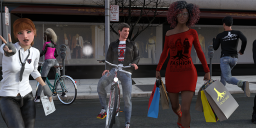
JRay-Render01.png
1152 x 414 - 889K
Post edited by ArtAngel on

Daz 3D is part of 
Connect
DAZ Productions, Inc.
7533 S Center View Ct #4664
West Jordan, UT 84084
Licensing Agreement | Terms of Service | Privacy Policy | EULA
© 2026 Daz Productions Inc. All Rights Reserved.
Comments
Are they all Iray shaders? Released as Iray, I mean. This is presuming that is an iray scene?
There have also been changes to the shaders since release too.
I tend to use the same lighting when I'm creating my characters, so if I combine them in a scene they will be consistent.
Lighting makes a huge difference. It also kinda looks like you have the spot light turned on for the camera - never have it turned on, it just gets annoying.
Thanks nicstt. Yes, Iray. I bought a couple of tutorials on lighting. I'll have to read them. I managed to do something with the store using a sky dome. But not much improvement with the crowd.
Can I ask what you mean by 'same lighting'?
And theres's that hideous light on the building. I'll check out the camera spot light and if on , turn it off..
I customise all characters; I never use them out-of-the-box, or I use ones I've created for myself.
I use the same lighting settings (I uploaded an HDRI to my Deviant Art account), that has uniform lighting to compare characters.
If you open two copies of Studio, load two different characters, load two different HDRIs or other Light settings and render them; chances are they will look different (skin-shader-wise); now, is that down to the lighting, or the textures and shaders? You only know for sure if you compare the two different characters under identical light settings; incidentally, also compare them at the default position and without a pose - and ideally with the character shape dialled out, but that is not that important if they are about the same height and body shape.
You could also load the same character and load two different light settings, there is a good chance they will look different.
@ArtAngel "But not much improvement with the crowd."
The skin tones of your characters look pretty good / natural to me. I would guess that your monitor settings are fairly different from my calibrated monitor.
Have you manually "tweaked" your monitor colors?
Do you mean the red of Josie's face in the first attached image? It looks like she might be using a different face texture map than the rest of her. You could maybe try adjusting the SSS tint color of the face surface (in surfaces tab) to try and get it to match better with her neck and arms.
If all else fails you can try copying the surface texture of the torso and paste it into the face surface tab and then go in and manually replace the torso maps with the face maps. It's a bit of a pain in the tush to do it that way but you'd assure that the surface settings for both material zones are set the same.
EDIT -On second look, the face texture of Josie looks a bit like what happens when I sometimes accidentally apply the 3DL makeup settings instead of the Iray ones. Maybe try reapplying the makeup settings and making sure to use the Iray ones and see if that fixes the mismatching tones of her face and neck.
Good point; Spyder 5 Express (or Pro) is a good way of keeping monitors calibrated. It can be done manually however, and if you don't have a professional grade monitor then it may be a waste of cash. Depends on the monitor and on its age. Even non-graphics orientated ones can still gove excellent colour accuracy.
BTW, what pose set are you using with the guy in the red New York City shirt:
Yeah, I'm not seeing any "red glow" either. I do see that Josie's face texture in the first image is quite a bit redder than the rest of her though and that maybe what they mean? *shrug*
Hmmm.... This really doesn't look like an iray render to me at all. Looks like 3DL, or even OpenGL...
Thanks nicstt. Yes, Iray. I bought a couple of tutorials on lighting. I'll have to read them. I managed to do something with the store using a sky dome. But not much improvement with the crowd.
Can I ask what you mean by 'same lighting'?
Thank you so much.
I plan to try everthing you suggested. I can't for the life of me get the lighting looking good on my end.
@fastbike1. I have 4k 38" lg curves and am ashamed to admit I have not. I haven't even installed the cd they came with. :( I just plugged them in. after I finish this post I'm off to google that. Been years since I calibrated a monitor. I wanted to have each of the 6 main characters upfront and center for a slideshow but because the ground/road was so dark in the group shot, I ended up trying to render the store and the characters individually to bring into PS 2019 and rebuild there, but that was a nightmare. That's when I noticed how red they were. I have no clue how they turned red. If I didn't empty the PC trash I'll find the lucas one and post it.
@ Divamakeup.I did apply makeup to Josie and tried to brighten everyones eyes so God knows what I did. I should make notes I guess. I'll try everything mentioned here. I also bought your altern8 hoping to use it to fix the issue. Re the poses. I tweaked quite a few using the scene tab to select bones and move parts of arms and fingers. At one point I had his hand in his stomach. I was inspired by a pose of hubby in hospital bed at home,after surgery. (attached). Is there a way I can find the starting poses used?
@Leonides02 Rendered it with 2 titan pascal x's in Iray. What is openGL and how do I find if I somehow used it accidently?
Not sure what's going on now. Went to see if I could find the pose and got this. (Took a window screenshot). The t-shirts have lost the textures I created and their faces are gray boxes. I liked their faces better when they were red. I downloaded the new Daz 4.11 hair strand version. Would that do this? That's it I'm having a drink. Maybe they'll look better after a few. Urrrg.