Lighting Issues
 vonHobo
Posts: 1,715
vonHobo
Posts: 1,715
Hello,
I have been having a light issue that just started recently. There seems to be a really strong side light on my scenes, casting long shadows.
Any other lights added to the scene have little to know effect against this light source.
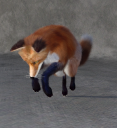
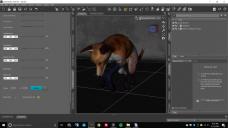
My scene has no lights, as you can see with the fox example Scene pane, and I even set the default Environment Map (HDR) to 'None' and yet the light issue persists. You can see the fox seems to be strongly illuminated from the left and casts a long shadow on the ground to the right.
The last time this happened, a few days ago, the only thing that fixed it was to reboot my computer and pull up the scene again. Then magically, the side light was gone, and additional added lights once again had the intended effects desired.
Has anyone experienced this issue? I've been using DAZ Studio for months and never ran into this problem before.

Daz 3D is part of 
Connect
DAZ Productions, Inc.
7533 S Center View Ct #4664
West Jordan, UT 84084
Licensing Agreement | Terms of Service | Privacy Policy | EULA
© 2026 Daz Productions Inc. All Rights Reserved.
Comments
I should also add that the Headlamp is set to "When no scene lights" but adding lights or removing them produces the exact same lighting as scene in the picture.
I panned all the way out on the scene, to see if I can find some hidden light or something but there is nothing out there.
This issue is really driving me crazy. I really enjoyed using lights to get different effects in DAZ Studio, but now nothing works because of this weird ghost side light.
If you set the Environment, in Render Settings, to None you turn on Sun and Sky - if you don't want an environment light you need to set the type to Scene Only, instead of Dome and Scene
OMG Thank you Richard!
I must have set it from Scene Only to Dome and Scene at some point.
Also, I had to adjust the exposure value from 13 to 10 to get enough light... now things are back to what they were before.
I'm not sure if I accidentally adjusted the Dome/Scene dropdown, or the Exposure Value last week. Still not entirely sure what the heck is going on but at least it's fixed.