Installing Daz Studio
 dash2128
Posts: 736
dash2128
Posts: 736
I am attempting to download DazStudio onto my new computer.
But when I open Install Manager, and click on Public Build, nothing appears.
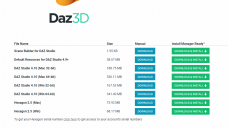
I also tried using the download page I located, below, in the screenshot. But that didn't work, either.
ALSO: My computer has a solid state boot drive, and a 2 Tb hard drive. (I use the 2 TB stabdard drive to store all my Daz/duff files.) Does that change where I should download DazStudio onto?
13.PNG
1163 x 654 - 75K

Daz 3D is part of 
Connect
DAZ Productions, Inc.
7533 S Center View Ct #4664
West Jordan, UT 84084
Licensing Agreement | Terms of Service | Privacy Policy | EULA
© 2026 Daz Productions Inc. All Rights Reserved.
Comments
In Install Manager, make sure you have checked either Win64-bit, Win32-bit or Mac (depending on your operating system) as well as "Public Build" in the filters.
ETA: You can't download the Beta from that download page, but the current release version you should be able to download from there. Which do you want to use? (You can install both if you want to). If you want the Beta, have you actually "bought" it? (it's free but you have to put it in your cart and check out)
On your second question, it depends on the size of your SSD. If it's got enough space then installing the Daz Studio software there will make it a little quicker to open, but personally I have a tiny SSD so DS is installed on my hard drive. You need to tell Install Manager where to put it if you want to use an alternative location to the default. It's in the settings somewhere (sorry I'm on my laptop just now so can't check exactly where).
Thank you for replying!
I started using the Public Build (10 and then 11- I experienced problems with 11 that I did not with 10) last year (or the year before- cannot remember), when I needed to upgrade, after some product purchases (and experienced difficulties downloading an upgrade). But when I tried to setup on my new (refurbished, actually) computer, I couldn't get Download Manager to download one of the versions. (Screenshots)
Second Question: It sounds like I need to setup DazStudio on the 2 tb standard Hard Drive, then. (Since I wish to keep the much-smaller solid-state drive as free as possible, so it will run smoothly and reain speedy. (right now, there is 150 gb free on it. It is a 214 gb drive.)
Have you tried adding your OS to the filters, like I suggested?
Oh, and you may want to move your downloads folder from the C: drive (I presume that is your SSD?) to the other one - some of those download files are pretty large and it will be easier if you move the download location now (before you get started).
First expand the program to full screen then un-check Install After Download but do check Show Details.