White rendered environments
 xblurp
Posts: 12
xblurp
Posts: 12
Hello! I'm pretty new to Daz3d and I've tried searching up this issue on Google, but any answers or even topics on the subject seemed to elude me. I'm not even too sure what to type for the problem although I have tried several searches.
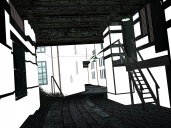
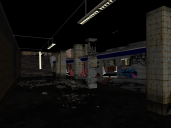
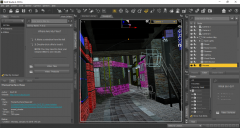
For some reason a majority of my environments seem to come out as white when they are rendered. The first pic is an example of this while the third is what it looks like pre-rendered. The second image in the middle is a background that seemed to not have this problem however all my environments seem to lack is taking in or rather having any light cast upon them. As in when light hits the environments it doesn't really seem to be affected by it. Characters and everything else seem to be 100 percent fine, but not knowing what most of these terms even mean I've gotten stuck. So if anyone knows what the solution is I'd be most grateful.

Daz 3D is part of 
Connect
DAZ Productions, Inc.
7533 S Center View Ct #4664
West Jordan, UT 84084
Licensing Agreement | Terms of Service | Privacy Policy | EULA
© 2026 Daz Productions Inc. All Rights Reserved.
Comments
What are your render settings?
I believe I have everything aside from the engine and the size of the render image on the default settings.