Help With Caustics
 shaneseymourstudio
Posts: 383
shaneseymourstudio
Posts: 383
Does anyone know what skin setting to adjust when using caustics so that it does not affect the skin or minimize the effect like in this example:
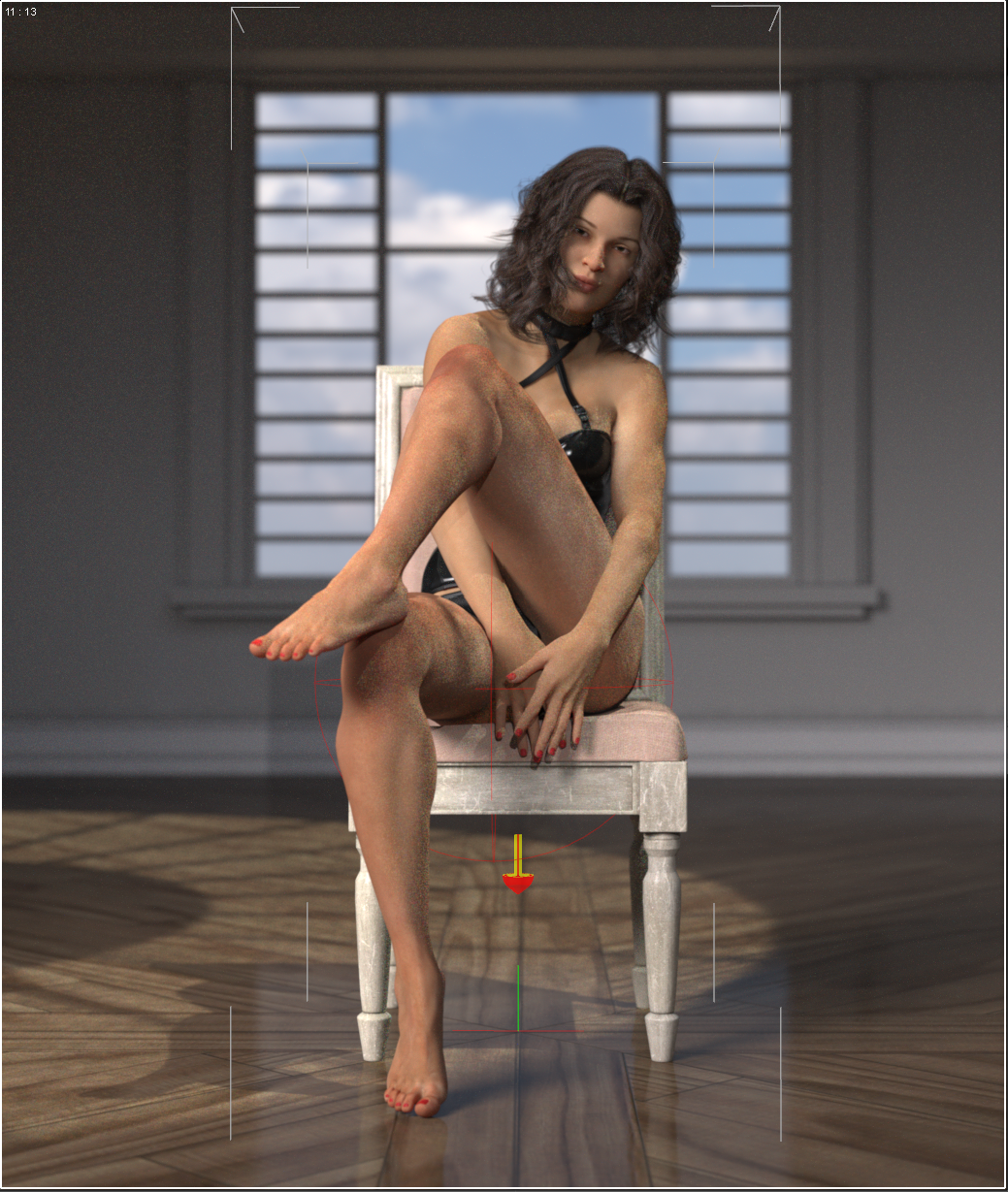
I have tried turning off dual lobe and lowering the glossy layered weight and increasing the glossy roughness but nothing seems to help. I want to use the caustics in this scene for the nice floor shadows it produces. Below is with caustics off:
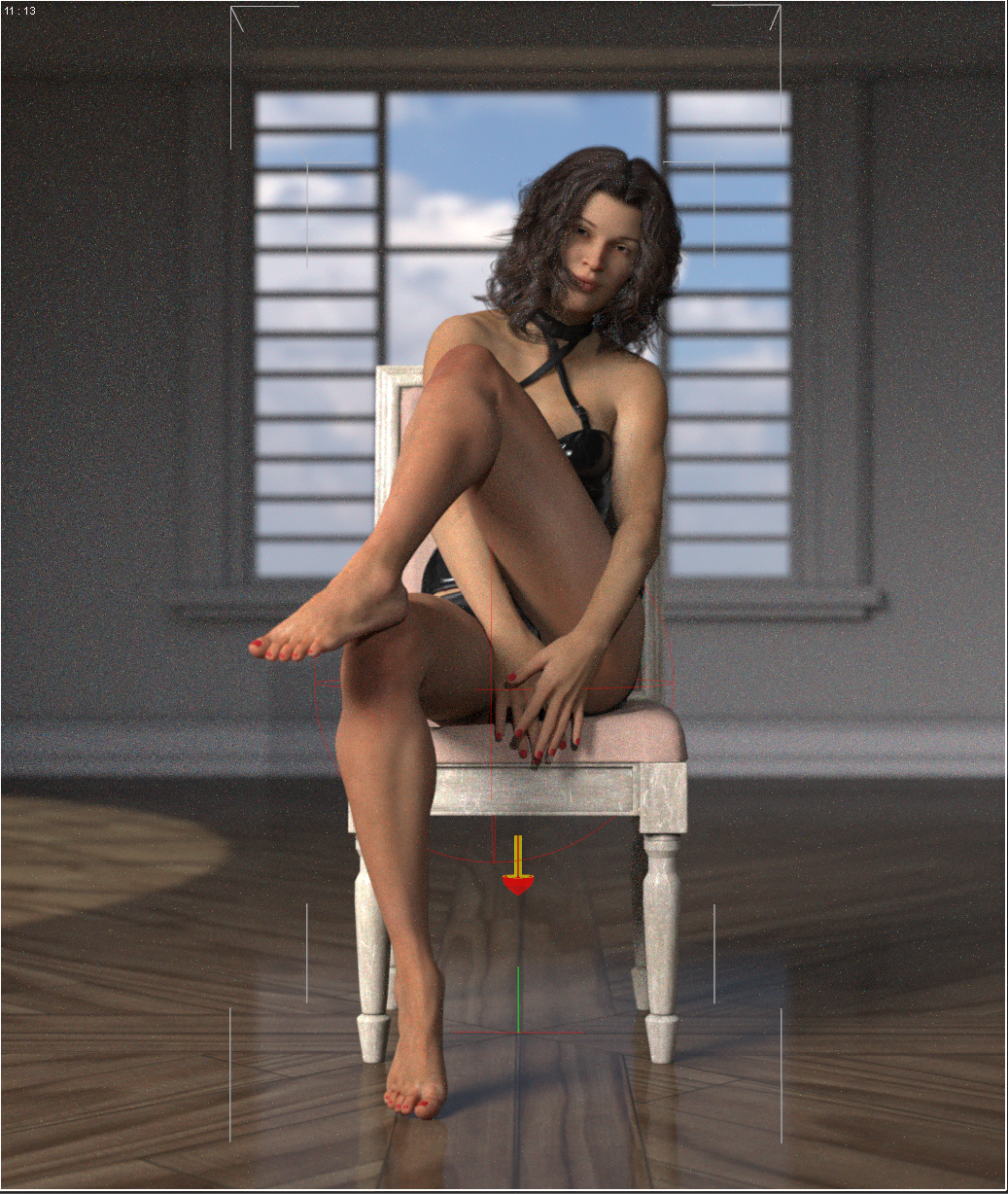
The effect on the skin will minimize the longer I let it run but it takes much more time than I want to let it run and most of that effect resolves quickly on the floor so I assume that there is something in particular with skin shaders or system that causes it to effect it in this way. I can render twice and composite, of course, in photoshop but I wanted to see if there was some part of iray skin shaders that causes caustics to go off the rails that someone knew of so I could turn it to 0 or remove it etc.



Daz 3D is part of 
Connect
DAZ Productions, Inc.
7533 S Center View Ct #4664
West Jordan, UT 84084
Licensing Agreement | Terms of Service | Privacy Policy | EULA
© 2026 Daz Productions Inc. All Rights Reserved.
Comments
Looks like the shorts cut off the circulation in her legs, poor dear. I am thinking there is something funky going on in the SS settings, which skin set are you using?
The two images don't seem to be lit in the same way. The shadows on the floor, which seem to be produced by a window to the above and to the figure's left, have moved in the second as if the light source/window has moved. Has it, or did switching off caustics cause the shadows to move that much?
Caustics are of course most useful for effects seen with water, glass and other such materials when they have some thickness to refract the light passing through them. I wouldn't immediately think they are going to make very much difference to light shining through thin window glass, and they are costly in terms of rendering time. If caustics moved the shadows that much, I would try moving the light source so that they are where you want them to be without using caustics.
All caustics. Just switching it on produces the wonderful lighting on the floor while simultaneously wrecking the skin. I ended up leaving a render running overnight and it still did not get rid of all the spots on the skin. I have attached that render here:
There is something with skin shaders, at least in regards to the current implementation of the caustic algorithm (latest beta .335), that seems to cause the issue.
So looks like the longer it renders the less the sparkles show, which lines up with the fact caustics can take a long time to compute.
The most obvious element in a skin shader that I can fhink of that might produce caustic effects is the Top Coat. Try turning that off or at least setting the IOR to 1.0. Also set Top Coat Thin Film to zero.
More radically, maybe consider rendering the scene without the figure and caustics on, then figure only with caustics off to PNG, and composite the figure onto the room. Or leave caustics off altogether and aim the light through the window so that it falls where you want it.
Yeah I know caustics inherently take longer but they resolve quickly on the floor and the back wall but seem to have particular issue in the skin so wanted to see if anyone had insight as to what setting directly effects it. I believe that I tried the top coat off as well last night in my trials but it still showed up. I didn't try IOR at 1 and didn't check the thin film so I will check that, thanks.
I can certainly combine them in post, as I mentioned in my initial post, but I wanted to do a series with this setup and not sacrifice the lighting as it is and hopefully find the culprit in the skin shader. If I cannot determine the root setting/cause on the skin then I will have to choose to jump through compositing hoops or ditch the lighting, of course.
I will likely just set one of the surfaces on Gia to use diffuse map only and rebuild from there until I see the reaction on that surface from the caustics wrecking it. If I determine what it is I will post it here for anyone else who may run into the situation.
You mentioned that you used an Altern8 no maps setting on Gia 8 maps. I'd save that as a material preset, so you can easily come back to it later, then try applying Gia 8 maps without changes and see how that affects the skin with caustics on. Use the Spot Render with New Window selected in the Tool Settings, and only render a portion of her legs. That will allow you to see the results faster. You might also try applying a 3DL skin materials, and convert that to Iray Uber Base, if the Gia 8 materials give you the same problem.
The point of the testing this way is to find a skin materials setting that doesn't have the issue, so you can compare settings and try to find the culprit.
***UPDATE***
It seems this is being caused by any light coming through the glass material on the top dome. I thought it might have been the hdr environment but I tried using a distant light through the glass instead of the environment and it still had the same effect inside the image. I changed the opacity on the glass to 0 and there was no issue of course but then I lose the lighting on the floor like it is when the light is passing through the glass material. Most of the objects seem to have no issue resolving the firefly type of effect from the caustic but skin materials in particular are problematic it seems. Wherever the disperesed light hit on the model that is where the fireflies appear (rotated dome to verify in several positions). I tried changing alof of the properties on the glass including IOR top coat etc but nothing seems to help it. To recap I get no firefly effect if there is no light that is passing through the glass material hitting the model.
Indeed, thanks for the suggestions! I will try this tonight.
Well I have applied the default materials for Gia8 and same issue. I believe I have run through every setting including swapping the base mix and going down the list between specular/glossiness and default metallicity/roughness and cannot find what if anything is causing the disturbance. I suppose something in the caustics algorithm is causing it regardless of what I change. Similar, I imagine, to how the denoiser is going to have a certain effect on everything in the scene. I am going to try opening the scene in 4.10 and see what happens with caustics.
4.10 had same issues.