Retro Pickup
 shg0816_13461e8196
Posts: 352
shg0816_13461e8196
Posts: 352
in The Commons
A while ago, I picked up the retro vehicle bundle by Polish, and was testing them out in terms of suitability for a project I am working on
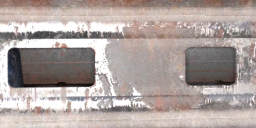
While I like the vehicles, I am very disappointed in the tailgate of a pickup truck (Attached is a simple render of what I am seeing)
Unless there is a setting in the surfaces tab to fill those holes in, I can't use the product. Additionally, I am disappointed that I can't open and close the tailgate at all.
Retro Pickup.PNG
869 x 409 - 873K

Daz 3D is part of 
Connect
DAZ Productions, Inc.
7533 S Center View Ct #4664
West Jordan, UT 84084
Licensing Agreement | Terms of Service | Privacy Policy | EULA
© 2026 Daz Productions Inc. All Rights Reserved.
Comments
None of the promos show the tailgate open, nor does any of the product description mention an opening tailgate. All promos witha visible tailgate show the holes. Why would you expect something else?
Quick and dirty render adding a plane behind the tailgate - needs the tweaking on the colour, but is shows one fix for the holes
Great Idea...a simple plane would work
would it not be possible to fill in the holes within Hexagon or another modeling app? Even the bones or whatever to allow the tailgate to open? The chains would have to be boned as well ...
I like the Pick' em up truck here: https://www.daz3d.com/pick-em-up-truck
But also several on Rendo would work.
I have & like this one although admittedly you'd need to go in with the Geometry Editor and edit the Surfaces so better textures could be assigned or make a brand new set of textures:
https://www.daz3d.com/pickup-truck
this one is good too but so old I don't 'think of it as a pickup truck' but it is
https://www.daz3d.com/pickup-truck-1930