What is happening here?
 music2u4u
Posts: 2,822
music2u4u
Posts: 2,822
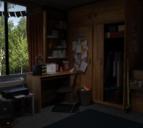
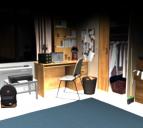
Hi all, this is the second model I have bought here from " i13". The first was the stylish apartment and I had to get a refund because it was broken. Even the Daz support said it was. So I just bought this model here today. It is the Dorm model and after installing it and loading it with the preload AND with the render ready icons, This is what I get. The first is an Iray render straight out of the box. No adjustments of any kind made. This is a near hour run for this. Notice the background picture I used out the window came through just fine. It's only the model itself that is out of focus and very dark. I relaoded it and restarted it and did everything I could think of without actually changing anything on the model. It is suppost to give you a nice render right out of the box. It does not. The second render here is a 3D Delight render after 180 items optimized. This is the outcome of it! I am not sure what is causing these screwed up renders, but I am not having any problems at all with any other models in my runtime. Like I said before, the background picture I used rendered fine!
https://www.daz3d.com/i13-dorm-interior
Can anyone offer me any help here?

Daz 3D is part of 
Connect
DAZ Productions, Inc.
7533 S Center View Ct #4664
West Jordan, UT 84084
Licensing Agreement | Terms of Service | Privacy Policy | EULA
© 2026 Daz Productions Inc. All Rights Reserved.
Comments
What light source did you use for outside the window and what did you use to light the room up. Remember that the room is basically a box, so that if you have a backdrop, it has to be emissive so that it will shine light in and you have to add lights inside the room to light up the interior. IRay is a bit more real world than 3delight hence you see more brightness in the room.
Maybe turn off depth of field in the camera?
What issues were you having with the stylish apartment? I ask because it renders ok for me using the prebuilt scene settings, I don't know whether there was an update. But was it a similar situation to what you see now?
I don't have this soecific product to check on details, but a few places to start:
You mention changing the background image, can you check (or even better show a screenshot) of your Environment tab under render settings? All the renders in the store show the scene being lit from the window, so I expect there aren't any emissives in the room itself to light it if the outside light isn't bright enough. The stylish apartment is similar, to get enough light in the scene, the preset increases the environment intensity to 20 and the environment map strength to 8. If you loaded another HDRI preset, it may have reset these values. The preset also appears to set the exposure value under tone mapping to 12 (I think I was using Studio recently with it set to 12, so not 100% sure if it didn't start up like that, but tone mapping would be another way to better show an interior scene lit from the outside).
I'd start with the environment settings, and if that gets better but not quite there, I'd ask about tone mapping settings next.
The default camera (camera 5) that loads with the presets has depth of field enabled, hence the out of focus effect.
It is an iray optimised set, so rendering with 3delight needs loads of material tweaking.
I used the spotlights that came with the model. All placed by the author of the model. There is a seperate icon just for them.
I use background images applied through the background tab on everything I render. I have never had a single problem with not enough light emmited from a window before. I don't think it changes the amount of light outside, just changes the image from a white background. I have tried to render this with no background at all and still looks the same. I do know that there is a button that says for Iray to supply lighting if there are no lights used in the render. I tried this without the spotlights that came with it and it didn't change the darkness. It only got worse.
The out of focus issue is similar to what I was experiencing with the stylish apt. The Daz support team loaded it and even they said it was a bit fuzzy looking. I can't load it to show you now because they gave me a refund and I deleted it. I will check the DOF on camera five and see whats up with that.
...everytime I see the title of this thread I think Buffalo Springfield.
...'cause what it is ain't exactly clear?
Yeah, using the Background option from the Environment tab will just put a picture as the back of your image. It won't affect or be affected by any lighting in the scene. The other way to get a background image in Iray is to put an HDRI image into the Environment Map under Render Settings, set the Environment mode to Dome and Scene (or Dome only), and turn Draw Dome on. Then you get a background image, and that image provides light for the scene. Which then immediately throws any enclosed room in your render into total shadow since the "outside light" can't go through walls and you have to throw additional lights into the scene to make up for it. It's a tricky business, is what I'm saying, but when you get it to work, it can provide better results.
I threw the scene into Studio, took a look at the camera, and yeah, the DOF settings "out of the box" are wonky.
The dashed lines are the field of view and the solid box is the in focus area. The camera is set to the default value for F/Stop, which gives you a pretty tiny area that's in focus. If you dial the F/Stop up and adjust the Focal Distance, you should get the space you want to clear up. Or you can turn Depth of Field off and the whole scene will sharpen up.
As for your lighting, I'm drawing a blank. The only thing I can think of is that maybe you hit the icon for Preload and Spotlights, but not the Ready to Render option (which does both and sets your render settings for you). Then if you hit render and your Tone Mapping settings aren't good for an interior scene, you'll get a darker image. Try going to the Render Settings -> Tone Mapping and checking the Exposure Value. Ready to Render sets it somewhere around 10. Higher than that makes for a darker image.
I did some of the suggestions here and this is what I now have. I went to camera five settings and it in fact does have the DOF turned on. All the others do not. So, I turned it off and I got this without a background image. It cleared up a lot of the out of focus problem but anyone will want to put a background image in the window. It looks stupid without one...lol. Still it is way too dark.
So...I went to the render settings as suggested and I went to the environment settings and I saw that the environment intensity was set at 1. I upped it to 20. The environment map setting was set to 2. I upped it to 8. This is what I got. A hundred times better but there is still no image in the window.
So, i put one in it and this is what I now have. This will work just fine for now.
So here is the final results. I think it may sharpen up a bit more with more bake time. I learned a lot from you guys with this and I will be using the info in the future for other models. Thanks a ton for the help. This is with camera one that has the DOF turned off by default.
You're showing your age now Koyoto...lol. (Great song BTW!)
STOP!....HEY!....Whats that sound.....everybody look what's going down!
Here is my render for the same scene using the 4.11 beta. I used the denoiser in 4.11, and this render was set for just 5 mins, but I have a pretty good graphics card (1080 Ti), so it will likely take a good deal longer with a lesser (or no) card. I used camera 5 and switched off DOF. I changed to Sun-Sky only in the render settings and fiddled a bit with the exposure settings to improve the look. Since the window is the only means of light then the area close to the window looks over exposed, whilst further into the room it looks quite dark.
I added the view outside the window in post work (very easy to do), as any attempt to use a background plane is likely to leave the outside looking blown out due to the exposure settings.
The denoiser is very important to reduce the render time of a scene like this. If you do not have access to an nVidia card, as needed by the denoiser in the 4.11 beta, then you might want to try a software denoiser as discussed in another current thread.
Looks good Havos! I am using 4.10 still and I have a nice Nvida card. Windows 10 64 bit. The denoise feature looks like it is gonna be a hit! There always seems to be some noise in lots of renders done inside. The outside ones, HDRI scenes like Cake And Bob's beach scene and Deminsion Theory's stuff, seem to render better and clearer. No obstructions and you can choose your sun location for the time of day it is. I have gone back and opened a few of my older scenes and upped the environment settings, the tone mapping, and eliminated any outside backgrounds not being seen in the renders and the outcome is much brighter. I am a happy puppy again!
( This is my girl "Ginger" who I had for 15 years. She passed away two years ago. I did this render in her memory...gawd I miss her!)
One suggestion - add a ghostlight to the ceiling, that gives a bit more light in any room.
What a field day for the heat, a thousand people in the street
Paranoia strikes deep!.....
We are old LOL! I really felt old when I heard Peter Tork died. I had a matchbox car that was the Monkeemobile.