Poser Content - How to Find Stuff?
 3Diva
Posts: 12,058
3Diva
Posts: 12,058
There's a scary little category in Daz Studio called "Poser Formats" that I try not to venture into very often as I value my sanity too much.
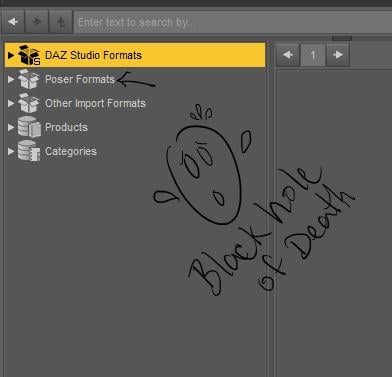
However, I've recently purchased some products that I need but I can't find the textures for and I'm sure they must be hiding in there somewhere. Many of the older products load without any textures. Is there an easier way to find the textures for them? There seem to be some textures in "Materials" but also a lot in "Pose" as well. Some listed under their product name, but some listed under a vendor name, and some listed under "MAT" first, but there seems to be no rhyme or reason.
Also is there a way to find out what figure a product is made for? A lot of the Poser content is so confusing. Things like clothing (listed under "Figures" of course ..because "reasons"?) with the oh-so-helpful file name of "Gear". Clicking on the file reveals equally helpful names like "pants" and "top". Pants and top for who? What figure? Aiko 3, V4, Cookie, Star, Genesis, G2M, G2F? Loading them onto the scene and checking the "Scene Identification" doesn't help ..."content type: None" "compatibility base: None". "Browse file Location" doesn't help, just listed under "Libraries >> Character". Mystery content. Fun? How do I find out who this stuff belongs to? And how do I more easily find the textures for all the Poser products that load white and textureless? Why was this ever a thing? lol
And, side question, why are some hair in "Hair" but a lot are also in "Figures"?
...inquiring minds need to know.
Seriously, is there a trick to finding this stuff?
Update - Ok, it looks like there IS a "trick" to finding the files: Use DIM to find where the installed files are located. Thank you for the suggestions and help, guys! I still think the Poser categories are nuts, but now I know that I can at least find the textures via DIM. :)


Daz 3D is part of 
Connect
DAZ Productions, Inc.
7533 S Center View Ct #4664
West Jordan, UT 84084
Licensing Agreement | Terms of Service | Privacy Policy | EULA
© 2026 Daz Productions Inc. All Rights Reserved.
Comments
All the vendors seem to use a differing hierarchy of descriptions, so sometimes the content is pretty scattered. I don't know if it has something to do with Poser, or just because vendors, like other people, like to set things up 'their' way. I use that 'dark hole' a lot, so it holds no fear for me ;-) Easiest way is to look at what you bought, then go into Daz and 'create a product' for the item and its mats/poses with enough desciption to satisfy your need to know. Sometimes the folders can hold clues (listed as a V4 folder, or something) but otherwise going back to your source is the easiest way, especially since it sounds like you use a lot of different base characters. You can also search for the attendant readme files, which will include most of the info you need - assuming you kept them.
For me, I find it no more difficult or confusing than the 'smart content' function in Daz, which isn't smart, and doesn't list my content in any recognizable way. :-)
I'm not going to be able to help with most of these questions unfortunately.
"Figures", also called "Characters", is for anything that is rigged (i.e., not a prop). That is why clothes are under there as well. Also the reason for hair, the hr2 file type I believe cannot include rigging, so if the hair is longer and needs rigging it would be under Figures. I don't recall if there were any real differences between the hr2 format and pp2 format, at least in Studio. Poses and material files (the types of materials that Studio uses anyway) were both int he poses folder, hence why some creators added MAT in front of the folder name, but... it was up to them, there weren't set conventions for this.
I haven't used Studio's category system yet, so I'm not sure if you can can add those labels once you find out what everything is for. But what you are seeing is why in the past I have spent dozens of hours relabeling items and folders in my Poser structure to get any sort of rhyme and reason out of it. If you got the product you are looking for from DAZ, I would look in DIM to see the file list to see where it is located by default, or if you downloaded the zip check there (same with zips from other places).
Something with older content to consider, with generation 3 it was a bit of a "reset", so something that is just labeled Michael or David or Aiko may be more likely to be for M3 and D3 and A3, with Michael 4 products being more likely to have the 4 label. This might help a bit, but if you have a ton of content and the thumbnails aren't good, there may be some trial and error. I haven't used Michael 3 lately, so I don't recall if there are any bones in the rig that will let you know right away if you load a clothing item and it has certain bones.
Hopefully someone else will know if there have been any new tricks in Studio in the past few years that can help with this.
For me, I make sure to know the artist's name and aliases. But I use the Products menu mainly, and only have to venture into the Poser Format folder for stuff from Renderosity, RDNA (that didn't crossover), Aeon Soul, Xurge, and Content Paradise stuff.
Anything Genesis and later will have Daz files; thus, the Poser clothing stuff is Generation 4 or earlier, and when you fit it to V4, you'll find out whether or not it's for her.
.hr files go in Hair, and newer hair files go to Figures (mostly).
Right click on a Poser folder (for random example; Flinks Water FX) and a bunch of options will pop up. Select "Create a Product" - a text window will pop up, allowing you to type in however you want that to be identified (I always include the product name as it appears on whatever site I bought it from, so I can find it, plus the creator, plus anything I might also need (for V4, Mats or Textures for whatever). Once you have done this, whatever is in that folder will be available in your Daz Products folder under whatever letter corresponds with whatever you chose to name it, and a search will now find objects inside that folder. Do this every time you hunt madly for something - and find it! - and soon your Poser problems will begin to vanish! :-D
Thank you, guys! Excellent suggestions! I'll try the "Create a Product" trick (at least when I finally find something, that will make it easier to find in the future it sounds like!).
I totally forgot you can look up all the locations of the installed files via DIM - great suggestion! That's going to help me track down those pesky texture files that seem to be flung all over the runtime. lol
Thank you, guys! I appreciate the help as well as some background info on why some of the categories were set up the way they were. I still have to scratch my head and wonder what they were smoking when they decided on that categorization system. lol Poses are in Pose but so are some Textures. And just want to find content for one specific figure? hahahahah Good luck...
Your suggestions are a big help though, thank you! :)
If the product was sold by DAZ, then you can find the location of any file just by using DIM. Load DIM up, highlight the item you're looking for in the "installed" column on the right and select "show installed files". that'll show you exactly where every file is and what name was used. If the product wasn't sold by DAZ, most vendors (and freebies) include a list of the products files and where they should be installed as part of the read-me in the product's zip file, and Renderosity also includes the same readme on the product page. If you still can't find them, they may have been improperly installed, so just use windows explorer to search the general area where they were supposed to go using a keyword unique to the product. And then, once you've found it, categorize the item so you can find it using categories in the future..
If you installed the product with DIM, then do as Cyberfox suggested. Typically the files you need to apply textures will be under Pose or Materials in the libraries area.
If the file was not installed via DIM, then open the original install zip file to see where everything is located.
A bit more info about Poser library system:
I don't know if it changed but in old versions of Poser you had to be in the Material Room to use those, so a good number of content creators kept using pz2 for their material presets as they were easier to use for the end user.
For a long time DS could not use those at all, now it can read them as well as pz2 materials (ie it ignores anything specific to material room nodes ^^).
Unfortunately there was never really a standard to organize items inside those libraries. Besides early versions of Poser would only see a given type of item if it was in the corresponing library, so you often had parts of a given product scattered among various libraries. So yes, finding content could be quite a hassle. Most people would reorganize items themselves inside the libraries to group them in a way that was logical to them, for example by figure and/or type of item. Quite a few people used separate Runtimes for each figure.
That's actually why Daz created their category system in the first place.
Textures are all in the poses folder. If you can find the readme for the product it will usually tell you exactly where the textures were put. The problem is if they are add on textures trying to match those is a bear. The good news, such as it is, is that DAZ doesn't require you leave those where they are. You can stick all the textures for an item in a subfolder under the item so you never have to search for them again. That animal can be tamed, it just takes some time to do it. You can move the giblets under props where you want them the same way. And the lights, and the cameras, etc. Put them all where it makes sense to put them. If it isn't one of the nine folders DAZ recognizes though, don't move it. Those will break things.
Edit: once you have identified which figure it is for, I would move it to a subfolder with that figure name. For example, all my V4 clothing is under Figures/people/v4/clothing
Leana's folder definitions are correct, but I'd just like to add that DAZ QA now recommend that PAs put files in a single folder, rather than split them up. For example, figures and props should be in 1 folder, and perhaps materials and poses in a sub-folder. The newer versions of Poser can read them, so it makes life easier for all.
OK, that was annoying me for the longest time. Now I know why everything under the sun in Poserland is called a pose. :D
I don't make as near much use of Poser Formats as I should because I have a hoard of Poser / Content Paradise content that would look great in iRay.
Poser categories are nuts ;). You have to understand though, that the file structure was created years ago and hasn't been updated all that much since. Hair used to be strictly props, but when they started being conformers, they were put in Figures along with clothing (because technically, they are figures as Poser saw them - rigged items). They added Materials somewhere along the way, but not much else, and we have a lot more file types now than we used to. It also doesn't help that most of what you're going to find in your pose folders is going to be files that apply textures and not actual poses, not to mention all the vanity !'s, !!'s and !!!!!!!'s in the file names ;).
Do yourself favors (if you know how to and I'm sure you do)....resave all the stuff once you have it set up the way you want it to .duf format. It'll save you some headaches from time to time ;).
Laurie
I feel for you. When a friend got me into this hobby (using DS3 then Carrara7/8) he spent a lot of time teaching me the Poser file structure* & I got to where I could work with them pretty well. After taking a long break, I rejoined the hobby with DS4.x. And the file structure was different. It made no sense to me*, and of course I couldn't find anything, even from Daz, in the Poser content. (I did recall that some mats/textures were in Poses.) Worse, when I tried to manually reinstall/install Poser content, parts wouldn't end up where they should be. THEN, I found a tutorial by Sickleyield that made sense to me.** Finally I can manually install Poser & Daz format things and have everything show up where it should be, unless the item folders weren't set up quite right, but I can now fix that.
Leana, thanks for explaining all the details of the Poser files. I only understood it on the practical level
*I've got the world's worst learning curve for computer things
**Thanks, Sickleyield!
haha I'm glad I'm not the only one who thinks the categorization system of Poser content is nuts. Once I find what I need I immediately add it to one of my custom categories so that I can find it in the future. I really need to go through my Poser Format stuff and folder by folder add everything to the custom categories that I have set up. It's something I had done for my Daz Format stuff a while back (though I've made quite a few purchases since then so I'm pretty behind on categorizing the Daz files as well).
Not enough hours in the day. lol I think if I just spend 30 minutes to an hour or so every day and just dive into my content library again, I'll get caught up on organizing eventually. This time doing the Poser Format stuff as well. :)
Thank you for the feedback and suggestions! :) I'm glad to know that I'm not the only one who struggles with this (I was wondering if maybe there was just something obvious that I was missing on how to use and find the Poser format stuff). It turns out there kind of was - using DIM to track down where the files are installed is a good trick! DIM is a life-saver. I can't imagine how people did it before DIM. lol
There's a tutorial by Sickleyield on this? I'll have to look it up. :) I've used some of her various tutorials in the past (I love the one for using G3F content on G8F characters) and they've been a huge help.
Link below. It's actually not on Poser formats, but a very basic how-to for manually installing content, but it solved most of my "Where is my 3d stuff?!" woes.
It also works for Poser format content. Just copy the unzipped files to base directories under that scary Poser Format. (I think Daz Connect & My DAZ 3D Library are defaults, just like under DAZ Studio Formats.)
You can even use it if you don't use her suggested file organization.
https://www.deviantart.com/sickleyield/journal/Tutorial-Installing-Content-in-DAZ-Studio-508155677
Thanks for the link. :)
Once you get used to it, there is a logic behind the poser structure that makes sense. For me, I create folders and grouped like items in them. For example under Props I added "Furniture" and moved all the furniture into it. Now it's easy.
In a way, the old random of poser was a little easier in some ways than the shiny new standards in Daz. Many (most?) PAs now put all their products under a directory with their name. Trouble is when I want a specific item it's harder to remember who made it than it is to remember its name. To complicate it, some vendors like Saaby team up with different other vendors and then puts her stuff in appropriately named directories reflecting the partnership name so I am scratching my head "Was that character in the FWSA directory, the SilverSaaby directory, or the Saaby directory?" I want to reorganize everything in studio the way I did in poser but then it screws up DIMs ability to uninstall or update cleanly. But these are minor irritations really, it's not hard to find stuff in either content format (Studio or Poser runtime) when you get the hang of it.
In addition to a whole lot of stuff ending up in the Poses folder because it uses the .pz2 format which was never the original intent as Leana described, the issue is exacerbated by different content creators using different naming conventions and folder structures as well. Some use so-called "Vanity" folders based upon the creator's name, with the actual content nested within, which can make browsing for your desired content frustrating at times. Then, since many of the textures are stored under the Poses category, they can sometimes be difficult to locate because some content is prefixed with MAT (for materials) while others are not. There are usually a whole slug of those MAT-named files in there. Then there was the propensity for prefixing filenames with various operators to avoid duplication. My favourite (sarcasm) is/was the use of one or more exclamation marks - I believe some have up to four!!!!
Anyway, as others have said, it is not necessarily the fault of the Poser content folder structure itself, but a bunch of content creator idiosyncracies that crept in slowly over a very long time without anyone stepping in and imposing a little discipline by setting and enforcing rigid rules. As it is, think of it as a consequence of 3D content library anarchy.
3D content library anarchy! lol
It's definitely a plus to keep a sense of humour about it. :) Thank goodness for the ability in Daz Studio to categorize things for ourselves in custom categories. Whenever have to hunt down something and I finally find it, I take the couple extra moments it takes to plop them into one of my custom categories so I can more easily find it in the future. :)
I really don't know what people did before DIM and Custom Categories. What a headache that must have been. It must have taken so much longer to find content and set up scenes "back then".
A lot of people reorganized library files till they made sense to them instead of using the default setup.
Doesn't moving content to different folders in the library break Smart Content? Or does Poser not have the equivalent of Smart Content?
Poser does have a system similar to smart content now, but it's fairly recent, IIRC it was added in P8.