Clearing HDRI Light Sets?
 Starkdog
Posts: 176
Starkdog
Posts: 176
in The Commons
So, I had been making some neat renders with the Noir light set freebie. Now, I ahve a new outdoor scene, and I'm using the Pines Beach HDRI lighting setup. However, when i render, all I get is my scene that looks like a black & white render. How do i clear light sets, so that I may use the proper HDRI image to drive the scene lighting? Below is what renders, and also what the "textured-view" shows.
Thanks, -David
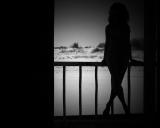
ChooliBeachNoir.jpg
1600 x 1280 - 758K
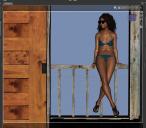
ChooliBeachDS.JPG
1040 x 909 - 138K

Daz 3D is part of 
Connect
DAZ Productions, Inc.
7533 S Center View Ct #4664
West Jordan, UT 84084
Licensing Agreement | Terms of Service | Privacy Policy | EULA
© 2026 Daz Productions Inc. All Rights Reserved.
Comments
Try checking the settings.
Render Settings -> Tone Mapping -> Saturation
Set Saturation to 1.
Most products usually come with DUFs/shortcuts that let you do this.
Y3kman,
I moved saturation up to 1, and I finally get color. However, the scene is still fairly dark, and what is with the "binoculars" hazy effect around the image?
Go to the Render Settings Tab, then click on the "Defaults" (located close to the top under the blue "Render" button).
You will then be able to load a new HDRI or adjust the settings from there.
The "binoculars" effect thingy shows an aggressive (note: really high) vignette setting. You can also check this value at the Tone Mapping portion of the render settings. Set this to zero.
For the dark scene, how's your light setup? Did you also changed the exposure value?
I really recommend you check what your first light set/product did with your settings. When all else fails, I'll just save the scene, close and restart DAZ Studio (or set the render settings back to default), and just reload the scene.
Clicking on the default button should reset the rendering conditions:
Thank you all! Somehow, i had some weird settings stuck, and I couldn't seem to get them until I reset Iray settings, re-opened my scene, and then manually flushed out he settings, and re-loaded the lightset. Chooli is happy now that she moved over into the sun. Now, both Chooli and my render are now baking... render about 45% complete.