Fitting problems with Gen 8 Lethal Rogue Outfit #45585
 jukingeo
Posts: 761
jukingeo
Posts: 761
Hello All,
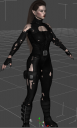
Fairly recently I bought the Lethal Rogue Outfit for Genesis figure. There seems to be very bad fitting problem with this outfit. I tried it on two Genesis 8 figures, of which the outfit was designed for, and it seems as if if fits too small. Generally there are some adjustment controls to help fit outfits on some figures that have some endowed proportions. Case in point, I have a tendency to create warrior like female characters and naturally their frames are overall larger. Twice I tried this outfit on such a figure and the results come out as in the first picture. I normally do not have this with a Genesis 8 outfit...Putting a Genesis 2 or 3 outfit, yes I have it, but then I use the shaping controls for the garment to fix the issue. However, the Lethal Rogue Outfit has no such compensating controls. All there is an 'Expand All' option and that isn't even there for some of the parts. Using the scaling adjustment causes weird problems. Such as the neck goes way too high on the shrug.
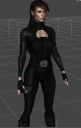
Again this happens to figures that are larger and more endowed. If I created a small to average size figure using the Genesis 8 base figure to start and put the Lethal Rogue outfit her, it seems to work out fine (see second picture below).
So my question is if anyone knows of a way that I can get the outfit to fit the character on the left without distorting it. Yes, I know of the collision iterations setting and I tried increasing that, but it seems to have no effect.
Thanks!

Daz 3D is part of 
Connect
DAZ Productions, Inc.
7533 S Center View Ct #4664
West Jordan, UT 84084
Licensing Agreement | Terms of Service | Privacy Policy | EULA
© 2026 Daz Productions Inc. All Rights Reserved.
Comments
Try adding a push modifier and setting it to something really small. It will start with a default value of 1.00. If you change it to something like 0.015 and then just keep bumping it up in small increments, you'll usually reach a point where the smoothing modifier will take care of the rest.
I just created my first well-endowed lady. Usually I do more petite figures. Getting shirts to work on her has been frustrating, to say the least.
I've also had problems when fitting clothes to ladies that are shorter. Lots of poke through. That base height of 5'11" was kind of a dumb thing to set as a "Standard" when it's 3 inches above average for ladies. And don't even get me started on her 3 measurements!
Lots of finangling, but I don't mind doing it because at the end of the day, the ladies are worth it.
And seriously. You should try fitting things to Mariah. Even without making any adjustments to her base figure, she just doesn't want to be clothed! (Love the model, though)
Select outfit piece. Go to edit->Figure->geometry->add push modifier. In the Parameters tab, this is adjusted under "Mesh Offset"
Hopes this helps!
I tried this outfit with a dozen Genesis 8 Female body shapes and all the supported morphs as stated on the product page. Never had a problem with the fit for any combination of settings other than Olympia 8 with body size parameters (height and girth) at high values, but the poke-through was usually under the breasts and maybe a small patch at the knees, but nothing like you show in the first image.
Are you certain all the pieces are "Fit to..." Genesis 8 and not just parented? Was the figure selected when you added the outfit? Basic stuff, I know, but sometimes it's the obvious things that are overlooked.
I am a newbie, having only started with Daz in December, so forgive me when I say that I don't know what a 'push modifier' is, let alone, know how to use. it.
My initial ladies were not very endowed as I am going to admit I am not a fan of huge breasts. I do like them however, LOL, but I am more a B & C guy. D is Okay, but things get out of hand for me really fast over that. However, I do admit I am more tolerant of the backside on a woman and I like it when there is a fairly steep transistion from the waist to hips, predominately the back. I just love the curvature from the lower back transitioning to the buttocks. And yes, as you pointed out, this is a big issue when I create a lady that is larger in this area. And it does happen often as I while I am not into a gigantic butt, I don't mind a 'proportionately large bum.
I find that the Lethal Rogue outfit does favor slimer girls that are close to the base figure, which is second woman in the pictures above. She was the first Daz lady I created and I left her height at 5'11. I state her as this, but it is possible she is a little taller because I know I scaled her chest and that tends to make a figure taller. I would have to pop in a raw Gen 8 figure on top of hers to see the difference. Also her body has slight muscular definition and it fit perfectly. A slight minor adjustment to the breasts and I was good. That is what I expected. However, I find only the bodice has adjustments, none of the other parts do. However, any woman that I have that is curvier or has more of a muscular build, it will not work. The bolero (shrug) on top has NO adjustments, save for scale and that throws everything out of proportion.
Oh! My! She IS nice!
https://www.daz3d.com/mariah-for-genesis-8-female
I am not overly fond of her face, but that body is definitely one of the types I like. You should check out my Orisa...she is similar (see attached):
As you see, she has some nice attributes all around. A very strong looking build, a flat stomach, but as you see in the second picture, she does have quite the bum on her. This, of course, leads into a pair of nice solid curving legs. She has some nice solid arms too and well rounded shoulders. Naturally, I do see her as a warrior as well (last picture) as I can see her seriously kicking someone's butt. She is one that I DO use heavily for renders. But the woman above that I have in the outfit that fits is my ultimate favorite. She has a smaller frame, but more athletic and muscular build, but she is VERY beautiful. I am not saying Orisa isn't beautiful as she is, but I do have prettier woman in my lineup. However, though, when it comes to sexy...Orisa is in my top 3 ladies.
Ok, I guess that answers my question above.
Yes, she is another solid build woman. I didn't care for her because her face looks too masculine. I think Ophelia is a nicer build for a warrior, but she is only for Gen 3 and I mostly have Gen 8. I have no morphs for Gen 3. Another nice Gen 3 warrior type is Rune 7. I like her body type for a warrior even more:
https://www.daz3d.com/rune-7-starter-bundle
She's perfect, but again, being Gen 7, I will not be able to make adjustments on her. Gia 8 seems to be the only one (of the main models) that has a warrior like build, but even she is 'smaller' than Rune or Ophelia.
However, I came across "The Bride" for Genesis 8:
https://www.daz3d.com/the-bride-for-genesis-8-female
Her body I like, and what more, I can't dial that in even with morphs. The skin and texture on her are very different. It could be the reason I am having such issues. But I have had this issue with my other figures as well. While I have not tried it on Orisa, I have another that is close in body to her and it doesn't work on her either.
Yup! I checked that.
Thanks
The reason why the smoothing modifier is not working is that it is switched OFF by defualt on all parts of the clothing
Oh really? So it is switched off on that outfit? How do I switch it on? I guess that would explain why on the first woman I posted above, every single article of clothing on that outfit has poke through...even the gloves.
That would explain it. Select the outfit and then go to the parameters tab and under general, look for Mesh Smoothing and at the top it will tell you if it is on or off.
Hello guys! Sorry I didn't get back right away on this. I found that the above setting did work, but I still had some minor poke through. Playing around with the collision iterations didn't seem to do much, in fact going too high made it even worse. However I found that leaving those settings as is and changing the resolution from High Resolution to Base resolution helped even further. After that there was only one or two small spots and a very minor size scaling did the trick.
So here is the same lady from above in the 'fixed' outfit.
Yes, she looks different as I wanted to make her prettier, but it is the same woman. Well, with her outfit fixed, now my vampire lady is happy. You can even see it on her face. Yes, I know it isn't much of a smile, but trust me she is happy now. Heck we even got an eyebrow raise! Bonus! So yeah, she's VERY happy.
She's a pretty big lady too. I put her next to one of my other characters that I know is 5'11'', and I would say she is about 6'4" tall. Yeah, it is wise not to make her angry. She would show her teeth for sure. Or, if not for that, with those size arms, she would crush you. LOL!
Anyway, thanks guys for the help!
If you don't have figure metrics or don't want to use them, one way I've used to dial in heights is to simply make a cylinder and set the unit to inches and whatever height I want. So for 6'0" that'd be 72 inches. Drop it to the floor, drop my character fully to the floor (meaning no shoes, etc.) remove the hair and then adjust various height dials, leg lengths, whatever I want basically, until the top of her head doesn't poke out of the top of the cylinder and is just under it. That'll be pretty close to the height you want and in reality as long as you use the same method to get all the heights for your characters their ratios should be the same and what really matter.
No, I don't have figure metrics and don't intend to buy it because it is just too expensive for what it is. If it was a $5 or less item, I would consider it. As it is, the most used feature is the height. I think your cylinder idea is great. I was actually thinking about a flat plane that is divided into half foot sections with a different colored bar for each half foot. Then I would just line up my character to the base of the panel and adjust the size accordingly.
The funniest thing was that I realized that I need something like this because my Vampire Woman turned out pretty big by accident. But I left her as is because she just looks so big and intimidating...as if her being a vampire isn't enough. However, despite being tall and very muscular...she can be pretty graceful and elegant too:
And her closeup:
She quickly became one of my favorites and I must have made about a couple dozen renders from her alone.
But yes, it is a good idea that I put some kind of 'measuring stick' in place since I do deal with characters of very varied heights.
The cylinder is a good idea though and even having the character half in and half out of the cylinder will give a good idea of the height as with my plane idea, there is a chance for parallex error. What I would need is to get an accurate way to measure out a 6" high cylinder and then just keep stacking them up to about 10 feet, then I could save that as a character and use 'merge' to bring it into the viewport when I want to measure out a character.
Up to now, I been using the base Genesis 8 female as a reference since I know she is 5'11" tall. But it is approximate at best. I DO want something more accurate.
Thanks,
Geo