Krampus details gone
 LindaB
Posts: 193
LindaB
Posts: 193
in The Commons
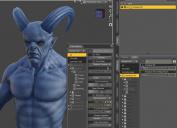
I loaded Krampus for the first time, and it appears all of his details are gone. I have the Krapus HD setting turned all the way up, and sub-d level at 4 and still his details are gone. I tried another figure, to see if DAZ Studio itself was wonky, but other figures load fine with details intact. Has anyone else run into this?
Krampus-1.jpg
1046 x 758 - 122K

Daz 3D is part of 
Connect
DAZ Productions, Inc.
7533 S Center View Ct #4664
West Jordan, UT 84084
Licensing Agreement | Terms of Service | Privacy Policy | EULA
© 2026 Daz Productions Inc. All Rights Reserved.
Comments
The Render SubD Level is <?>, which suggests that soemthing odd is going on (depending on what else you have selected in the scene). Try setting that to 3 or 4 instead.
So actually from what I am observing, only the horns area has HD geomtery the rest of the details come from the normal maps.
I tried setting it to 3, then 4, but it didn't help. I also tried reinstalling Krampus but that didn't help, either.
Here's what I have for normals. Also I tried reinstalling Krampus but that didn't help either.
I am having the same problem. I have attache the image I get in shaded texture with the HD setting turned up. I checked the surface shaders and morphs and none of them seem to have installed--I reinstalled (twice) and nothing changed. I am trying to use this figure in a current project and would like an answer on this ASAP.
Sorry to hear you folks are having trouble with this character. Looks like I'll have to submit an update. Looks like the HD link has been broken along the way... probably when customer service was fixing the issue with the neck.
Unfortunately, this happens sometimes when DS is overwriting files. I've run into this problem quite a few times myself while trying to save out morphs where the HD link will break when overwriting. I'll get a fix in for this ASAP. Sorry for the inconvenience guys.
This stuff happens with software and software updates all the time, it's just the name of the game, so please try to go easy on the Daz staff as they work hard to give you all top notch products.
As a temporary fix, the normal maps SHOULD be included in the runtime/texture folder though they are not applied by default, so you'll have to apply them yourself. I always try to include the normal maps even if they do not pass QA (for seams) for those who want access to them. Let me know here if they are not included and I'll gladly make them available here for you. Thanks for your patience.
Josh
Update has been submitted, please be patient
Great customer service Josh!
My favorite PAs are the ones who read the forums and work with the customers to fix problems. I just got Krampus, and though I haven't had the chance to use him yet, I appreciate the quick response to this issue, especially since it technically isn't the PA's product anymore. So thank you for that Josh!
Ditto!
Update should be live in store now guys, please let me know if you run into any more problems :)
Josh