What are your 3, 5 or 10 largest IM installs and do you even use them ?
 Show not Tell
Posts: 206
Show not Tell
Posts: 206
Simply glancing at IM installer I was kinda surprised what products were largest and if I was even using them:
1) Modular cove creator: 2.3GM (I have not even spent 10 minutes on this and never even did a render although I probably will use it down the road ?)
2) Youngblood Hair for Genesis 3 and 8 1.6GB (I don't even use it. Not that it is not good, just that there are 4 or 5 I like better. And are you kidding me ? A hair piece is #2 ?!)
3) Pix Cypher for Genesis 3 Male. 1GB (I have used, love it and plan to continue to use it in the future- IMO a great product and good to see it taking up some space).
4) Touseled Hair for Genesis 3 and 8. 969MB (Won't use it (probably) for the same reasons as Youngblood. I suppose the size has to with the product being both for G3 and G8 ? Both these from redzstudio.
5) Mobil Home 898MG. (Have used some props in other scene renders. Do plan to use it in the future and is a nice product- mobil home would make a great murder scene - LOL.
6) PW Cruiser Arhena 827MB (Love sea vessels and ocean scenes and this is a beautiful product and with a nice dinghy- bang for the buck).
7) Construction Worker outfit for Genesis 2 and 3. 818MB (TOOL TIME ! What can I say ?) Great product clothes and tools for the man beast.)
8) Classic Side Part Hair for G3 &G8 771MB (Yes use it and plan to use it in the future many times)
9) George HD for Genesis 3 Males 740MB. (Can't live without this big fella.)
10) Willis Hair and Beard for G3 and G8. 655MB (Another of my favorites.)
So 4 of my top 10 beasts are hair pieces ? Like stated above I suppose it is because those are each really for two products justifying the size. I would say overall my largest installs I am happy with, except those two hair pieces I never plan on using.I will have to put my hair buying in check and be more careful for now on.

Daz 3D is part of 
Connect
DAZ Productions, Inc.
7533 S Center View Ct #4664
West Jordan, UT 84084
Licensing Agreement | Terms of Service | Privacy Policy | EULA
© 2026 Daz Productions Inc. All Rights Reserved.
Comments
I'll play. Most of this I acquired recently so not much rendering.
1) dForce HD Wet and Dry Baby Doll Outfit for G8F (in three parts - combined it must be ~3 gig)
2) Eco Building 2.8 gig installed.
3) Youngblood Hair same as you.
4) Just Bits Iray Shaders. 1.5 gig. Couldn't even remember what this was...
5) iRadiance - Light Probe HDR Expansion 6 - 1.3 gig.
6) Morphing SOCKS (!!!) for G3/G8 - 1.2 gig. My #2 clothing item is socks!
7) Vintage Changing Room and Props - 1.2 gig
8) Bonnie Hair for G8 - 1.2 gig
9) MEC4D HDRI Beach Vol 1 - 1.2 gig
10) Bend of the River - 1.2 gig
11) Pix Janella for Mika 8 - 1.2 gig. This is the largest character.
The shaders and HDRI are so big that I do have to weigh that fact when I buy them...
interesting..I had never paid attention to the installed size at all. I have 21 items greater than 1 gig ...
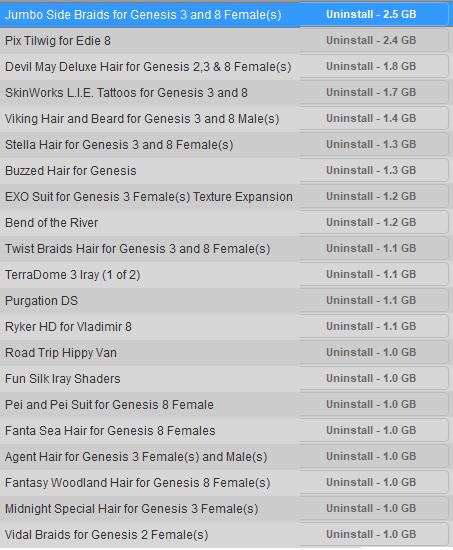
I've used maybe half of these in a render ... now i need to use the rest
you mean i could have just copied and pasted that ? I have had special agent hair in the wish list but figured it was too close to side part hair so gave it a pass. gonna look at bend in the river since you and tzorg both have it
i did a screen shot and cropped, etc
Now-Crowd Billboards - Modern City Life consists of 15 downloads, each of them is about a gigabyte, so about 15 GB for the product. And, yes, I use then quite a lot.
Some tutorials are also quite large, because of the video files.
Oh yeah that's true. I don't download tutorials via DIM or that could have been a pretty samey list.
We all have large Pix characters. Must inspect for hidden payload.
Lol That is a loaded question
1. Architectural Garden Plants 4GB ( I once used one flower out of them ... but they are nice
2. shiny sheets for g2f 2.6 GB (used that sometimes before dforce became a thing)
3. eagle guard armor 2.3 and torso armor 2.1 GB got them only recently with the PC for a day so not much time for using yes
4. dforce Miellyn Outfit 1.9GB sama as above but I used tha one already
5. Super messy Hair updo for g3 and 8 1.8 GB I love and use that a lot
6. Corvus ensemble 1.6 GB as 3 and 4
7 Alfred Hair for Michael 6 (Whut?!)
8. just bits Iray shader
There are quite some more whic are 1GB or slightly above
Slightly off topic, but if your using Windows (Win 7 through Win 10), type "snip" in the search box, and select "Snipping Tool", click/drag a box around the portion of the screen you want to capture, then save the image (or copy to the clipboard for use in the desired application). This is a super handy little tool for grabbing part of the screen, the only down side is it won't work for capturing interactive menus, for that you still need to hit print screen and edit it in your preferred image editing app. I use the Snipping Tool a lot, especially for creating step-by-step instructions for class exercises.
Back on topic, I must be lucky, here are my top 10 (top 11, but there is one Bryce item listed), noting over 1 GB (directly from the Snipping Tool).
i used the print screen function, but where is the "search" box you talk about.? it would surely be easier
Mine are as follows:
01. Eco Building - in at a whopping 2.8 gig. I have not used this yet but plan to. I think it's all those wonderful plants that are taking up so much space ;). I have the space tho. so....do your worst vendors! :P
02. Whiskers for Genesis 3 males - used these many times and intend to go on using them if circumstances require.
03. Cute Bob Hair for G3 and 8 females - used it once so far, but do intend to use it again. I think the fiber based hairs are just gigantic in size by their nature and not anything the vendor has done wrong. LOVE Redz! :)
04. Pix Tilwig for Edie 8 - Cute little bugger, but haven't used her yet.
05. Crone for Etta HD - Played with these a bit and they are extremely well done. Plan to use them in future.
06. Nick Hair for G3 and 8 - Used it already. Nice hair :)
07. Syble HD for G8F - I am ashamed to say that I haven't used her yet. I'm SUCH a Linday fan it's not even funny. I'll get around to her in time.
08. George Expandable - Yep, used it. Gonna keep usin' it.
09. Super Messy Updo hair for G3 and 8 - have not used this yet.
10. Devil May Deluxe Hair for G2, 3, and 8 Females - I have used this. I love it.
FWIW, I have 53 products that are 1 gig or larger. 7 that are larger than two gigs.
Laurie
It depends on the version of Windows you are using, but with both Win7 and Win 10, clicking on the "Start" button in the lower left corner will bring up the search box, similar to the attached image below (actually, the search box will typically be right next to the start button on Win10). For Windows Vista/8, I can't remember where it is, but is is there, I just never used it enough to remeber (maybe 15 times).
The "Search Box" is where I you see "snip" near the bottom of the image below.
oh.. in the directory..my Win 10 is not set up like that at all....
This should help anyone using Win10 to get the search box:
https://www.isunshare.com/windows-10/hide-and-show-search-box-on-taskbar-in-windows-10.html
Edit to add: I use the search a lot, rather than scrolling through the programs list/directory. I have a lot of programs installed, and it's much faster to search for the program, rather than scrolling through the list (of course I do need to remember the name of the program). It can save quite a bit of time, plus it enables you to find things like the Snipping Tool, which for some strange reason MS includes, but doesn't let you know it in the program list/directory.
@AllenArt made me curious, so I counted: 141 product files of 1.0GB or larger, 99 of those are larger. There are several products that download in multiple files, though none which made my top ten.
(Rather annoying that Daz won't let us upload images to the gallery that have a side less than 400 pixels.)
RedzStudio hairs have such large files for two reasons, Show not Tell. 1) They are fiber mesh, which creates large files, and 2) she includes hair for 4 figures, G3F, G3M, G8F and G8M. You're 1.6GB for Youngblood, for example, is 409.6 MB per hair, not taking into account any overhead that might make the files larger if downloaded separately.
I've used one of the 15 Single Homes I have, not sure if it was 08. Odds are against it. Although I haven't published all the images I've used them on, I have used Casual Spikes Hair, Cute Bob Hair, and Meillyn Outfit. Tilwig came with the Edie bundle. I fully expect to use all the items on this list at some point.
Cool thread. Getting DIM started on computer to look it up.
It can work for interactive menus. Under the delay tab, you can set it so that the screen freeze happens after 1-5 seconds. This even works over fullscreen applications (like videogames).
By far my largest installed product is Riversofts crowd now bill boards each download is around a gig or more and each set has about 12 downloads I have them installed on their own hard drive they are huge.
I install everything manually but here is a screen shot of how big the crowd now bill board sets are . I have about all the sets so I am only showing about half of them with this screen shot . Over all I have 5 -2 TB each HHD for content Each generations of products on their own drive makes it much easier to find stuff that way . plus a1- 2tb HHD for my poser and everything else..lol
The IBL Skies series by Denki Gaka are the largest I have ever seen. If you get the bundle, its just over 24GB - https://www.daz3d.com/ibl-skies-perfect-skies-bundle
Opps!!
I showed my largest uninstalled content, not the largest installed. Things got a bit bigger, thankfully I've used over half of them. All but one of items that I haven't used were either free, or included in some sort of bundle deal, so I don't feel too bad. But I also now know why certain items seem to really bog DS down - because are quite large!
My revised list: