Wavefront Obj and Wearable Presets
 stevejackhammer
Posts: 13
stevejackhammer
Posts: 13
Using Blender, I've constructed a model for use in a Daz scene. Typical workflow -- get the scaling right in Blender, assign materials to different zones, export as a Wavefront object. I import it into Daz wear I attach materials for rendering in Iray. I save the material preset so as I refine the model in Blender and re-import it, I can apply the material preset and instantly recover the material settings. It all works brilliantly.
Then I decide to add a decal to the object. Thinking about it, I figure I need to add it in Daz using the Iray decal node, just like I'm doing the materials. The decal node is parented to the object, but when I try to save the wearable preset, I get a message that says the object has to be a figure. OK, so I convert the object to a figure using Edit-->Object-->Rigging-->Convert Prop to Figure. A hip bone is added, but now I can save the wearable preset.
I start a new scene in Daz and re-import the Wavefront object, but I don't convert it to a figure. I apply the material preset like before, and I apply the wearable preset...and it works!
I create duplicates of the object, and I can mass select them to apply the material preset, but not the wearable preset. That has to be applied one at a time. But it works fine otherwise.
So my question to the smart people in the room is this: Am I doing something wrong here? The asymmetry has me vaguely worried. I can't save a wearable preset until I convert the object into a figure, but I can apply the wearable preset to the unconverted object. Am I corrupting something in my scene by using wearables this way? It seems like it's ok -- just a quirk in the UI that prevents saving it in the first place.
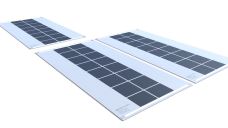
Not that it adds any clarity to the question, but here's a test render of the objects. The "Gravity Plating" text is the Iray decal being applied using the Wearable preset to the unconverted Wavefront objects.

Daz 3D is part of 
Connect
DAZ Productions, Inc.
7533 S Center View Ct #4664
West Jordan, UT 84084
Licensing Agreement | Terms of Service | Privacy Policy | EULA
© 2026 Daz Productions Inc. All Rights Reserved.