dForce Universal Dress
 katherinepoche_e11a5b0e7e
Posts: 269
katherinepoche_e11a5b0e7e
Posts: 269
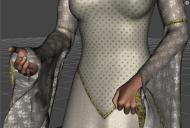
Help! No matter what I do, I get the same (or similar) results with the sleeves pulling down off of the forearms. Whether I try to do it myself or use the pre-made dforce settings.
Not sure what I am doing wrong! Here is my workflow:
- plane for ground
- load g8
- set timeline to 40
- go to frame 15 & pose
- go back to frame 1 load dress
- with dress selected, add dforce dynamic surface
- select use timeline
- hit simulate
This is what I get more or less each time:

Daz 3D is part of 
Connect
DAZ Productions, Inc.
7533 S Center View Ct #4664
West Jordan, UT 84084
Licensing Agreement | Terms of Service | Privacy Policy | EULA
© 2026 Daz Productions Inc. All Rights Reserved.
Comments
You don't need to '- with dress selected, add dforce dynamic surface' the dress already has that done you may well be resetting the dforce settings by doing this.
All I do is
Load figure, load a plane if needed
Load Dress
Pose figure
Have Start Bones From Memorised Pose set to On
Hit Simulate
Actually, only use Start Bones From Memorised Pose if you want it to start from the A or T pose.
I recommend watching this video.
I did that - got the same results.
It looks like the dress is falling through her hands. But I do not know what could cause that: The dress is working fine for me.
Are you using default simulation settings? You could try to increase 'Collision itterations (per subframe)' and see if that can fix it.
Or change Collision mode.