hi can someone please help me
 lasagnaman
Posts: 1,001
lasagnaman
Posts: 1,001
in The Commons
i am trying to do this stitch on the shoulders in photoshop for my daz characters
on the jacket can someone please show me how to make this stitch ty so much heres the pic
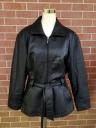
s-l1600.jpg
1200 x 1600 - 252K

Daz 3D is part of 
Connect
DAZ Productions, Inc.
7533 S Center View Ct #4664
West Jordan, UT 84084
Licensing Agreement | Terms of Service | Privacy Policy | EULA
© 2026 Daz Productions Inc. All Rights Reserved.
Comments
What "stitch on the shoulders" are you talking about? There's some kinda beading where the arm joins the torso, is that it?
In "trying to do this stitch ... in photoshop," do you mean adding it to a completed image in postwork? Or do you mean modifying the map image(s) of an existing product?
There are two things that you will need to do to simulate the effect.
1. Add a double row of actual stitches in the correct location on a Diffuse texture map for the jacket using a brush that is designed for that purpose. Just do a search for "photoshop stitch brush" and that should find you some, if you don't already have one. The tricky part is getting them in the proper location. (BTW, you are working with a texture template for the garment, right?)
2. Next you need to create a new bump or displacement or normal map, or edit an existing one, to create the troughs and ridges adjacent to the seams.
If none of that makes any sense to you, you need to rewind and start with a good texturing tutorial that explains all of it in detail, prior to diving into such a specific task.