iRAY skin materials I made are producing white fireflys
 RAMWolff
Posts: 10,382
RAMWolff
Posts: 10,382
Hi,
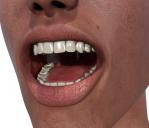
I tried to find the iRAY skin thread but it's buried somewhere and I don't have it bookmarked so starting this one. I am working on getting my settings finalized for my character Gino but upon closer look I'm seeing white firefly's on his skin settings. Not appearing in the open mouth settings so not sure what I should be looking for to try to eliminate them. Here is a render of the open mouth as I was working on the inner mouth and teeth but as you can see there are noticable white firefly's along the skin. Any suggestions as to what settings to look at a little more closely? I'm off to bed so don't have the settings handy right now ....
Thanks so much,
Richard

Daz 3D is part of 
Connect
DAZ Productions, Inc.
7533 S Center View Ct #4664
West Jordan, UT 84084
Licensing Agreement | Terms of Service | Privacy Policy | EULA
© 2026 Daz Productions Inc. All Rights Reserved.
Comments
I have no idea what causes them, I think it must be a combination of skin settings and lighting, because I even had that issue last week with one of my characters.
Thing is, I have used that character in many renders with no issues, I rendered it a thousand times while making it. So I know it didnt have those issues, and had no idea why they suddenly showed up in that render.
One thing I did notice is that the fireflies are actually "holes" if you save as a png file. Then what you can do to fix it is duplicate your layer in your paint program, and put a slight blur on the layer below. That blur will fill the holes.
Yes, that is just a work around, and it would be better to find what causes the issue....but maybe it willl help.
I thought one of the possible "fixes" was to render with the Environment Draw Dome set to ON.
Hmmmm, in the original, before resaving it as a JPG in Irfanview it was a PNG and saved with no background. I did upload an image last night but the system here must have rejected it... here it is..
As you can see the interior of the mouth has no issues with the fireflies so not sure what's causing this effect along the skin!
It's not the "Dome Off" syndrome? Or does that only produce black flies?
I have occassionally had this happening, having tested it I have noticed it only happens when using pale skins, and not all the time. I've noticed it has happened, for me atleast, both with and without Dome On. I did not know of the work around though, so big thanks for that @RawArt
I'll try the render again and save out as a JPG this next time and if that's the case then there is some weird bug in the PNG export!