Really old products made new with Iray!

WonderlandWonderland Posts: 7,137
edited November 2018 in The Commons

The PC sale brought me back to when I first started playing with Poser and Daz products. With the BYOB sale, I started looking at all the old content and tried to see what would autofit. I had the Mediterrannean Dress for V3 and S3 and was considering textures for it but could not get it to autofit well on Genesis to move up the line. If someone has a trick, please let me know... But I thought, why not try it on old V3 with IRay and although this needs a little postwork, I was amazed how well she could still look (although I don't have many textures for her.) She has a lot of different morphs to play with like different nationalities for the head. So here is my test of V3 in V3 clothes IRayed with current shaders. I played with a lot of morphs on the dress and tried to give it a billowy look like it was floating in the wind. Not sure if it was successful but I kinda like it...

If anyone else would like to post old stuff made new, please do!
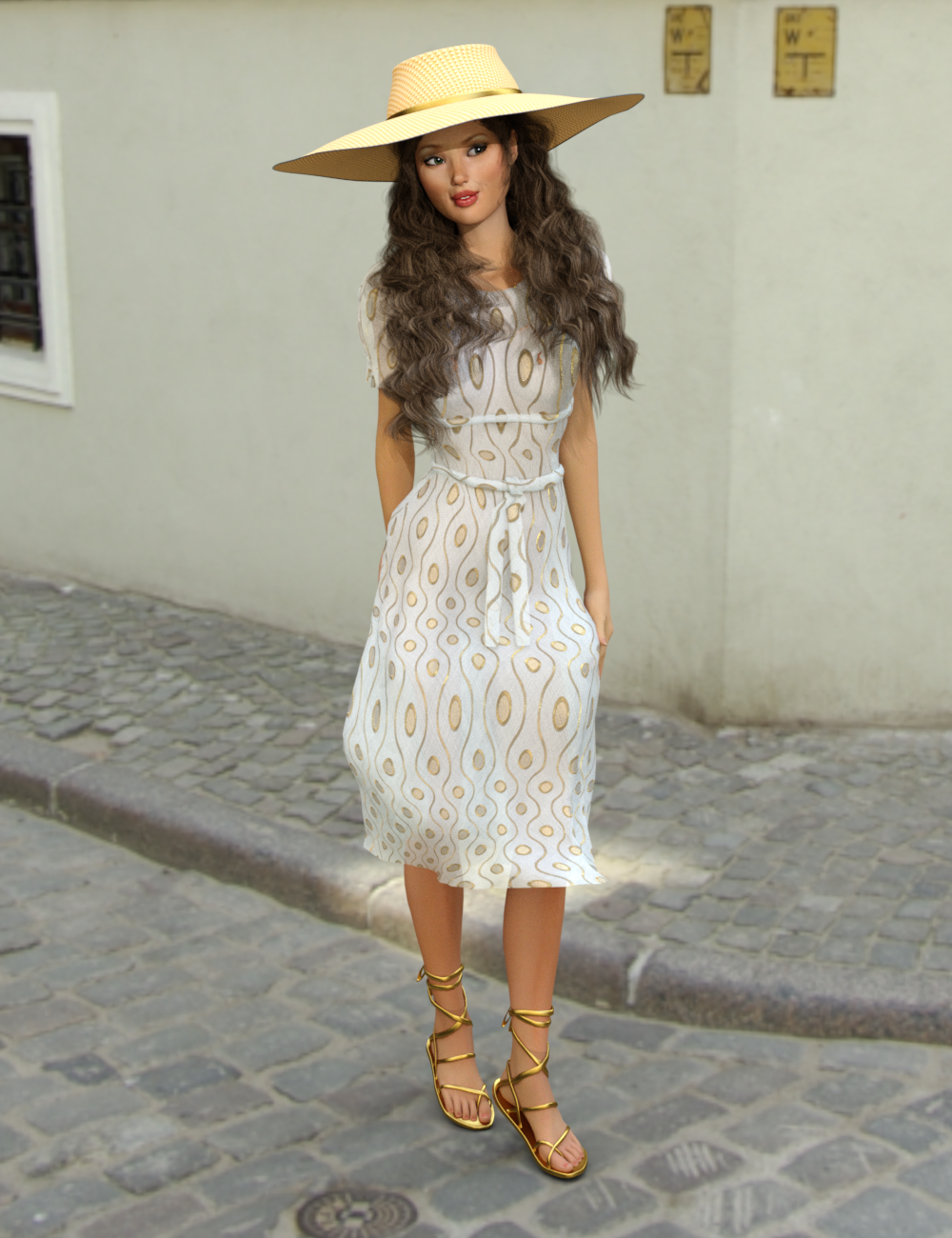
V3 Carina Meditarreanian Dress Channen Hair 2.png
1000 x 1300 - 1M
Post edited by Wonderland on

Comments

  • frankrblowfrankrblow Posts: 2,052
    edited November 2018

    The old 'Jungle Queen Safari Boat' scrubs up reasonably well with new textures, a pity it's been retired:

    Water_Rats-1.jpg
    1920 x 1080 - 308K
    Post edited by frankrblow on
  • TaozTaoz Posts: 10,323

    I've been experimenting a lot with older stuff, here's some examples:


    spring_of_'76.jpg
    1024 x 1028 - 145K
    a3_angel_of_light.jpg
    800 x 914 - 424K
    yuletide_01.jpg
    1433 x 1070 - 1M
    v4_gwen_ngs_01.jpg
    959 x 1041 - 492K
    fantasy_tavern_iray.jpg
    1780 x 1041 - 2M
  • TaozTaoz Posts: 10,323
    edited November 2018

    G3F has a V3 option in the Autofit dialog, works quite well with the V3 Mediterranean dress. Select Victoria 3 and Dresses/Knee Length in the Autofit dialog, then apply a Smoothing Modifier to the dress, select Generic as Smoothing Type and adjust the number of iterations to your liking. I've used 50 here. Collision Iterations are set to 1, it seems to work and is faster.


    g3_v3_mediterranean_dress.png
    885 x 933 - 953K
    Post edited by Taoz on
  • caravellecaravelle Posts: 2,746

    Really old products made new with Iray!...

    ... and/or good 3Delight shaders and lights! wink  

  • MelanieLMelanieL Posts: 7,849
    Taoz said:

    G3F has a V3 option in the Autofit dialog, works quite well with the V3 Mediterranean dress. Select Victoria 3 and Dress/Knee Length in the Autofit dialog, then apply a Smoothing Modifier to the dress, select Generic as Smoothing Type and adjust the number of iterations to your liking. I've used 50 here. Collision Iterations are set to 1, it seems to work and is faster.

    The option to fit clothes made for V3 (and other generation 3 shapes) to G3F comes with this product: https://www.daz3d.com/wear-them-all-autofit-clones-expansion-for-genesis-3-male-s-and-genesis-3-female-s

  • MelanieLMelanieL Posts: 7,849

    The PC sale brought me back to when I first started playing with Poser and Daz products. With the BYOB sale, I started looking at all the old content and tried to see what would autofit. I had the Mediterrannean Dress for V3 and S3 and was considering textures for it but could not get it to autofit well on Genesis to move up the line. If someone has a trick, please let me know... But I thought, why not try it on old V3 with IRay and although this needs a little postwork, I was amazed how well she could still look (although I don't have many textures for her.) She has a lot of different morphs to play with like different nationalities for the head. So here is my test of V3 in V3 clothes IRayed with current shaders. I played with a lot of morphs on the dress and tried to give it a billowy look like it was floating in the wind. Not sure if it was successful but I kinda like it...

    If anyone else would like to post old stuff made new, please do!

    That looks really good, @Wonderland - I wouldn't have realised that was the old V3 figure unless you'd said it!

  • nDelphinDelphi Posts: 1,967
    edited November 2018

    Victoria 4, Michael 4, Night World Fallen characters.

    Michael 4 and Victoria 4 clothing.

    Fantasy Knight Armor for V4 - Iray - 01a - Sig.jpg
    1000 x 1300 - 199K
    Fantasy Knight Armor for M4 - Iray - 01a - Sig.jpg
    1000 x 1300 - 220K
    Night World Fallen - Lovers - 04 - Sig.jpg
    1000 x 1300 - 218K
    Post edited by nDelphi on
  • TaozTaoz Posts: 10,323
    MelanieL said:
    Taoz said:

    G3F has a V3 option in the Autofit dialog, works quite well with the V3 Mediterranean dress. Select Victoria 3 and Dress/Knee Length in the Autofit dialog, then apply a Smoothing Modifier to the dress, select Generic as Smoothing Type and adjust the number of iterations to your liking. I've used 50 here. Collision Iterations are set to 1, it seems to work and is faster.

    The option to fit clothes made for V3 (and other generation 3 shapes) to G3F comes with this product: https://www.daz3d.com/wear-them-all-autofit-clones-expansion-for-genesis-3-male-s-and-genesis-3-female-s

    Oh, thought it was a DS feature (I do have this product I can see).

  • SummerhorseSummerhorse Posts: 684
    edited November 2018

    She looks great, Wonderland. And nDelphi- those Knights look terrific.

    I love seeing these older products brought up to date!

    https://www.daz3d.com/gallery/#images/677081/ I hope it's OK to link this,such a great update to this dress.

    Post edited by Summerhorse on
  • nDelphinDelphi Posts: 1,967

    And nDelphi- those Knights look terrific.


    Thanks!
  • mrposermrposer Posts: 1,137

    Great render Wonderland!.... V3 never looked better

  • The older items "up-graded" to iray look fantastic.

    Is it mostly a matter of applying iray shaders from a stand alone pack, or is more involved?

  • nDelphinDelphi Posts: 1,967

    The older items "up-graded" to iray look fantastic.

    Is it mostly a matter of applying iray shaders from a stand alone pack, or is more involved?

    It depends. For my Olympia Cityscape renders, a Poser only product, I took the textures to Photoshop and reworked them to look more like real-world cement & marble and then did a lot of trial and error with the Iray shader. These were the very first photo-real renders I did when Iray was introduced in DAZ Studio.

    Olympia - iRay - 09.jpg
    900 x 900 - 172K
    Olympia - iRay - 01.jpg
    900 x 900 - 184K
  • WonderlandWonderland Posts: 7,137
    MelanieL said:
    Taoz said:

    G3F has a V3 option in the Autofit dialog, works quite well with the V3 Mediterranean dress. Select Victoria 3 and Dress/Knee Length in the Autofit dialog, then apply a Smoothing Modifier to the dress, select Generic as Smoothing Type and adjust the number of iterations to your liking. I've used 50 here. Collision Iterations are set to 1, it seems to work and is faster.

    The option to fit clothes made for V3 (and other generation 3 shapes) to G3F comes with this product: https://www.daz3d.com/wear-them-all-autofit-clones-expansion-for-genesis-3-male-s-and-genesis-3-female-s

    I have that and totally forgot! I did not not have luck putting it on Genesis but I’ll try with G3 with your tips. Thanks! 

  • WonderlandWonderland Posts: 7,137

    The older items "up-graded" to iray look fantastic.

    Is it mostly a matter of applying iray shaders from a stand alone pack, or is more involved?

    I used separate IRay shaders for everything but the hat but found that many textures hold up if you just add IRay to them. 

  • KitsumoKitsumo Posts: 1,222

    The older items "up-graded" to iray look fantastic.

    Is it mostly a matter of applying iray shaders from a stand alone pack, or is more involved?

    I used separate IRay shaders for everything but the hat but found that many textures hold up if you just add IRay to them. 

    It looks great. I picked up a lot of older stuff during the sale. I think I literally have to wait for my PC+ to expire so I can get to work, that way I'm not preoccupied with checking for sales 2-3 times a day.

  • WonderlandWonderland Posts: 7,137
    edited November 2018

    This was a test with old SP3 clothes I already had on G8 because I was debating getting some older clothes for her, but waited too long and the sale ended literally as I was checking out with a big cart... Hopefully they’ll have another sale with this stuff and not retire it. The original textures on this were fine iRayed but boring so I added some new shaders... I think the pants are the original textures with the color slightly changed. There are a few wrinkles but that can easily be corrected in Photoshop.


    75624613-C8DA-485B-B02A-0636B1C45BEC.png
    1600 x 2000 - 5M
    Post edited by Wonderland on
  • YamanekoYamaneko Posts: 52
    edited November 2018

    I cannot give up all my old content, so I love this thread!

    Here are some oldies made new with Iray and dForce.  The kimono is an old dynamic cloth for M3 by Hiyasan.  I downloaded this,  and a load of other beautiful Japanese DC freebies, years ago, thinking that I might get Poser some day.  It worked okay with dForce.  I applied a shader by Destiny's Garden to the top and used Design Anvil's cloth converter on the Hakama.

    The character is M3, technicallly Brom by CDI, with a free texture (Hong for M3 by Panko) applied upon which I used Anagenessis.  The hair is Samural hair for M3 with Slosh hair shaders applied.

    The setting is Iyeyasu's Shrine, which I converted with a shader product from Rendo called Convert It!

    M3 Samurai Scaled.png
    1082 x 1400 - 2M
    Post edited by Yamaneko on
Sign In or Register to comment.

