Fastest Render Engine for Daz Studio
This discussion has been closed.

Daz 3D is part of 
Connect
DAZ Productions, Inc.
7533 S Center View Ct #4664
West Jordan, UT 84084
Licensing Agreement | Terms of Service | Privacy Policy | EULA
© 2026 Daz Productions Inc. All Rights Reserved.
Comments
Dude, Pixar has been using GPU for several years. Pixar was using Nvidia OptiX ray tracing before RTX came along. The movies Coco and The Incredibles 2 both feature GPU rendered animation. No, it wasn't the entire movie. But they are moving towards using GPU even more now. I am not making this stuff up.
"Over the past several years, and predating the RenderMan XPU project, Pixar’s internal tools team developed a GPU-based ray tracer, built on CUDA and Optix. An application called Flow was built around that renderer to deliver a real-time shading system to our artists. To date, Flow has helped artists shade hundreds of assets across several feature films like Coco and The Incredibles 2."
From here:
https://renderman.pixar.com/news/renderman-xpu-development-update
They talk about the limits of VRAM here, but remember this was back in March. Nvidia has released far larger VRAM specs since then, as well as the DGX-2 which has 512GB VRAM.
And again, check actual history. How many 4GB 650's existed? I count...0. In 5 years the low end cards went from 0.5 to 2 or 4GB of VRAM. In five more years we may see more. It doesn't even matter what the users are doing, it matters more what the competition is doing. To suggest otherwise is very short sighted. To suggest that 1080p will only ever need 4GB is also short sighted. You cannot predict what new features game studios come up with that require more VRAM. And again, look at future consoles to predict where this segment goes. The moment consoles make more than 4GB a mainstream thing is the moment that GPUs will do the same. The only reason 4K games use less than 8GB of VRAM is because 99% of all GPUs in gaming have less than 8GB. It is a chicken and egg thing, studios are not going to make games that need more until we get more GPUs that have more. It is pretty simple, really.
And that Matt Pharr presentation...The dude works at Nvidia. The place where they make GPUs. His presentation is about making use of real time ray tracing, with GPUs. You are not doing this with CPUs, are you? The denoisers, these are not CPU based. Nvidia has dedicated Tensor cores for this task, while others use the normal core GPU. You can denoise on CPU, but the speed is much, well, slower. That would seem to not support your fastest render engine argument. OpenGL is a bit of troll response. In your own link, Vray beats the other engines consistently and by a fair margin. Just think if those renders were very complex with hours long renders. What was just a 5 minute advantage becomes 20, 30, 40 minutes or more. Certainly there may be considerations for converting a shader to another engine. But this is not totally fair, either. A plug in could release to change all of that. Octane and Vray are constantly updating their software, and they can always add new features. If Daz Studio becomes super popular, who knows, maybe other places will support it more. The issue at hand is that Daz uses its own DUF format. As the name suggests, the format was created by Daz and as such is not an industry standard. But there are plug ins and add ons in other programs that are starting to support Daz exports, so who knows. Things could change, partnerships could be struck, anything could happen. This can be a fast changing business, so I would never bet on it standing still for too long. That is why the conversion process is not something most people are talking about here. There is no doubt though that Iray is used more often for the simple reason that it is included with Daz. Simplicity often wins.
But if you want to talk about conversion processes, Iray has some advantages here. It is very easy to convert 3DL shaders to Iray in most cases, while the reverse is a bit tougher, though a product exists to help with that. Also, Iray has another advantage over 3DL, it renders the entire image, which allows you to see what you are getting sooner. 3DL on the other hand runs its scans in lines that fill out from the top to the bottom. The problem with this is that you might find you screwed up and want to fix something. But this is a problem if that issue is near the bottom of the render. You might not see it for quite a while, and then you have to start all over again. Meanwhile Iray is much easier to spot any such mistakes, especially with the denoiser. Plus Iray has a preview mode, which can help spot issues before you even hit the render button. Additionally, because of how 3DL renders, you cannot end the render early. However you can choose to end Iray before it reaches its convergence, potentially saving a ton of time. Again, the denoise feature in 4.11 can potentially make what you consider "done" far quicker than before, especially for backgrounds and inorganic things. Now this is what I call a time saving feature, and 3DL cannot compete with this. It is totally possible to render a building in seconds, stopping the render with it at just a few percent converged, thanks to denoising, and it might look fine. The denoiser is indeed a game changer, and GPUs do it best.
I once had major concerns over Nvidia's workstation clause in its EULA. However since that time it has been determined that rendering is not considered a workstation use unless you do certain specific things, like sell cloud rendering services with GTX cards in your cloud machine. This has actually happened, a Japanese cloud render service was asked to shut down a server run with GTX Titans. But there is no case of Nvidia cracking down on people rendering in their homes. And if you look at some rendering forums, Octane or Vray, I forget which, got a response from Nvidia on the subject to clarify things up more.
Nvidia knows that people are buying GTX (or now RTX) for rendering. I personally believe this is why the new Titan RTX is what it is. One thing people might not have noticed about the new Titan RTX is that it actually stripped out some of the features the Titan V has, one being Double Precision. The new Titan RTX has a fraction of the double precision of the Titan V. So there are tasks that the Titan V still does better. However, with 24GB VRAM, RT cores and Tensor cores, the Titan RTX is a GPU rendering dream. One could even argue the inclusion of ray tracing and Tensor as being features that creative users would want more than gamers do. But hey, we got ray tracing and Tensor in consumer cards! People who debated me before said that including 24GB in the Titan would undermine the Quadro line. Well...Nvidia just did it. I don't think Nvidia is concerned, nor should they be. The Titan RTX still lacks many Quadro features.
Chaosgroup, the people behind Vray, say they got memory pooling to work on the 2080ti. They did not write new code to make this happen. All they did was enable Nvlink. How they did it is all outlined on their page covering 2080 and 2080ti tests. They did note that current GPU monitoring software do not properly report the correct amount of VRAM available. So they do not know how much VRAM is actually pooled. However, they were able to render a large scene that would not fit on a single 2080ti, nor even the Nvlink enabled 2080's.
https://www.chaosgroup.com/blog/profiling-the-nvidia-rtx-cards
Check again. Optix is a lot of things. There' the Optix ray tracing framework and there's the Optix denoiser. The one shipping with Renderman 21 and 22 are the GPU Optix denoiser.
Have you bothered looking at the actual application?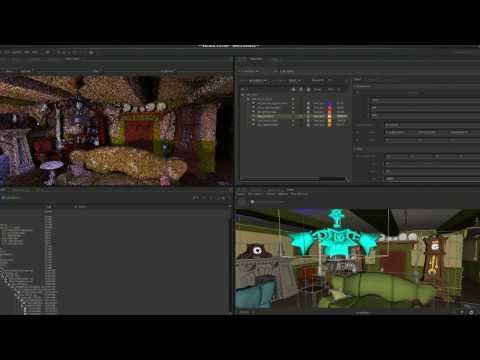
It's an interactive look dev application - not meant for final renders. Hence why the talk is called - Pixar's Fast Lighting Preview with NVIDIA Technology. Shading artists and lighters uses it to tweak their setup in Katana. Final renders, the one that actually get sent to post production, are still done using Renderman RIS for Coco and Incredibles 2. I actually mentioned Flow, though not by name, in my post.
"They have a GPU accelerated lighting tool, but that's an in-house app."
There's a difference between allocating 8 GB and actually using 8 GB.
Using 4K Ultra settings. 1080p will much likely be lower.
The less variance you have, the less dependent you are on denoising. Denoising isn't a full proof solution either.
https://www.chaosgroup.com/blog/experiments-with-v-ray-next-using-the-nvidia-optix-denoiser
Hmm, OK. Can you point me to where I posted results comparing vray and 'other engines'? What I posted was Mike Pan's Cycles results and Vladimir Koyzalov Vray results - using completely different scene and very likely settings, so they are not directly comparable.
3delight - render settings - Progressive mode.
Aux viewport - IPR.
Doesn't matter to me. I'm not the one saying NVLink will work with non certified SLI boards.
Closed.
It really should be possible to discuss these issues in a civil manner, for soem reason hardware and GPU threads seem to be particularly inclined to go off the rails.