Cookie and Chip Geometry Problem -- Help, please
 wsterdan
Posts: 3,568
wsterdan
Posts: 3,568
I finally grabbed a cheap 3D printer last month and I've been having almost too much fun sending models to GamePrint to fix, then printing them. Almost zero issues, super, super happy with both the printer and GamePrint.
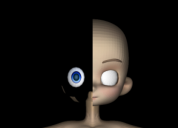
This week I'm testing different toon-based charactes to see which ones print the best, but Chip and Cookie have a geometry issue with their heads. When sent for fixing by Gameprint, half of the head disappears. I assmue it's because Lady Littlefox scuplted half of the head and then mirrored it for the other half, but I'm not sure how to fix this.
Pickles and Peaches work fine, so Capsces must have fixed whatever the issue is when she rebuilt teh heads for the morphs.
I noticed as well (I believe it's been mentioned in the forums some time ago) that trying to use just the head for either Chip or Cookie doesn't work either, as the head and body both show up and look as if they've been punched by an old computer punch-card machine (almost random squre polys missing).
Any ideas on how to do a quick fix for this? I'd really love to see how they print, as their simpler and exaggerated features look like they'd be perfect for my needs.
Thanks,
Walt Sterdan

Daz 3D is part of 
Connect
DAZ Productions, Inc.
7533 S Center View Ct #4664
West Jordan, UT 84084
Licensing Agreement | Terms of Service | Privacy Policy | EULA
© 2026 Daz Productions Inc. All Rights Reserved.
Comments
Minor update, if I export the character as an .obj and re-import it into DAZ then submit it to GamePrint, it works. I'd rather not have to go that route, obviously.
GamePrint is looking into it, but if someone here can offer any suggestions that would be appreciated.
-- Walt Sterdan
Sound like half the normals are pointing inwards, any program that can unify the normals and get them pointing outward will fix the problem.
That was my first impression, but the figure works fine for previewing, rendering, etc. No issues with the figure loaded as a whole in DAZ Studio. With flipped normals, I'd expect that it wouldn't work 100%, that the "wrong" side of the head would render black, but it's fine.
As mentioned above, as well, if I load the character into D|S, export as an .obj, load the .obj and send that to GamePrint it works perfectly.
I did try flipping a few polys in D|S and sending it to GamePrint, but no change. I'll try again doing the whole geometry in other software.
-- Walt Sterdan
Studio uses winding order to determine the normals and for a few versions now has auto flipped normals.
Ah, thanks for the info, much appreciated. I still plan on checking things out in a modelling program when I have a few minutes.
Again, thanks for you help.
-- Walt Sterdan