Is it possible to fix autofit issues like cleavage overlap before autofit? (ZBrush, Blender, etc)
 Gator
Posts: 1,320
Gator
Posts: 1,320
This most notably happens in the cleavage area when a gal has a larger chest - clothing can overlap in the cleavage area. Which is very difficult to fix when the mesh overlaps.
I tried to create a morph of my own.
1. I loaded the figure (Genesis 3 female), and the clothing item was fit & parented to the figure then I fit to none and un-parented it.
2. I created a morph in Zbrush for that figure, sent back to Studio.
3. I applied the custom morph to see the fit in Studio.
4. I fit the morphed item to the figure, but the clothing ballooned over the breasts - the autofit followed the figures shape, then had the custom morph on top of it.
Is it possible to do what I'm trying to achieve - Create your own morph on a clothing item for a specific figure, but to be able to still use autofit? Am I simply doing something incorrectly?

Daz 3D is part of 
Connect
DAZ Productions, Inc.
7533 S Center View Ct #4664
West Jordan, UT 84084
Licensing Agreement | Terms of Service | Privacy Policy | EULA
© 2026 Daz Productions Inc. All Rights Reserved.
Comments
To prevent your custom morph combining with automatic morphs you need to load your modified object via morph loader when the automatic morphs are in use, and tell morph loader to "reverse deformations" when creating the new morph. That way what's actually saved as a custom morph is the "delta" between the mesh with the automatic morphs and your modified mesh, so when you use it it will be combined with the automatic morphs to give the final shape.
https://www.daz3d.com/fit-control-for-genesis-8-female-s
I think this product might be able to help as well. It has a lot of helpers that fix clothing issues.
Sounds like I can't bring that back with the bridge then... there's no way to use the bridge both ways? That's so much faster.
If can't use the bridge both ways I load it into Zbrush, make my changes, then export it as an OBJ and use Morph Loader?
I mentioned Genesis 3, I do have fit control for G3 male & female but I prefer tweaks in Zbrush.
This is your problem. Don’t unfit it. By unfitting you’re removing the G3 shape and morphs. So when you apply your morph it’s not taking into account the G3 shape etc.
Keep the clothing fit and send it all to zbrush including G3 and send the morph back while the clothing is still fit.
The fitting is the problem - at least it's very difficult to fix. The mesh mashes into each other, even overlapping (typically cleavage).
Well I had an idea... but it didn't work.
I saved the shape of the figure, to apply to a second G3F. I dialed breasts to zero on the model with the top fitted to. I exported all to Zbrush.
That way, I had a figure with zeroed morphs to apply the clothing morph to. Made the changes, then imported back over the bridge. Even deleted the other reference figure. Same thing happens.
I think you can use the bridge if you start from the clothes fit to the figure, but as I don't have ZBrudh I never tried.
I found out through trial and error you can't.
I followed LayLo3D's instructions using Morph Loader Pro and it still doesn't work.
It does the same thing. I have the morphs loaded into the clothing, but I adjust her shape back and it follows without the morph dialed, then setting her shape back I get the ballooning again.
http://www.laylo3d.com/creating-characters-and-morphs-for-daz-3d-figures-import-obj-with-morph-loader-pro/
1. I zeroed the breast morphs on the figure
2. I exported the clothes as OBJ.
3. I dialed breasts up, exported figure as OBJ (So I have reference to model clothing). Then zeroed breast morphs again.
4. I imported the clothes and figure into Zbrush.
5. Made changes, exported to OBJ.
6. Used OBJ for Morph Loader Pro to create morph. (Fitted to G3F with breast morphs zeroed).
Your process is wrong if what you want is to adjust the "breast morph autofollow" shape. If you use morph loader to create your custom morph when the breast morphs is zeroed then the autofollow morph will kick-in when you use the breast morph, and will be added to your custom morph as you already noticed.
What you need to do for step 6 is to use Morph Loader on the clothes on G3F with the breast morphs applied, and use "Reverse deformations from source morphs" option when creating your custom morph.
That way morph loader will "substract" the effect of "breast morph autofollow" and create a custom morph intended to be combined with it to get the target shape.
The only "real" solution (not counting dforce) i have seen achieve this is:
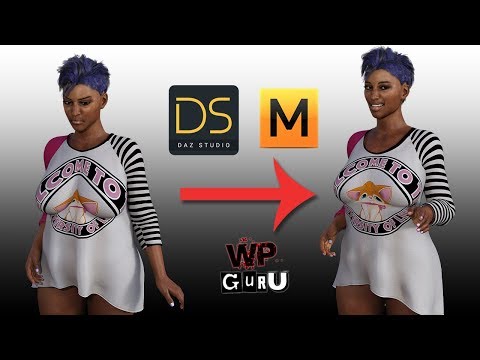
The downside to this method is that you need another application and it only works for that mode/morph/shape and that specific clothe
Also i agree that fit control is a good workaround. Its not always perfect but i have had good results with it.
@Leana
Thank you Leana!!!
Reverse Deformations was it.
@Mescalino
Thanks. Looks like he does it another way... he's getting the borked up version after adding the morph with autofit on, then deleting the autofit morph.
Leana's method seems better to me, but I do not know nearly enough about Studio and autofit to know. He got pokethrough after posing, which makes me wonder if it wouldn't happen using Leana's method and preserving the autofit morph.
Dang, Marvelous Designer looks cool but it is pricey!
The pricetag was also my major beef. I still hope that dForce at some point will solve this issue in a more easy matter. "Put a dress on and press simulate" easy way but if i got it right the problem lies with weightmaps or the lack thereof. I know there is a tutorial but its also a quite elaborate method to use.
So far i only use fit control to try and get a more realistic look.