QX Carah for Teen Kaylee 8
 ThatGuy
Posts: 797
ThatGuy
Posts: 797
The character is cute,https://www.daz3d.com/qx-carah-for-teen-kaylee-8, but why do her thighs look so weird? Are her thighs really supposed to look like those in the promo images or is it just something overlooked by the artist? Can anyone who bought this let me know if the product is as advertised in the promo images?
daz3d_qx_carah_for_teen_kaylee_8-02.jpg
1000 x 1300 - 134K
Post edited by ThatGuy on

Daz 3D is part of 
Connect
DAZ Productions, Inc.
7533 S Center View Ct #4664
West Jordan, UT 84084
Licensing Agreement | Terms of Service | Privacy Policy | EULA
© 2026 Daz Productions Inc. All Rights Reserved.
Comments
Product Link
You are right, I think. Something is wrong there. I didn't buy it, so I don't know if the product is really like that.
It says it requires Body Mixer for Genesis 3 and 8 Female. I wonder if something didn't mix very well.
The version of her I have - she's not showing any of the thigh things I see in the promos. I don't have body mixer though - so perhaps that's what's causing it? I'm sure there is a way to dial that out. Here's what she looks like on my end (again, I don't have Body Mixer):
I think she's really cute! :)
Thanks, divamakeup, for posting the image. I had hoped it was just the promo images that were faulty. I will get her then.
Here's a close up of the thighs (again, no Body Mixer):
Sorry for the quality and harsh lighting - I stopped it early and just wanted to show a quick render of her to show that I'm not getting that issue. :)
If you have any issues with your version of her please let us know. :)
Is this one of your products Diva? I was thinking of her but those thighs. Should she not be used with body mixer?
She's not one of mine, but I've chatted with the PA about her and she was super sweet and sent her to me - the PAs sometimes "product swap", which is fun! heheh :D
I'm not sure if it's body mixer causing the ridges around the thighs, but if I were to guess say that might be it - since I don't have that product and I'm not seeing the issue. Might just be an odd interaction between the character's morph and that product's morphs? I'm not sure.
Hi everyone!
I’m so glad someone made a thread for this so I can explain. (Thank you, ThatGuy!) Carah is my first character, so any and all feedback is very welcome.
The pronounced ridge is actually entirely my mistake and only in the promos. I used an older version of her body morph when I was making the promotional art and somehow when I went to submit it, I completely overlooked the wonky ridges on her legs. That's the only difference between the current body shape and the old one - those weird ridges. (It was an early attempt at a pronounced leg muscle that just wasn't right.) They didn't appear in testing and I just double-checked with my own, freshly-downloaded-from-DIM Carah files. The final version of the character, which is the one that's in the store, does not have the ridges either with the normal body or with the Body Mixer morphs dialed in.
I'm very sorry for the confusion, but glad the leg problem was pointed out. I'm putting together updated promos at this very moment so I can get them sent in and fixed. Then folks don't have to be cautious about her maybe having lumpy legs. That would put me off a character too. Sorry, guys!
Thank you, Divamakeup, so very much for checking Carah out for me, for those adorable pictures of her, and for jumping into this thread and helping out! I'm not terribly active on the forum, so it would have taken me a while to notice this thread. You're the best. :)
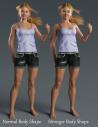
Here's a quick series of Iray preview screenshots showing what Carah really looks like:
By the way, is this Body Mixer really necessary for this character?
Could somebody show up the difference: with and without Body Mixer, please.
I'm glad I could help! Carah is so cute! It's hard to believe she's your first character. :) Well done, Mary!
It's not a 100% requirement, no. The renders I posted do not have Body Mixer and in the post right above yours Mary posts screen shots of the character's body with and without Body Mixer.
Thanks, Diva. Her face looks very nice.
Now I see the difference - with Body Mixer her body looks better, more pronounced.
Probably will wait until Zev0 products will be on sale, then.
Hi Artini!
Divamakeup is right. You don't need the Body Mixer product to get the character's base shape. There's an extra morph dial named QX Carah Stronger Body included in the product that dials in some low percentages of Body Mixer morphs to give Carah a bit of extra muscle definition in the stomach, arms, and legs. That's the only thing that requires the Body Mixer product. Carah herself will work fine without it and you'd just have the use of her normal shape, not the slightly more fit one. That one dial would just not do anything, since without Body Mixer, it has none of the Mixer dials to reference. :)
Thanks for the explanation, Mary Baker, and congratulations on the release of such a cute character.
Cuteness sales - at least for me ;)
Thanks, Artini!
I have an update for everyone. I sent in the fixed promos on the 7th, and I'm hoping they'll be updated sometime this week. Soon everyone will be able to look at a proper preview of Carah. In the meantime, thanks everybody who asked questions and all the folks who took the plunge and got her in spite of the bad promos. You made her release a success to me.
Congrats on your first character, Mary! She looks great!
The updated promos are live in the store.
EDIT: I was playing around with the marvelous Cartoonized for Genesis 8 Female and came up with this. It turned out nice enough that I wanted to share with you guys. Carah cartoonized (Cartoonized dial at 40%).
carah is really supercute. :) lots of personality.
i wish i'd been able to light her better here...this lighting doesn't do her face justice. but my nvidia card just didn't have the moxie to play with the environment, and after four days i surrended. this render i stopped at five hours/37%.
i really look forward to seeing your next character!
j
*my* apple?