G3F Eyes Gone Wonky
 DarkElf
Posts: 528
DarkElf
Posts: 528
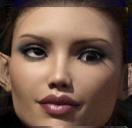
I have a saved G3F character that I like to use from time to time. She is my own morphed character. She seems to have a strange thing going on with her eyes that I cannot figure out.
I can manually make her eyes look the same direction by moving the individually but they refuse to work together. If I use the left/right slider one looks up and left and the other looks down and right a bit. The don't both move the exact same amount it seems. Please view the attached figure. The more I move the side to side slider the worse they get and the side to side slider seems to effect both the side to side AND the up/downmovements.
If I zero them manually, the side to side slider for both moves.
Is there a way to force them to zero and zero the sliders also?

Daz 3D is part of 
Connect
DAZ Productions, Inc.
7533 S Center View Ct #4664
West Jordan, UT 84084
Licensing Agreement | Terms of Service | Privacy Policy | EULA
© 2026 Daz Productions Inc. All Rights Reserved.
Comments
Actually ... they do seem to both go in the same direction as far as left to right is concerned. It's just that one goes up and one goes down. I don't get it.
I have found that if I move the eyes individually up/down and left/right, they move at a 45 degree angle rather than straight - if this is any clue to anyone who reads this.
I have had a similar problem with the eyes. What I do when I notice this happening (haven't a clue why), is that I go the the Scene tab, go to the Figure/Head, and then select each eyeball separately. I'll go to the parameters and see where that eyeball was stuck at, say -7 right/left and 13., just any numbers from an expression or pose. I click on the actual value and over type the highlight with 0.00, and do the same steps for the other eye. This seems to fix the eyeball rotation and focus. If I used "Point At" for the eyes, it makes them nearly unchangeable as long as the thing they were pointed at is still in the scene. That is easily fixed by going to the General window and click on Point AT to turn off, for each eye.
If I had saved your pose/expression with the Point At, or just with the eyes focused on something, then when I try to apply the saved pose/expression to a new figure, the "starting" point of the eyeballs can't be at zero, and so makes weird eyemovements. Hope that helps.
Yes. I have found this to be the same issue I am having and I have done the same things you describe.
I just don't know why or how to fix it perminantly. I'm hoping someone out there knows.
Thanks for the reply. ;-)
A morph you are using may be to blame. This can occur when someone is saving the morph and isn't perhasp as selective as they can be with the Joint Editor. To determine if it is a morph to blame, bring up all the morphs currently used while the eyes are askew and turn them off one by one. When the eyes properly align, you have the culprit.
Hope this helps.
Cool RKane_1. I'll try that. Thanks.
You usually find it on thjird party morphs. Most guys here are REALLY good aat making sure this is done properly.