Help needed: Getting genesis 8 female high heeled shoes to work with genesis 3
 ps2000
Posts: 278
ps2000
Posts: 278
Hello,
I am trying to get a pair of genesis 8 high-heeled shoes to work with genesis 3 (because I don't want to upgrade to genesis 8 yet, I invested a lot of money in genesis 3 and as long as I can get the new genesis 8 clothes to work on genesis 3 I see no reason for it). With clothes in general I have no problem (I have the Genesis 8 Clones for Genesis 3 from SY). But I can't get the shoes to work. I read and followed the tutorial from SY (https://www.deviantart.com/sickleyield/journal/Tutorial-Convert-Clothing-G3-to-G8-G8-to-G3-686682065). Alas the results are in no way satisfying.
In the following I will describe my work-process. Maybe I did something wrong? Or perhaps someone knows another way getting high-heeled shoes to work? I am grateful for every hint.
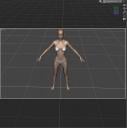
1. First I change the pose of my genesis 3 character into the general genesis 8 female pose (shoulders and legs). Then I change the pose of the feet (I am getting the values from the provided genesis 8 feet pose).(See attached image 1).
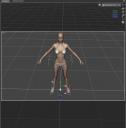
2. Then I load the genesis 8 shoes into the scene without having the genesis 3 figure selected (see attached image 2).
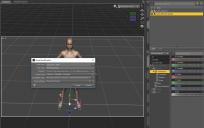
3. Now I select the shoes in the scene tab and click on edit --- scene identification, I click on the "..." to the right of "Preferred Base and select genesis 3 female and accept (see attached image 3).
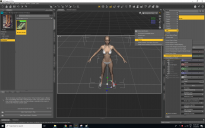
4. Now I select genesis 3 female in the scene tab and then the shoes with shift pressed. I click on edit again and Choose Edit--Rigging--Transfer Rigging (Figure Space). (see attached picture 4).
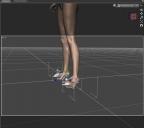
And it happens exactly nothing. The shoes still don't fit. (See picture 5).
The used shoes are https://www.daz3d.com/rb-strap-sandal-for-genesis-8-females. These are the only genesis 8 high-heeled shoes I have but I think the results wouldn't be different with other high-heeled shoes.
As mentioned before I am grateful for every hint/help.
Thanks

Daz 3D is part of 
Connect
DAZ Productions, Inc.
7533 S Center View Ct #4664
West Jordan, UT 84084
Licensing Agreement | Terms of Service | Privacy Policy | EULA
© 2026 Daz Productions Inc. All Rights Reserved.
Comments
Was there a foot pose included with the shoes? Try applying that to the figure before you go thru the transfer process.
Unfortunately, shoes are always a crapshoot. Some work, some don't.
Laurie
It's a no win situation with heels from my experience I am afriad. Best to just use them on the figure they are designed for. Autofit and clonescan work wonders on clothing, but never has on heels.
There was one for genesis 8. I got the bending vaulues from it and applied it manually to the genesis 3 figure.
Have you tried it without posing the feet? I've had decent luck transfering shoes, including heels, by not posing the feet until after I do the rigging transfer.
I tried it. But I got no better result.
I do have the same problem, ie using only G3 but trying to fit clothes and shoes made for G8. Like you, my first reference was the SY approach. For clothes, no real problems, so far. Shoes, particularely high heels are another story.
By trial an error, I was able to go further and get better results than what you've got so far. I am able to get the feet fit in the shoes (If I can, I should post you my method later).
Even then, I consider my transfer tentative a fail, because the heel part of the shoe get deformed (the heel moves backward a bit) after the transfer. I suspect the reason is that G3 has a heel bone, and G8 doesn't.
I also tried something else. I load the shoes on G8, and save (only the shoes) as obj. Import the shoes, load G3F and fit the foot inside the shoes. However, with this method, the shoes are not deformed, BUT I loose all the intitial adjusting morphs made for the shoe, which is not an acceptable situation for me.
I really hope somebody will come with a solution to this problem, so G3 users can benefit from the growing offer made for G8.
Try this - it's not perfect, and will require further adjustments from you as you pose the figure. But it has worked for me when I've used it. (No guarantees that it will work with those shoes, however. I don't have them, and yes, Shoes are always a crapshoot when it comes to refitting.)
Switch ID to Genesis 3.
Fit to Genesis 3. Do Not transfer rigging.
if needed, go to the thigh bones of the shoes and adjust +6 and -6 on the Side to side/ X (I think) rotation.
As you pose the figure, you will need to manually tweak the side to side positions on the thigh bones of the shoes (not G3F) to get the shoes to follow, but if all else works, that should be the only adjustment needed.
You missed a step (Highlited in blue).
1. First I change the pose of my genesis 3 character into the general genesis 8 female pose (shoulders and legs). Then I change the pose of the feet (I am getting the values from the provided genesis 8 feet pose).
2. Then I load the genesis 8 shoes into the scene without having the genesis 3 figure selected
3. Now I select the shoes in the scene tab and click on edit --- scene identification, I click on the "..." to the right of "Preferred Base and select genesis 3 female and accept.
4. Before you perform the transfer step, pose the clothing to match the target figure (arms down for G8, arms up for G3) and click the Bone Editor. It looks like a bone with a pencil across it. Now right-click in the 3d window and choose Edit and Bake Joint Rotations.
5. Now I select genesis 3 female in the scene tab and then the shoes with shift pressed. I click on edit again and Choose Edit--Rigging--Transfer Rigging (Figure Space).
Hope this helps
technically they are not supposed to, they are supposed to upgrade to the latest figure.
Well, I also tried to fit the foot manually into the shoe, but the problem is as you said that the genesis 8 female foot is a little bit different than the foot of genesis 3 female basis or victoria 7. On comparison the heel is "larger" and also the toes of genesis 8 basis seem to be more narrow.
Another method I tried was to load the shoes with genesis 8, then also load genesis 3 into the scene with exactly the same pose as genesis 8, then I transformed the shoes to prop and parent them to the genesis 3 figure. But no matter what I do I can't fit the feet of genesis 3 exactly into the shoes because of the different form. Either a toe pokes through in the front or the strap at the back of the shoe is too far away from the heel.
So I tried to make a morph for genesis 8 in blender, to make them look exactly like genesis 3 or victoria 7 feet. My idea was that I would apply the shoes on the genesis 8 with morphed feet, then load genesis 3, transform the shoes to a prop and parent them to genesis 3. The feet of genesis should then fit perfectly into the genesis 8 shoes because of the morph. But despite that the feet of genesis 3 and genesis 8 now look exactly the same unposed as soon as I pose them with exactly the same values there is still a difference, the feet are not congruent. Maybe it has something to do with the different bone structure?
Another question:
With the feet morph for genesis 8 I got the shoes into the right form for genesis 3. But I still need to do some small adjustment for every shoe seperately. The problem is that as soon as I delete genesis 8 the shoes loose their form despite parenting them to genesis 3. I transformed them to a prop but the problem is that I then I can only adjust them together.
Can I seperate the shoes somehow?
Thanks for your answer. Maybe a stupid question, but what exactly do I achieve by baking the joint rotation?
Bakes the current joint rotations of a single skin figure as the new geometry base, and replaces bones accordingly. Without doing this the shoes will deform when fitted to the new base as the bones will be in the wrong base.
For example if going from G8 to G3 and you don't bake the joint rotations then next time you try to fit the shoes to G3 the bones will be set for G8 and this is what causes the shoes to deform.
Ok. Thanks for the explanation.
Ok. Mission accomplished. I finally found a way to use genesis 8 high-heeled shoes with genesis 3 female (see attached pictures). I think it should work for nearly all shoes with only minor hassle. I think a key was the use of a self created feet morph in blender (exported both characters and used shrinkwrap to get the feet of genesis 8 into the form of genesis 3) to get the shoes in a better fitting form for the use with victoria 7.
In the following I describe my workaround, maybe it helps someone with the same problem.
1. Load genesis 8, pose feet and apply shoes.
2. Load feet morph and apply it. Shoes get in a more fitting form for Victoria 7.
3. Make character and left shoe invisible to be able to only export right shoe (it's better to separate shoes for posing issues).
4. Export left shoe as obj. and do the same with the right shoe
5. Load Victoria 7 into new scene. Pose legs like genesis 8. Pose feet of vitoria 7 (get values from genesis 8 feet pose).
6. Import both shoes. Fit is not perfect but a lot better than with unmodified shoes. Pose shoes until they fit (do maybe also minor adjustments to the feet pose) or until there are only minor poke-through.
7. Apply smoothing modifier on shoes and set Victoria 7 as collision object to get rid of remaining poke-throughs.
8. Parent shoes to Victoria 7
Comments, criticism and suggestions how to improve process are welcome.
Thanks for all the comments, they led me on the right path to solve my issue.