Legacy UVs -Victoria 4 is causing gaps when "preparing G3F"
 Griffin Avid
Posts: 3,888
Griffin Avid
Posts: 3,888
It's the GenX product to transfers materials from V4 to Gen 3,
We got the morphs to work and arrive as a single slider. Yeah....
Now the Materials....when we load a Genesis 3 female and use the script "Prepare G3F" it's supposed to toss on a geoshell that I can load my materials preset on to...
Instead I get this- with gaps at the seams.--
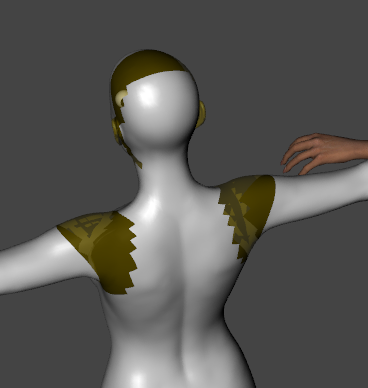
Any ideas?
After reading numerous threads and using google, I tried, to no avail....
1) Trying the script more than once..
2) Made sure that V42 is in the UV surface tab set (it is and is fine)
3) Prepared V4 skins and they do apply and they have the same gaps in the seams so I know it's the 'prepare G3F' part of the plan.
P.S. This is why I hate geoshells - there's always an issue. It's that the face doesn't match the neck or the shoulder has a seam/line or there's a split at the hands or a square box around the tattoo...always something....
Oh yes, in the tab list the missing parts are listed.....

Those are the names of the EXACT missing areas.....



Daz 3D is part of 
Connect
DAZ Productions, Inc.
7533 S Center View Ct #4664
West Jordan, UT 84084
Licensing Agreement | Terms of Service | Privacy Policy | EULA
© 2026 Daz Productions Inc. All Rights Reserved.
Comments
That is not the GenX product, that is one of the Cayman Studio UV products. Not sure what you did in the first part with morphs, but that could be what is causing problems with your figure.
As for the textures, you need to select all those surfaces before applying the new UV and the textures.
Can't be. When I check Cayman Studios OWNED PRODUCTS, only his expression Randomizer comes up.
OH no, wait, I grabbed it from that other place- that explain it!
He/She never released the V4 to Gen 3 version here.....
It says to select the G3 character in the scene tab. I'm doing that......
Yeah, I did the select ALL and it still has the gaps....
There's something else going on....
That's pretty much what G3F looks like when I apply all the prepare stuff from Cayman's product, and it works fine when I go to put the V4 skins on it. Assuming you have a V4 material in DUF format (which is necessary for the Cayman products to work), try applying that to G3F and see what happens.
Check that the geografts (note there is no geoshell) are selected when you apply the V4 skin.
In your screen shot, the geografts aren't selected. They must be. THis is what I do:
Everything is .pz2 format.
That's why I ahve to export the textures and load them as a Materials Preset.
I did this before and it worked. Something I did before fixed this....
Just trying it again and again, I at least I got to there being very slight seams now...
I don't have the V4 to G3 version of the female, but here's my steps:
- load G3 into the scene.
- click on "Prepare G3M"
- In the scene tab, select the G3M and the geografts (they are NOT geoshells, by the way)
- in the Surface tab, select The G3M and the geographs
- with everything selected, click on "Apply M4 UVs"
- then, still with everything selected, go and apply the M4 UVs.
Works fine without problems for me.
Yeah, I did what you suggested and that's what gives me the slight seams....
Well, I think that will have to do for now. Photoshop and me get along really well, so luckily we don't too many skimpy scenes so there won't be much to fix.
This is good enough. I'm exhasuted. lol
Thanks everyone for helping- I appreciate your time and efforts.
Hmm, your result is kinda strange. I've never seen seams like that. When you said 'export as textures', I'm assuming you meant load onto a V4 figure and Save As > Material Preset.
Yes.
I have this product - and yes it comes from "the other store".
The first thing you're going to want to do is load V4 and apply the skin that you want to transfer. Now make sure you apply any skin shaders and tweak it just the way you want it. Once you have it the way you want it save it as a Materials Preset: File >> Save As >> Material(s) Preset. Name it something you'll remember. Delete or move V4 over to make room for G3F.
Load G3F. Navigate to the Legacy UVs folder. Click "_Prepare G3F". She's going to look funny - but don't panic. lol Navigate to the saved V4 material preset. Double click on it. The skin will load but again it will look funny. Now go back to the Legacy UVs folder and click "Legacy UVs - Apply Victoria 4 UVs".
That should set the skin properly.
I hope that helps. :) I've used this product quite a few times and it's great!
Here's the product letting me use Muriel's textures (with Altern8 adjustments) on G3F:
I was hoping you wouldn't show up.
You make everything look good.
Now I'm in a fetal position over this experiment.
-----
I got it to work "Close enough" Maybe the morph isn't fully right and that's where the little seams are from.
If I use a skin shader, an idea I thought to use as a crutch, I'd lose the specialized skin most of the older characters have - the freckles and blemishes and some have pores...
Sometimes I don't know what makes a figure a character -
The eyes, the skin or the morphs - the hair also has a HUGE impact.
Don't want to lose the skin though....
I think I got that right enough - I was probably clicking away too much and using the Content Tab to navigate around and I bet it was de-selecting stuff that I didn't notice.
I ended up with odd miscoloration on the geograft parts. I was able to fix this by messing with the surface settngs between the figure and the geograft parts. Couldn't remember how I fixed it so I just ended up going with the texture transformer and the V4 plugin over at the other site and simply converted my skin to be used natively on G3 and G8. Worked much better I think.
Griffin, it looks to me from this image as though the UVs for some of the surfaces on the Head and Shoulder geografts are not set correctly (i.e. not Victoria 4). If you just use the scripts everything should be selected automatically and the UVs set accordingly.
Deal with your MAT first. Load the .pz2 onto V4 or Genesis, then save as a Material Preset in DUF format. You should save it somewhere in the DAZ Studio Formats section of the Content Library (e.g. "People\Victoria 4\Materials") because DUF files not show in the Poser Formats section.
The way I do my texture converting of V4, G1, G2 to G3 is the Blender route.. It may take longer but when I saw that product mentioned here I went nah and followed a very cool tutorial on how to do the Blender method of texture converting.. And the results are very good to awesome..
I've been playing with the same thing - V4 skin on G3F with Cayman's UV and was having the same problems you show in your image, Griffn. It turned out to be surface settings. You have to make sure that all the surfaces have limits turned off. Some skins have some really drastic surface settings and won't copy over to the geografts if limits are on. Another thing I noticed was when I copied from one surface material onto the geograft, it would often change the UV to Aiko5. I checked all the parts and surfaces and make sure everything was set to V4, then did it again. And it would still switch it to Aiko5. I never did figure out where that was coming from and just set them manually and gave up. Also, some skins have texture only to the very edge of the template and these can shows seams, too. That's where Photoshop comes in handy.
Thank you Cayman for chiming i. and sandman_Max for your pointers.
We are doing big things now. Thanks.
Just out of curiosity, is there a way to save the Legacy UVs as part of a character preset? When I used the DAZ Studio one, it just saved G3F even though I had all the geografts selected.
Probably as a scene subset, just like when you save a character with clothing.
Awww :( I was just trying to help.
Most skin shaders and skin settings products (like Beautiful Skin Iray, Altern8, etc) don't do anything like that - they don't get rid of the freckles or blemishes or anything else on the texture maps. They just adjust the settings to enhance the skin. The blemishes and freckles are still there.
I have both the M4 and V4 UVs for G3 M/F products. The process is a bit temperamental for me, probably due to my older computer, but I've not had any seam issues. Usually it just takes me a couple tries to get the texture to properly apply.
Really useful utilities though. Very glad I bought them.
A few recent examples, showing the Ashen V4 texture (Rendo) on Iznami G3F, the scar option of Jinn for the V4 Male on Lee 7, and one of my favorite Aiko 3 textures -- Samil's Flowers -- on G3F (the white dots on her face are part of the fantasy texture.) I'd converted Jinn V4 Male to M4 and the Aiko 3 texture to V4 some years back with UTC2.
What if Victoria 4 or Genesis 2 Female doesn't show up in the Surface tab under the UV Set? I get Victoria 7, 6 and 5, but 4 is missing altogether.
I'm having the same problem as Griffin, but NOTHING has worked. Still getting seams.
If you have the legacy UVs products installed and the corresponding UVs don't show up then they might not be installed properly. Where did you install them?
There are several of the Legacy UV products out now for both Genesis 3 and Genesis 8. What figure are you using? And which product are you using?