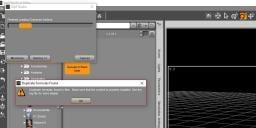
Duplicate formula error warning loading G8M

DiomedeDiomede Posts: 15,388
edited June 2018 in The Commons


Duplicate formula error warning loading G8M

Anyone else getting this?  Has there been an update recently?  The figure seems to load and perform.  

duplicate formula files.JPG
999 x 491 - 70K
Post edited by Diomede on

Comments

  • Richard HaseltineRichard Haseltine Posts: 107,968

    Check the log - Help>Troubleshooting>View Log File. That will tell you one of the moprhs causing the issue.

  • AllenArtAllenArt Posts: 7,175
    edited June 2018

    I got it too. Seems to be something to do with Zevo's Aging Morphs (at least on my end). At least at a quick glance....there's a crapload of stuff in the log file.

    Laurie

    Post edited by AllenArt on
  • Richard HaseltineRichard Haseltine Posts: 107,968

    I have the aging morphs and no issue, so it's a conflict with something else. Had you converted the previous gernation aging morphs before you added the Genesis 8 version?

  • DiomedeDiomede Posts: 15,388

    I don't understand the troubleshooting messages, but it appears that the face age morphs are interacting with a custom morph that I made to make a 3-fingered man?

    error warning face age and 3 fingered man.JPG
    1759 x 680 - 557K
  • Serene NightSerene Night Posts: 17,704
    edited June 2018

    I had the aging morphs as well cause this. I had to uninstall it.

    There was one morph causing the issue- I started a thread in the tech support area about it.

    Unforunately, it seems to be an update, because it worked fine initially but later, I started getting the error. I just didn't have time to mess around and figure out what caused it.

    I wish they could disable these errors when they occur because an error that prevents studio from loading files means that I can't use batch render... Which is a huge deal for me.

    Post edited by Serene Night on
  • vwranglervwrangler Posts: 4,971
    edited June 2018

    I was getting an error after an update as well. With Zev0's help, I found that the issue was that I did a manual install without removing the previous data folder, so that there was both the outdated and the updated morph present.

    You can check for it this way:

    1. Load G8M

    2. On the Parameters tab, type an exclamation point. Just ! and nothing else, and press Enter.

    3. Check the morphs in the list that you get . If you have both "! Face Age Controller" (and according to your log file, you do) and "! Aging Head Controller" in the list, then it didn't uninstall correctly. You need to go to the data folder and remove the "! Face Age Controller".dsf file.

    Post edited by vwrangler on
  • AllenArtAllenArt Posts: 7,175
    edited June 2018

    I have the aging morphs and no issue, so it's a conflict with something else. Had you converted the previous gernation aging morphs before you added the Genesis 8 version?

    In my case, no. Have not converted any morphs at all. Just started one day...dunno what caused it (but I suspect it was an update). Rebuilding my library. Again. *sniff*

    Laurie

    Post edited by AllenArt on
  • vwranglervwrangler Posts: 4,971
    AllenArt said:

    I have the aging morphs and no issue, so it's a conflict with something else. Had you converted the previous gernation aging morphs before you added the Genesis 8 version?

    In my case, no. Have not converted any morphs at all. Just started one day...dunno what caused it (but I suspect it was an update). Rebuilding my library. Again. *sniff*

    Laurie

    So you didn't have the Face Age Controller issue in your log file?

  • AllenArtAllenArt Posts: 7,175
    vwrangler said:
    AllenArt said:

    I have the aging morphs and no issue, so it's a conflict with something else. Had you converted the previous gernation aging morphs before you added the Genesis 8 version?

    In my case, no. Have not converted any morphs at all. Just started one day...dunno what caused it (but I suspect it was an update). Rebuilding my library. Again. *sniff*

    Laurie

    So you didn't have the Face Age Controller issue in your log file?

    The only things I saw mentioned were Aging and Growing Up morphs. I didn't look very far after that because there was a boatload of errors....I just chucked my library and am reinstalling everything.

    Laurie

  • vwranglervwrangler Posts: 4,971
    AllenArt said:
    vwrangler said:
    AllenArt said:

    I have the aging morphs and no issue, so it's a conflict with something else. Had you converted the previous gernation aging morphs before you added the Genesis 8 version?

    In my case, no. Have not converted any morphs at all. Just started one day...dunno what caused it (but I suspect it was an update). Rebuilding my library. Again. *sniff*

    Laurie

    So you didn't have the Face Age Controller issue in your log file?

    The only things I saw mentioned were Aging and Growing Up morphs. I didn't look very far after that because there was a boatload of errors....I just chucked my library and am reinstalling everything.

    Laurie

     Ah. I hope you were planning to do that anyway!


  • xyer0xyer0 Posts: 6,328

    I recently had the same issue due to P3D Girl 8 Morphs, but P3Design updated and resolved it within a week or so.

  • Richard HaseltineRichard Haseltine Posts: 107,968
    AllenArt said:

    I have the aging morphs and no issue, so it's a conflict with something else. Had you converted the previous gernation aging morphs before you added the Genesis 8 version?

    In my case, no. Have not converted any morphs at all. Just started one day...dunno what caused it (but I suspect it was an update). Rebuilding my library. Again. *sniff*

    Laurie

    Did you do a manual update, as mentioned by vwrangler?

  • AllenArtAllenArt Posts: 7,175
    vwrangler said:
    AllenArt said:
    vwrangler said:
    AllenArt said:

    I have the aging morphs and no issue, so it's a conflict with something else. Had you converted the previous gernation aging morphs before you added the Genesis 8 version?

    In my case, no. Have not converted any morphs at all. Just started one day...dunno what caused it (but I suspect it was an update). Rebuilding my library. Again. *sniff*

    Laurie

    So you didn't have the Face Age Controller issue in your log file?

    The only things I saw mentioned were Aging and Growing Up morphs. I didn't look very far after that because there was a boatload of errors....I just chucked my library and am reinstalling everything.

    Laurie

     Ah. I hope you were planning to do that anyway!


    Seems like I've done it a lot in the last year ;)

    Laurie

  • AllenArtAllenArt Posts: 7,175
    AllenArt said:

    I have the aging morphs and no issue, so it's a conflict with something else. Had you converted the previous gernation aging morphs before you added the Genesis 8 version?

    In my case, no. Have not converted any morphs at all. Just started one day...dunno what caused it (but I suspect it was an update). Rebuilding my library. Again. *sniff*

    Laurie

    Did you do a manual update, as mentioned by vwrangler?

    Had already started rebuilding the library before they posted. Hopefully I'll remember for next time.

    Laurie

  • DiomedeDiomede Posts: 15,388

    Well, I'm still getting the error.

    I've used DIm to install everything from Daz.

    I've uninstalled and reinstalled genesis 8 male starter esentials and the zevo morph pack in the error log.  Yet, I'm still getting the duplicate error for genesis 8 male (no other figure at the moment).

    I am going to cross my fingers and try @vwrangler's suggestion to delete the ! face age controler.dsf

    The Daz help site says it is not catastrophic within Studio.  Here is the info page from help.


    https://helpdaz.zendesk.com/hc/en-us/articles/207530383?input_string=duplicate+error+when+loading+g8m+in+studio+-+others+figures+load+ok


  • DiomedeDiomede Posts: 15,388

    Thank you, @vwrangler.  I had created a custom morph fr the face.  For some reason, the "! Face Age Controller".dsf  file had also gotten copied to the location of my custom morph.  Manually deleting the file has eliminated the duplicate file errors.  Two thumbs up.  yesyes


    Now I am getting a database error, although the databases appear to be working.  


    bbbb post error.JPG
    598 x 216 - 30K
  • DiomedeDiomede Posts: 15,388

    Neve Mind


    Rebooting has solved the database error.

Sign In or Register to comment.