Has anyone successfully transferred V4 morphs to Gen3?
 Griffin Avid
Posts: 3,886
Griffin Avid
Posts: 3,886
So with a combination of programs I was able to get the material(s) to transfer and have a G3 character wearing the 'skin' of a V4 character.
Products being discussed:
https://www.daz3d.com/genesis-generation-x2
https://www.daz3d.com/genx2-addon-for-genesis-2
https://www.daz3d.com/genx2-addon-for-genesis-3
(When someone finds this thread in the future, they will appreciate the links)
Now for the Head and Body shape.
We want to take the Morphs from a customized V4 era character (a figure that is BASED on the V4.2 base) and get that head and body shape to become 1 dial that can be slid over in the ACTOR area of the genesis 3 parameter sliders tab. Whew.
So far, I've read the PDF(s) and watched a youtube video called drag and drop.
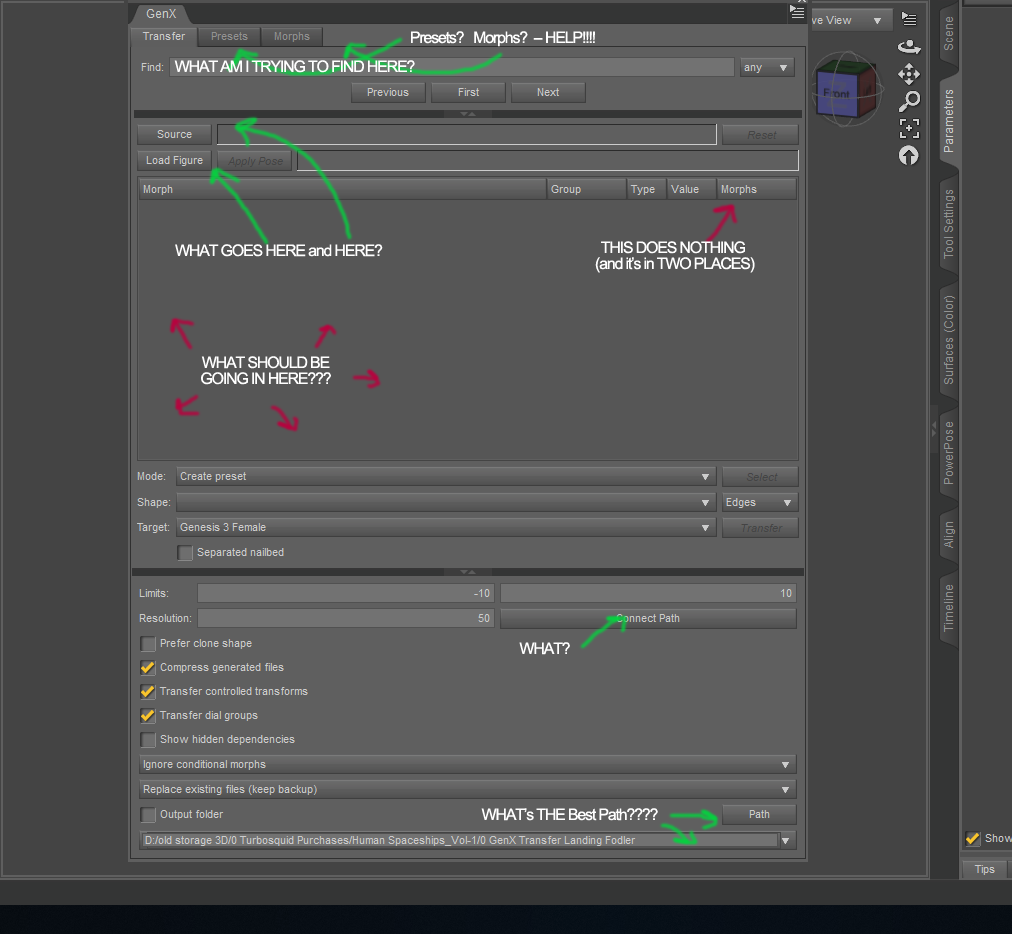
While I can mimic button presses and screen menu settings, I do not fully understand the process of transferring morphs, and thus, been stuck.
There's obvious questions like WHAT files and WHERE do I find all the files that are needed to load up the Gen X windows and WHERE should I 'transfer them to" once I'm done?
SKIP THIS NEXT SECTION IF YOU DON'T WANT TO BE CONFUSED WITH ME OR DON'T LIKE READING.
I see a loading of POSES, I have no idea why.
I see a reference to loading POSER characters. I have no idea why.
I used Smart Content to install most of the goods. How much of a problem is that? - when it comes to finding characters?
The two morphs I seem to want to load is Head Injection (for the head shape) and BODY INJECTION (for the....you know...)
Sometimes they seem to be able to be loaded in any of the windows (Source, Morphs) and other times NOT.
BACK TO THE MISSION:
To keep it as simple as possible.
I want to transfer the body shape and headshape of this Daz figure....
https://www.daz3d.com/mst-kharma-for-v4
Onto a Genesis 3 figure.
HELP!
I am open to negotiations.

Daz 3D is part of 
Connect
DAZ Productions, Inc.
7533 S Center View Ct #4664
West Jordan, UT 84084
Licensing Agreement | Terms of Service | Privacy Policy | EULA
© 2026 Daz Productions Inc. All Rights Reserved.
Comments
I've only used GenX like 2 maybe 3 times. Each time I need to re-figure how to transfer the morphs because I can never remember.
I think for the Find, you just leave it as is.
For the source, you need to browse to the V4 base character.
I think Load figure is for a specific morph you want to transfer (Last time I used it, I just transfered everything it could find or something like that)
Then what happens in the "what should be going on here?" section is it will list everything that's changed from the base figure and you can check/uncheck what you want or don't want to transfer.
*special note*
This is going off my very poor memory so some things are probably wrong
Well that's all helpful. I just lost hours battling this interface and watching a bunch of videos and tinkering.
I gotta take a break before I dive back in.
I will apply what you have suggested. Thank you.
I refer to this video all the time
https://www.youtube.com/watch?v=cYCapNih-A4
THAT VIDEO WORKED, Bless you.
what products are actually required to do this?
The gen X stuff confuses me as to which ones are needed for what ....
Just the base product ( https://www.daz3d.com/genesis-generation-x2 ) will get you from the generation 4 characters (V4, M4 ect) to genesis
The add-on for Genesis 2 will let you take morphs from V4/M4 and genesis to G2
Genesis Generation 3 add-on will let you then take them to G3
I think all the other ones are for the old-old generation 3 shapes (V3, M3, Aiko 3, etc.)
thanks..so basically 3 products need to be purchased to get to G3. yikes
They are often on sale, and since they are pretty old now, the discount can be quite high. Certainly much cheaper that re-buying all your old morphs instead of moving them with GenX. I should add that there are other ways to move morphs, but GenX is the easiest/fastest, at least for me.
on sale right now actually @ 50% off
Get them. GenX is worth it especially if you love V4. One of my favorites at Rendo had a clearance sale and I bought everything and converted to G3.
on sale right now actually @ 50% off
Yes! Ticket submitted. Woo hoo
How accurate is conversion? I remember looking at comparisons, and some details in face etc. were often slightly incorrect (or i misremembering).
Genesis figures have less polygons than V4, so yes, some details may be off after transfer.
I see, thanks for answer.
One more tutorial:
... and another one:
Thanks so much for this link. The video is amazing and easy to follow.