Adding a surface to G3F
 Illidanstorm
Posts: 655
Illidanstorm
Posts: 655
I try to add a surface to G3F by selecting the polygons with the Geometry editor and create a surface from the selected. After that the selectect things become white and so I have to put an uber shader on it and copy and paste the body texture to the new surface but then it looks like this.
What am I doing wrong and why does it look like that?
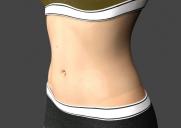
Unbenannt.JPG
775 x 549 - 40K
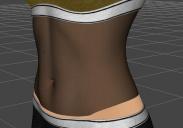
Unbenannt1.JPG
703 x 491 - 42K
Post edited by Illidanstorm on

Daz 3D is part of 
Connect
DAZ Productions, Inc.
7533 S Center View Ct #4664
West Jordan, UT 84084
Licensing Agreement | Terms of Service | Privacy Policy | EULA
© 2026 Daz Productions Inc. All Rights Reserved.
Comments
I don't know because it should be like the original.
The only thing I think is the original surface wasn't an Iray Uber shader. omSurface shader ? DAZ default shader ?
You should compare the settings and check if all the parameters get the same value. For example sometimes Copy/Paste can't copy UV set and Thin Walled On/Off.
I fixed it by instead of giving it the uber shader I gave it the !subsurface base shader and then pasted the skin. Now it works