WIP Skin-Appearance Quality Variances
 Firebrand
Posts: 22
Firebrand
Posts: 22
I understand why Hair has this problem -- but why Skin?
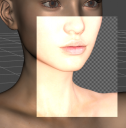
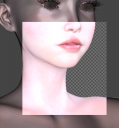
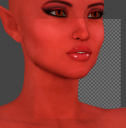
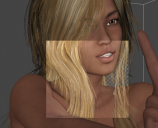
Why do some skins "preview" (when in normal mode posing) look so nice, yet others look so bad? Why do some look very, very natural and close to what the Render will look like --- while others look completely different from what the Render will look like? The accurate & nicely previewing ones don't seem to take up any more resources (at least on my system) than the poorly rendered or inaccurate ones, while posing and moving around, etc. -- zero lag difference. The only difference seems to be that some skins are nearly WYSIWYG and others look quite strange in the viewport prior to render (making it far difficult to predict how to light, etc).
The attachments are all made under the same (default, no added) lighting conditions -- just different Figures loaded.
Are there any simple tricks to getting all Skins to default to a look that is more like their final render?

Daz 3D is part of 
Connect
DAZ Productions, Inc.
7533 S Center View Ct #4664
West Jordan, UT 84084
Licensing Agreement | Terms of Service | Privacy Policy | EULA
© 2026 Daz Productions Inc. All Rights Reserved.
Comments
I'm not sure I understand what the issue is *(likely because it's past 4 AM and I haven't been to sleep yet lol)*. I think you're saying that your "preview" isn't showing an accurate idea of what the skin looks like? There are SO MANY different PA artists and so many different ways of setting up skin shaders and skin settings and some of the settings don't translate well in the "texture shaded" preview. Try using the Iray Preview (if you can) to get a better idea of what the skin looks like. :)
I used the Spot Render Tool -- as seen in the Images attached (squares).