Black 9or blanked) eyes
 cclesue
Posts: 420
cclesue
Posts: 420
in The Commons
this is an old M4 character from a three character set all M4 based this is the only one with these black eyes and nothing I try will get rid of them. All have been IRay "baptized".
I seem to remmber this problem from an while ago but don't remember the solution.
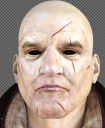
Screen Shot 2018-03-19 at 6.14.38 PM.png
535 x 653 - 568K

Daz 3D is part of 
Connect
DAZ Productions, Inc.
7533 S Center View Ct #4664
West Jordan, UT 84084
Licensing Agreement | Terms of Service | Privacy Policy | EULA
© 2026 Daz Productions Inc. All Rights Reserved.
Comments
Look at the cutoff opacity for cornia and eye moisture/tear
Done all of that stuff. Didn't work
In the Daz Default shaders, there is one for thin wall glass or use the one for water. There is clearly something black and opque covering the eyes. It may have too much refraction possibly.
Since I wrote the last comment I tried different characters and thet worked just fine. In fact the ones from JM Ovidious look even better than the original.
I had a similar issue (I'm not sure if it's the same issue as you're having): https://www.daz3d.com/forums/discussion/86216/help-please-eyes-rendering-black-or-pixilated
The "fix" for the issue I was having was given to me by @Thor - they said:
That fixed it for me. Maybe it will help you? (I hope so!)