Viewport colors in lighting different from Render
 afterdeath666
Posts: 11
afterdeath666
Posts: 11
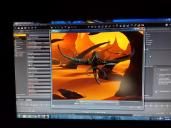
Got a question, I am making an animation, but having 2 problems that I can't figure out. The colors in my Viewport from the lighting look the way I want them too and the eyes and skin have a perfect color and the sky too, but when I render everything looks different, the eyes are no longer green, the skin is different and the whole sky and colors are different. I tried several different single renders with different Environment modes and that didn't work to fix it either, I am totally out of ideas to make the render look like it does in the Viewport. The second problem is that white spot that appears in the render in the bottom right corner, I tried doing a render with each of the 4 lights off and it didn't change anything either. Any help on these couple of problems would be greatly appreciated!!!


Daz 3D is part of 
Connect
DAZ Productions, Inc.
7533 S Center View Ct #4664
West Jordan, UT 84084
Licensing Agreement | Terms of Service | Privacy Policy | EULA
© 2026 Daz Productions Inc. All Rights Reserved.
Comments
The Draw Settings pane controls the preview render.
In Windows you can use the Snipping Tool (Windows Accessories>Snipping tool) to take proper screen shots, rather than trying to take a photo. Not so useful for a colour oddity that was consistent, but it should show the diffrences between two windows.
That's the Texture Shaded Preview, not the Iray preview. Draw Settings pane won't affect the Texture Shaded preview except for wireframe and bounding boxes.
The Texture Shaded mode doesn't send the image through all the rendering processing, but throws up a basic approximation using whatever scene illumination you have that is not reliant only on the rendering engine to display.
Meaning, if you have the camera's Headlamp turned off, it won't be used in the textured preview. If you have it set to auto, it will be on in the preview but may be off in the render. You can set whether it's On or Off in the render in the General settings of the render tab. The "When No Scene Lights" option will turn it on if those lights you're using are not photometric, and that could be where the white spot and the discoloration is coming from.
Set it to Never and see what happens. If you get a black screen, those lights you're using will not work in Iray, or they're way too dark for it.
Keep in mind that the Viewport is driven by your graphics card's OpenGL capabilities (unless you're in Iray preview mode), while the render is Iray. These are very different render engines; if you've adjusted materials and light settings to look just right in OpenGL, that pretty much guarantees they won't look the same in Iray.