Hair used with the Emily V4 model
 timer328-daz_c846f46f11
Posts: 13
timer328-daz_c846f46f11
Posts: 13
in The Commons
I was wondering if anyone knows what hair was used in this promo for Emily v4(please see attachment)? Haven't had any luck matching it.
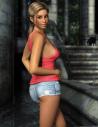
main.jpg
1000 x 1300 - 215K

Daz 3D is part of 
Connect
DAZ Productions, Inc.
7533 S Center View Ct #4664
West Jordan, UT 84084
Licensing Agreement | Terms of Service | Privacy Policy | EULA
© 2026 Daz Productions Inc. All Rights Reserved.
Comments
Could be this one https://www.mankahoo.com/index.php?l=product_detail&p=174
Great eye! Thanks for the reply. Looks very close. The attachment doesn't want to go full size. But the hair has the part on the left side of her head and the mankahoo version has the part in the middle. Not super Daz savvy yet so don't know if the part can be adjusted. Don't recall that as a morph on other hair products. But very small difference so should work well. Anyone familiar with the product prior to my making the purchase? Thanks again.
That product does have a "Top_Parting" morph listed - so maybe that changes the position of the part? *shrug*
It does.
Thanks for all the great help. The morph does indeed change the hair line and now matches the promo that I was working on. The textures shade are the remaining differenence. Is there a way to adjust the textures color beyond the textures offered? Not a huge deal but falls under the "it would be nice" and learning opportunity for me.
You can manually adjust colors in the Surfaces tab, but you need to know a bit about what settings do what. The easiest way though is to invest in a good hair shader or two. Out Of Touch has a good hair shader over a the other store and this hair shader system has been raved about here on the forum: https://www.daz3d.com/uht2-ultimate-color
This looks like the hair color product used.
I've loaded the character & added the hair. I've selected the hair and went to the surfaces tab. In materials/hair/hair colors/base I've clicked on the various materials options but the hair color doesn't change. I also tried to merge the selection but that didn't work either. Am I missing some steps or going about the process wrong? Thought this would work as it seems very similar to using textures. Thanks for you help and baring with me.
Thanks for the great find. Several of the options in the photo look to be a good match. Sadly, my wishlist of assets is a bit long to spring for an extra texture set for the hair. Perhaps sometime in the future. Thanks again for the link.