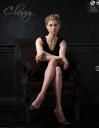
What morphs/textures were used to create this look (Classy Cover Photo Light by The Philosopher)?
 gibrril_fa945a6cee
Posts: 550
gibrril_fa945a6cee
Posts: 550
Hi all! I saw this promo image for the Classy Cover Photo Light and Vignette product by The Philosopher. My eye was caught by the detail on the feet of Victoria 8.
Apart from the lights, which is obviously absolutely tempting me to buy it, what other products were used to create that detail on the feet? I'm dying to know!
Thanks a lot,
Me
Classy.JPG
568 x 736 - 44K
Post edited by gibrril_fa945a6cee on

Daz 3D is part of 
Connect
DAZ Productions, Inc.
7533 S Center View Ct #4664
West Jordan, UT 84084
Licensing Agreement | Terms of Service | Privacy Policy | EULA
© 2026 Daz Productions Inc. All Rights Reserved.
Comments
Maybe Vascularity HD for Genesis 8 Female and Male, since those give beautiful details to the body by popping out veins.
Thanks for the reply! How about the muscles, or even bones you can see underneath the skin? Does anybody have an idea how that was done?
Thanks a lot,
ME
Could it be from this pack?
https://www.daz3d.com/killer-legs-2-0-morphs-for-genesis-8-female
My first instinct was to say it's Bend Control, but I don't believe they make the bones on the feet stick out like that. Ultimate Natural Bend Morphs might come closer to giving you that effect.
I think it's just Victoria 8 HD. The lights are enough to make it more noticable.
Thanks for the replies! It can't be the natural bend morphs, I think, as the figure used is genesis 8, not genesis 3... Or do these trnasfer over? Would be cool if The Philosopher would shine some light on this (pardon the pun :) ). If it is "just" Victoria 8 HD, what SubD level was used here?
Thanks a lot,
Me
I would try 4, or 5.
Thanks for the reply! 4 or 5? Must it realy be that high? I read on the forums here that some HD morphs need SubD 2 to really shine, but anything above that or above three at most was "a waste of resources" as the difference would not be visible unless it was a very strong close-up...
I did recheck the ultimate bend morphs. They do not come with morphs for the feet, so I would not think that product was used here...
Thanks a lot,
Me
have you actually tried to replicate the look?
This is with GF3, Victoria HD and Zevos vascularity for the feet at subD 2 which comes really close IMO
Try 4 but with the lights at the right angle to create the shadows even 2 will work. See the above post.
Thanks for the replies! What settings have you applied to these morphs? 100% or 120%? Or have you turned off the limits and raised it up even more?
Thanks a lot,
Me
Look for morphs that have HD in their name relevant to the character models you are using & dial in at 100%. There is often a combined slider morph dial that will dial in all the HD morphs at one and also often HD presets that effectively do the same.
Thanks! I'll give that a whirl!
Any other suggestions as to what products were used to create that look?
Thanks a lot,
Me
if you look at the bottom of the product page, the Philosopher lists 9 products used in the promos...including Zev0's vascularity.
and if you really want to get that look with that finely-tuned lighting? buy the set, and you'll be good to go. :)
Hey, Thanks !!! I completely missed that!!!
kind rgards,
Me!