Smart Content tab and Metadata
 Prospector
Posts: 54
Prospector
Posts: 54
in The Commons
Trying to set up metadata and watched 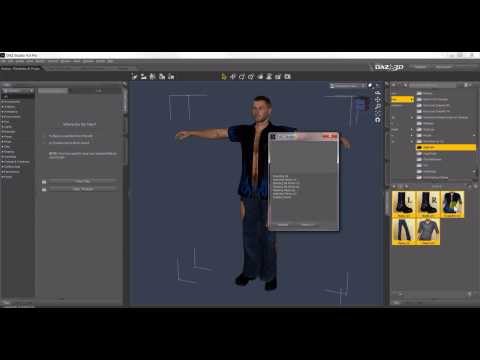
I can follow along with full video and nothing worked. Then I noticed that when he selected the Micheal object it showed up in the "nothing selected" box.
Mine doesn't..from V4 to gen8, nothing shows when selected. Tried many times with new install usind the Dim and also manually. they never show. Should I be selecting a different button somewhere? Running Win 7 and Daz 10.
I'm lost.
thanks for help.

Daz 3D is part of 
Connect
DAZ Productions, Inc.
7533 S Center View Ct #4664
West Jordan, UT 84084
Licensing Agreement | Terms of Service | Privacy Policy | EULA
© 2026 Daz Productions Inc. All Rights Reserved.
Comments
There is a link to a newer tutorial in this post:
https://www.daz3d.com/forums/discussion/comment/2653181/#Comment_2653181
getting 'page not found'
even tried looking for just the comment number...not found
well it does find the comment you left :)
Oh, you're probably not a PC+ member then, in that case you can't access the PC Members forum.
Here's a direct link to the tutorial: https://onedrive.live.com/?authkey=%21AFbN7U4QsFOSa20%22&cid=AED1D73F6FDF6450&id=AED1D73F6FDF6450%2118060&parId=AED1D73F6FDF6450%21151&o=OneUp
I could do all that...The base object shows in the 'no selection' button and all the smartitized ? stuff for that item shows. same here.
BUT
if I just load V4, gen,gen2,gen3, or gen8 and select them, I can't get them to show up on 'no selection' button to see what smart stuf she has in the smart tab. And he never loaded a base actor, whereas the vid I watched above, the base charector is selected and is showing in smart tab as selected. Mine don't show. He started with it already loaded and didn't show how it got there.
Sure you have selected (clicked so it turns yellow) the new compatibility base you have created before clicking Accept? Otherwise reopen the list, select it, click Accept and try again.
yea, everything works fine. can select a shirt (only thing loaded in scene) and all textures I went thru show up on the smart tab..and the shirt showes where nothing selected button is. so all that is fine. It's just the base girls when they are first loaded and they are only thing in scene. Select them and nothing selected stays nothing selected. I don't remember this happening on earlier ver of Daz Studio. I'm pretty sure when loaded from the dim they showed without doing anything else. Does everything have to go thru this process now ? I was under impression that Gen2 on was all set for smart tab when I downloaded it.
Works fine here, tried both V4 and G2F, DS 4.10.0.123. I install everything with DIM, maybe that's why?
hmm, something wrong here then. I tried with both manual and dim, both same as mentioned above. Back to the drawing board. Going thru system and regedit and getting rid of everything Daz and Dim , and try to install again.
WOO HOO !!!
After going thru everything and removing anything that may have offended Daz, sacrificing 3 chickens and a pig, reloading 1 thing at a time...it works.
Thanks for help
I just couldn't figure why my actors wouldn't show where yours did. Evedently something had a hiccup when installing and wouldn't play nice.
A happy camper
OK, glad you got it solved!
well it was good while it lasted :(
Loaded V4 with Dim worked
Loaded Genesis with dim worked...wrote last message above.
then it all went fubar
Loaded Gen 2, Gen 3, Gen 8.
and got this;
Gen 2 shows NO SELECTION
Gen 3 and 8 show FEMALE but are grayed out and not selectable
All were loaded By Dim all the same way. First 2 (V4 and Genesis) were auto in the box and selectable.
ARRGGGGG
just rebooted Daz,
same as pic above but clothes loaded for each.
V4 and Gen work fine..shows all that are selected in button.
Gen 3 and Gen 8;
shows female on button...un highlited like V4 and Gen
but clothes ARE listed on button but unhighlighted like V4 and gen.
Gen 2 absolutely nothing...no figure, no item selected, no highlighting.
Only loaded starter essentials as given on download page..would I need something else?
On my system, when I select Genesis 2 Female, Genesis 3 Female and Genesis 8 Female, the Smart Content Tab displays "Female" on all three. If you click on the drop down triangle, it displays the installed characters for the generation of Genesis selected. As an example, the picture attached shows installed characters when Genesis 8 Female is selected.
So far only have starter essentials installed and getting it set for compatibilities and may be not understanding how the interface works.
When V4 and then Genesis highlighted and showed the actor, I figured ALL would be the same.uuuu
going by yours then all is OK so far except Genesis 2, which doesn't do anything.
will try to figure that part out.