Dforce Wind question
 jorge dorlando
Posts: 1,159
jorge dorlando
Posts: 1,159
in The Commons
Hi,
I wanted to simulate wind in this jacket, and in that hair, but I've been kind of confused by what I've seen about. Is this necessary, to create weight map, etc. for the items?
Is not there a simple way to apply the fan and let it do the thing?
tes.jpg
1094 x 789 - 131K

Daz 3D is part of 
Connect
DAZ Productions, Inc.
7533 S Center View Ct #4664
West Jordan, UT 84084
Licensing Agreement | Terms of Service | Privacy Policy | EULA
© 2026 Daz Productions Inc. All Rights Reserved.
Comments
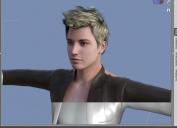
Note: This is Genesis1
The hair is: WildMane Hair
jaketa: Night Out Jacket
This character is in free fall in the air and without a parachute.
I want give some reallity your movements . Its animate
You may well mneed to work on the mdoels to make them work, but you can test simply by selecting hair and from the Simulation settings option menu (the lined button in the corner or right-click the tab) seelcting dForce>Apply dForce Modifier Dynamic, then clicking the Simulate button at the pane's top-right. It's likely that at least some parts will come detached, but if your luck is in adn they don't then you can just create a new Window Node (from the create menu, point it up, and let it create the falling effect.
Dforce wind is not going to do anything to those items unless you make the dynamic first. (From the Scene Tab Right CLick, Edit > Geometry > Add Dforce Modifier: Dynamic Surface.
Its not an altogether simple process and many older products will work with effort. But its not quite so simple as you'd like it to be,
Hello
now, following his explanations, Daz finally does not break anymore, and keeps consistent, before he was breaking / stopping responding.
But, it seems that this will not work out with "this" hair and this jacket.
Well, the hair even behaved acceptably using only gravity and air resistance, and this already give to enjoy. This hair also has a few morphs that will also help in the animation.
As for jaketa, this does not have morphs, and I'm going to see how to create some for it in blender ... I'm going to see a tutorial that says teach this.
This way I intend to create the movements in the animation by changing the morphs parameters and adding keyframes repeatedly.
But thank you very much for the explanation.