How do I fix fuzzy focus?
 dracorn
Posts: 2,379
dracorn
Posts: 2,379
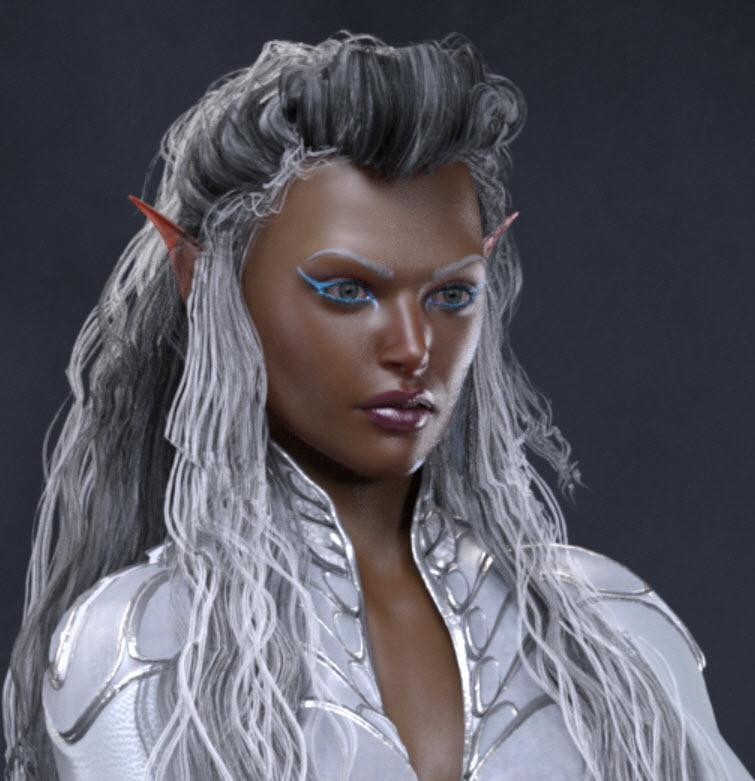
I'm rendering a large file 2000x2588 in Iray using Boss Pro Light Set and am expecting sharper focus. I'm using camera 7 Full Length Half Right and did pan out a bit to frame it better.
I thought maybe it was because of the panning that the settings were not optimal, so I experimented with an added camera in the same position - with the same results. I've had very good luck with Boss Pro, so I'm not sure what I'm doing wrong.
Here's a close up of the face.

Daz 3D is part of 
Connect
DAZ Productions, Inc.
7533 S Center View Ct #4664
West Jordan, UT 84084
Licensing Agreement | Terms of Service | Privacy Policy | EULA
© 2026 Daz Productions Inc. All Rights Reserved.
Comments
in your render settings, reduce the pixel filter size from the default 1.5 to somewhere between 0.75 and 0.95. ( open the Filtering dialogue, you can find it right under Optimisation )
switching to the mitchell mode might help as well.
If you moved the camera and didn't adjust the focal length to compensate that sometimes adds blurriness. Considering you don't really have a background, try just rendering without a camera. And as 3anson said, you can lower the pixel filter radius, which might help. :) You can find that under Render Settings >> Filtering >> Pixel Filter Radius.
Great, that's much better. I changed the pixel filter to 0.75. I'll try the mitchell mode... tomorrow. It's late.
I knew it had something to do with the camera. The background is the seamless backdrop that comes with Boss Pro Lights. I'll fiddle with the focal length as well.
Thanks for your suggestions!
If you have no depth of field on then the camera position and focal length should not add blurriness, but if you do this can be a big problem indeed.
Thanks - I was wondering about that. I had even set up a new camera with the same dimensions and it had the same problem. So I'll be messing with pixel filter and mitchell mode.
Something I stumbled over just now that threw off DOF completely was scaling down a complete scene including the cameras as I wanted them to stay in the same position. The scene was somehow just too large comepared to the human figures in it so I put it to 75% and then I really had a struggle with the DOF even though I seemed to be placed at the correct position. Took me a while to get the idea what happend.