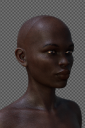
Dark Skin settings... I am very lost. Some assistance required

conscience73conscience73 Posts: 42
edited December 2017 in The Commons

Hello...
I'm actually now at wits end with this render. I've been fiddling with skin settings for 4 days now, to no avail. No idea what else to do...

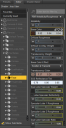
Textures on both are, in Base Colour: Diffuse + SSS + Blood vessel maps. Translucency colour has SSS maps (grey map for Makeda G3F set to a grey pinkish colour, coloured SSS map for FW Marcus for Darius 8 set to white.) Some assistance with settings and possibly explanations as to what I'm doing wrong will be greatly appreciated. Lots of time has been spent here. Both have the same skin settings. Faces, bodies, limbs also have the same settings. The faces are just different somehow.

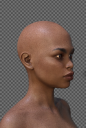
(Model with Nyarai for G3F textures. Same settings as listed.)
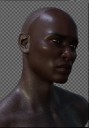
 

In the wilderness 47.98% converged.png
385 x 553 - 313K
In the wilderness b 29.36% converged.png
401 x 603 - 323K
Face settings.png
321 x 623 - 41K
Face settings2.png
319 x 625 - 41K
Face settings3.png
321 x 627 - 39K
Face settings4.png
321 x 625 - 36K
Nyarai.png
375 x 557 - 284K
Post edited by conscience73 on

Comments

  • Can you screenshot torso settings?

  • LyonessLyoness Posts: 1,640

    changing the translucency color will continue to darken the skin.

    I'm not really sure what your end goal is for the skin. are you going for a darker skin tone?  lighter? are you trying to remove a grey cast from the skin? 

    Please state what want and I'm sure we can get you there.

  • Lyoness said:

    changing the translucency color will continue to darken the skin.

    I'm not really sure what your end goal is for the skin. are you going for a darker skin tone?  lighter? are you trying to remove a grey cast from the skin? 

    Please state what want and I'm sure we can get you there.

    They're trying to fix that the torso and face render like they have different settings.

  • Can you screenshot torso settings?

    Ok. I was away setting up and running test renders. Followed a suggestion to use hair et al to mask the issues...I'd like if this were resolved though.

    Settings below.

    Torso Settings.png
    343 x 627 - 46K
    Torso Settings 2.png
    321 x 623 - 42K
    Torso Settings 3.png
    321 x 623 - 41K
    Torso Settings 4.png
    319 x 627 - 37K
  • Your torso settings are completely different from your face settings. Base color, different. Translucency color, different. SSS reflectance, different, and that's just the first set. This is why they don't match.

  • conscience73conscience73 Posts: 42
    edited December 2017


    Post edited by conscience73 on
  • agent unawares said:

    Your torso settings are completely different from your face settings. Base color, different. Translucency color, different. SSS reflectance, different, and that's just the first set. This is why they don't match.

    Apologies for that. The base colour for the face is different as I tried matching the torso. When it's the same colour as the torso, the visual difference remains.

    The differences you see with translucency colour, SSS reflectance, etc. is because I mistakenly posted her settings instead of his. The differences owe to their SSS maps. Her SSS map is grey with trans colour white, his map is coloured, trans colour the colour of the map. Hope this clarifies it somewhat.

    The skin settings, where the same with him - arms, ear, face, legs, torso - still produce the difference between torso and face.

  • Sure, that clarifies the differences, but posting her torso settings and his face settings provides no useful information.

  • conscience73conscience73 Posts: 42
    edited December 2017

    Sure, that clarifies the differences, but posting her torso settings and his face settings provides no useful information.

    That is true. An accident. Here they are. Torso and face settings, side by side.

    I'm wondering if it's the maps I'm using in base colour. The procedure creating them was the same. Diffuse + SSS map + Blood vessel map. The rest of the body matches in the render...just not the face.


    His settings.png
    700 x 652 - 83K
    His settings 2.png
    700 x 636 - 84K
    His settings 3.png
    698 x 636 - 73K
    His settings 4.png
    696 x 632 - 70K
    His settings - results.png
    362 x 450 - 200K
    Post edited by conscience73 on
  • One way to compare is to select both surfaces (click one, ctrl(Win)/cmd(Mac)-click the other) - the map thumbnails will go (I think) blue as they are obviosuly different but the numeric values and colours will show values unless there is a difference, in which case the values will be replaced with <?>

  • One way to compare is to select both surfaces (click one, ctrl(Win)/cmd(Mac)-click the other) - the map thumbnails will go (I think) blue as they are obviosuly different but the numeric values and colours will show values unless there is a difference, in which case the values will be replaced with <?>

  • One way to compare is to select both surfaces (click one, ctrl(Win)/cmd(Mac)-click the other) - the map thumbnails will go (I think) blue as they are obviosuly different but the numeric values and colours will show values unless there is a difference, in which case the values will be replaced with <?>

    Thanks, but in the last attached images, it indicates that they're the same values. I did what you suggested but no <?> came up, nothing different appeared.

    Alas, I think this is just one of those things which will remain. Bluejaunte (PA) posited that the pixels on the face are denser than those of the torso, despite both being 4096x4096 so some difference may be found. They suggested lowering bump and spec and or...using Lyra HD's (their product) micros. The latter appears to work on the female model at least. Using hair to mask the separation also works. I suspect this'll just have to do. The male model will be left in the wilderness because I just don't know. The settings are the same yet the faces are different. Oh, well...

  • bluejauntebluejaunte Posts: 2,036

    Hmm yeah, I did forget you can't just use female maps on male. Other than that I was talking about texel density. Google it for more info.

    You're running into a problem that bothers me often so I try to work around it in my own characters. The texel density in the face UV patch is about 4x higher than the torso. But both are usually 4k textures, so that means that you are abruptly going to 4x less pixel resolution along that edge where the face connects to the torso. Unless you're creating your own maps there's really not much you can do about it. Try to lower bump or spec in the torso to get it a little closer to acceptable. No other way than to eyeball it. Good news is that this edge is usually hidden by hair. Where it bothers me often, especially with dark skin since the spec and bump is so  prominent, is on the side of the neck.

    Oh and it seems you're using Annagenesis? This makes the issue even worse because there is one microskin map used for all UV's, so the face now not only has 4x more resolution purely on a pixel by pixel basis, but it also uses more of that map in a much smaller part of the body so it ends up being more dense. Think like same amount of butter stretched over lots of bread (torso) or condensed onto just a small piece (face). The more dense fine noise patterns like that get the less rough they are going to be to the renderer, so you end up with way more spec in the face. Hope that makes sense.

    If you have Lyra, Young Lyra, Faye or Yara, you could try those microskin maps instead as I've countered the effect as well as possible.

  • Hmm yeah, I did forget you can't just use female maps on male. Other than that I was talking about texel density. Google it for more info.

    You're running into a problem that bothers me often so I try to work around it in my own characters. The texel density in the face UV patch is about 4x higher than the torso. But both are usually 4k textures, so that means that you are abruptly going to 4x less pixel resolution along that edge where the face connects to the torso. Unless you're creating your own maps there's really not much you can do about it. Try to lower bump or spec in the torso to get it a little closer to acceptable. No other way than to eyeball it. Good news is that this edge is usually hidden by hair. Where it bothers me often, especially with dark skin since the spec and bump is so  prominent, is on the side of the neck.

    Oh and it seems you're using Annagenesis? This makes the issue even worse because there is one microskin map used for all UV's, so the face now not only has 4x more resolution purely on a pixel by pixel basis, but it also uses more of that map in a much smaller part of the body so it ends up being more dense. Think like same amount of butter stretched over lots of bread (torso) or condensed onto just a small piece (face). The more dense fine noise patterns like that get the less rough they are going to be to the renderer, so you end up with way more spec in the face. Hope that makes sense.

    If you have Lyra, Young Lyra, Faye or Yara, you could try those microskin maps instead as I've countered the effect as well as possible.

    Yeah. Thanks for your assistance, still.

  • Hmm yeah, I did forget you can't just use female maps on male. Other than that I was talking about texel density. Google it for more info.

    You're running into a problem that bothers me often so I try to work around it in my own characters. The texel density in the face UV patch is about 4x higher than the torso. But both are usually 4k textures, so that means that you are abruptly going to 4x less pixel resolution along that edge where the face connects to the torso. Unless you're creating your own maps there's really not much you can do about it. Try to lower bump or spec in the torso to get it a little closer to acceptable. No other way than to eyeball it. Good news is that this edge is usually hidden by hair. Where it bothers me often, especially with dark skin since the spec and bump is so  prominent, is on the side of the neck.

    Oh and it seems you're using Annagenesis? This makes the issue even worse because there is one microskin map used for all UV's, so the face now not only has 4x more resolution purely on a pixel by pixel basis, but it also uses more of that map in a much smaller part of the body so it ends up being more dense. Think like same amount of butter stretched over lots of bread (torso) or condensed onto just a small piece (face). The more dense fine noise patterns like that get the less rough they are going to be to the renderer, so you end up with way more spec in the face. Hope that makes sense.

    If you have Lyra, Young Lyra, Faye or Yara, you could try those microskin maps instead as I've countered the effect as well as possible.

    Yeah. Thanks for your assistance, still.

    TEXEL. Oh...misread. Thanks. I'll check it out.

Sign In or Register to comment.