Gen4 support files
 VIArts
Posts: 1,539
VIArts
Posts: 1,539
in The Commons
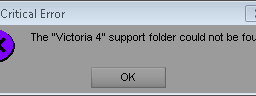
How do I fix this when an uninstall/reinstall doesn't work?
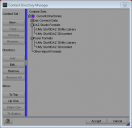
Screenshots show error message and directory.M4 is in "content".
Capture2.PNG
306 x 96 - 4K
Capture.PNG
476 x 463 - 17K

Daz 3D is part of 
Connect
DAZ Productions, Inc.
7533 S Center View Ct #4664
West Jordan, UT 84084
Licensing Agreement | Terms of Service | Privacy Policy | EULA
© 2026 Daz Productions Inc. All Rights Reserved.
Comments
I remember it happening to me a few times, years ago, but I'll buy myself a drink if I can remember how I fixed it.
Try reversing the order of the libraries, i.e., put "I:/My Stuff/DAZ 3D/content" first.
Is that on an external drive? Maybe restart it?
.........Buy yourself a drink. Changing the order did it.
How crazy is that?
Done... *clink*
Something to do with what Studio needs to load first...