Elusive shader window.
 cclesue
Posts: 420
cclesue
Posts: 420
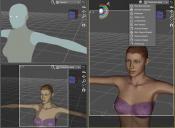
I discovered a shader window not available in the drop down menu. Being the impatient guy I am I have been working in “cartoon shaded” window since it is instantaneous unlike the IRay render window. How ever I discovered this much better shaded view when I decided to divide the single view to three panes. The big right view came up with the “elusive shader window” indicated by the circled ball. Ain indicator ball not available in the drop down menu.
This shader reacts to manipulation just like any of the other windows. Because the selection is not available in the drop down should i select an other shader I cannot return to it nor does another tactic I use recall it.
So whats the deal?? How can I get this stealth texture shaded view back?

Daz 3D is part of 
Connect
DAZ Productions, Inc.
7533 S Center View Ct #4664
West Jordan, UT 84084
Licensing Agreement | Terms of Service | Privacy Policy | EULA
© 2026 Daz Productions Inc. All Rights Reserved.
Comments
You're looking through the camera in the plain faces image, but through the perspective view in the other, maybe that's the diffrence?
It doesn't seem to matter which camera I switch to the window shader remains the same. I works like any other view just looks better. More like the Poser texture shaded view.
The circled ball is Texture Shaded. I'm not sure why your drop down menu shows the same plain circle for Cartoon Shaded and Texture Shaded.
Merge Menus, perhaps? Have you recently updated?
How do I merge menus?
I am running version DS 4.10.0.123 on a Mac running OS X 10.11.6 if that helps any.
Window>Workspace>Update and Merge Menus
What is merging menus meant to do? did it but can see no difference. The ball I need looks like the one under the wire texture shaded without the wire of course.
For some reason I am missing the texture shaded draw style. I asked about this a while back but got no real help and got distracted with other stuff so didn't follow through. as you can see when I select texture shaded I get something that most definately is not texture shaded. If you look at the draw style ball it is not the correct indicator for texture shaded. my current options for any kind of speed is to use cartoon shaded but that really isn't all that satisfactory. So what Am I missing?
On a Mac running 10.11.6
Threads merged.
Your description isn't clear - is texture Sahded actually missing, or does it have the wrong icon (I've had icon oddities with that list) or does it not work when selected? If the latter, what are your settings in Preferences>Interface?
here are two screen shots. one for the pref interface settings and the other for the drop down showing the draw style ball(s) you will notice that balls for Smooth Shaded, Texture shaded, and Cartoon shaded are the same where as the produced draw styles are all different. I don't use Smooth shaded so I can' tell if the produced image is correct.
As I indicated in the original post I did get both the correct draw style and indicater "ball" for the right hand window while the other window stayed something else. I got this window by accident and have not been able to repeat it.
What do you mean by window?
Sorry view ports when I selected 1 right two left
Ah, Isee - and no, I don't know what would cause it - unless it was some kind of memory issue but that would be expected to develop over a busy session and clear on a restart.
Well I just down loaded new Studio app. Still no joy.
I guess I might need a Mac expert to help me.
I occurs to me that there might be a corrupted support file somewhere. I once had had problems with Poser some years back and couldn't clear it up until I dumped one of those obscure files, I have looked wherever one would expect to find such a preference file but don't immediately recognize such. any ideas?