Velvet Ropes Freebie

SloshSlosh Posts: 2,391
edited December 1969 in Freebies

I made this velvet rope set for use in a recent image and would now like to share it with all of you. The ropes and posts come with a few material options, including brass, silver, chrome, and gold, plus red or blue velvet (other colors are easily made in surfaces tab).

Also included are pose presets which will move additional posts the correct distance away from each other so that the ropes fit between them. The ropes have pose presets that determine if they swing left, right, forward or back to connect with other posts.

There is a preload set that is a post with a rope attached, but separate post and rope props are available to end your rows with. To add additional ropes, just be sure to have the post selected in your scene, then the rope will parent to the post automatically. Then, select the rope and either use the preset poses to rotate them around the post, or use your Y-Rotate parameter slider.

Have fun with this, and if you care to, share a render in this thread so I can see how you are using them.

PS: Metadata is included, so be sure to "Re-Import Metadata" after you add it to your content directory.


ShareCG link: Velvet Ropes by Slosh
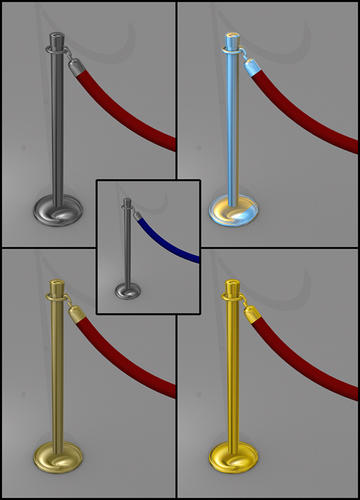
Promo_1.jpg
540 x 750 - 181K
Promo_2.jpg
750 x 537 - 223K

Comments

  • LindseyLindsey Posts: 2,008
    edited May 2013

    Thank you for sharing the fruits of your talent! A very nice freebie indeed!

    Edit: The supplied poses are brilliant!

    Post edited by Lindsey on
  • MelanieLMelanieL Posts: 7,717
    edited December 1969

    Oh, fantastic - I was looking for something like this recently and couldn't find it - next time I'll be ready! Thanks very much for this.

  • MattymanxMattymanx Posts: 6,996
    edited December 1969

    Thank you.

    .

  • SloshSlosh Posts: 2,391
    edited December 1969

    Lindsey said:
    Thank you for sharing the fruits of your talent! A very nice freebie indeed!

    Edit: The supplied poses are brilliant!

    The poses were made possible by help from adamr001. He provided me with the code necessary for the incremental moves. Thanks, Adam! Thanks also to Jaderail for offering to help and would have if Adam hadn't gotten to it first.

  • ElowanElowan Posts: 388
    edited December 1969

    A nice addition and one of those very useful items for certain scenes.

    Thnx for the effort and your generosity.

  • LimneryLimnery Posts: 126
    edited December 1969

    Thanks so much for sharing this. :)

  • l_stowel_stowe Posts: 169

    Slosh said:

    I made this velvet rope set for use in a recent image and would now like to share it with all of you. The ropes and posts come with a few material options, including brass, silver, chrome, and gold, plus red or blue velvet (other colors are easily made in surfaces tab).

    Also included are pose presets which will move additional posts the correct distance away from each other so that the ropes fit between them. The ropes have pose presets that determine if they swing left, right, forward or back to connect with other posts.

    There is a preload set that is a post with a rope attached, but separate post and rope props are available to end your rows with. To add additional ropes, just be sure to have the post selected in your scene, then the rope will parent to the post automatically. Then, select the rope and either use the preset poses to rotate them around the post, or use your Y-Rotate parameter slider.

    Have fun with this, and if you care to, share a render in this thread so I can see how you are using them.

    PS: Metadata is included, so be sure to "Re-Import Metadata" after you add it to your content directory.


    ShareCG link: Velvet Ropes by Slosh

    I don't suppose anybody knows whether these are still available now that ShareCG has gone? 

  • LeanaLeana Posts: 12,738

    l_stowe said:

    Slosh said:

    I made this velvet rope set for use in a recent image and would now like to share it with all of you. The ropes and posts come with a few material options, including brass, silver, chrome, and gold, plus red or blue velvet (other colors are easily made in surfaces tab).

    Also included are pose presets which will move additional posts the correct distance away from each other so that the ropes fit between them. The ropes have pose presets that determine if they swing left, right, forward or back to connect with other posts.

    There is a preload set that is a post with a rope attached, but separate post and rope props are available to end your rows with. To add additional ropes, just be sure to have the post selected in your scene, then the rope will parent to the post automatically. Then, select the rope and either use the preset poses to rotate them around the post, or use your Y-Rotate parameter slider.

    Have fun with this, and if you care to, share a render in this thread so I can see how you are using them.

    PS: Metadata is included, so be sure to "Re-Import Metadata" after you add it to your content directory.


    ShareCG link: Velvet Ropes by Slosh

    I don't suppose anybody knows whether these are still available now that ShareCG has gone? 

    Slosh passed away last year, so likely not.

  • ElorElor Posts: 3,145
    edited September 14

    Slosh passed away before ShareCG was shut down and I don't know if he shared it elsewere.

    As for sharing it myself, the readme included is ending on that sentence:

    Have fun with this, and use it any way you want, just do not redistribute as your own.

    I don't know if the 'use it any way you want' part of the sentence allows redistributing while crediting Slosh as the creator of if taken as a whole, any kind of redistribution is forbidden.

    Maybe a moderator can chime in.

    Post edited by Elor on
  • Elor said:

    Slosh passed away before ShareCG was shut down and I don't know if he shared it elsewere.

    As for sharing it myself, the readme included is ending on that sentence:

    Have fun with this, and use it any way you want, just do not redistribute as your own.

    I don't know if the 'use it any way you want' part of the sentence allows redistributing while crediting Slosh as the creator of if taken as a whole, any kind of redistribution is forbidden.

    Maybe a moderator can chime in.

    "do not redistribute as your own" does seem to allow redistributing it with the correct attribution, soi we probably would allow posting a link.

  • That would be fantastic!!  

    Sharecg shutting down was a very sad day!!

  • ElorElor Posts: 3,145
    edited September 19

    I attached the archive (it'll have a gibberish name, once downloaded, but you can name it back to 'VelvetRopes.zip')  as downloaded from Slosh ShareCG account, untouched and unmodified. I just checked the content in Daz Studio and everything should work fine.

    By downloading it, you'll get access to Slosh's Velvet Ropes as he shared it back in 2013.

    As he said eloquently in the readme, ’Have fun with this, and use it any way you want, just do not redistribute as your own’.

    If you want to thank someone, thank him.

    Full text of the readme:

    Velvet Ropes
    by Slosh
    05/01/2013

    Instructions:  Unzip files to your DAZ Library or preferred content directory.  To install metadata, open the Content DB Maintenance tab and choose "Re-Import Metadata".  Select "Velvet Ropes" from the list and click "Accept"

    I made this velvet rope set for use in a recent image and would now like to share it with all of you.  The ropes and posts come with a few material options, including brass, silver, chrome, and gold, plus red or blue velvet (other colors are easily made in surfaces tab).

    Also included are pose presets which will move additional posts the correct distance away from each other so that the ropes fit between them.  The ropes have pose presets that determine if they swing left, right, forward or back to connect with other posts.

    There is a preload set that is a post with a rope attached, but separate post and rope props are available to end your rows with.  To add additional ropes, just be sure to have the post selected in your scene, then the rope will parent to the post automatically.  Then, select the rope and either use the preset poses to rotate them around the post, or use your Y-Rotate parameter slider.

    Have fun with this, and use it any way you want, just do not redistribute as your own.  


    Regards,
        Slosh

    zip
    zip
    VelvetRopes.zip
    5M
    Post edited by Elor on
  • UnseenUnseen Posts: 757

    Thank you so much, thus, Elor and Slosh. :)

  • dyretdyret Posts: 188

    Thank you so much Elor!

  • Thank you so much!

Sign In or Register to comment.
