Welcome/Home Page Issue
 melanie
Posts: 807
melanie
Posts: 807
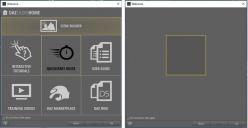
I had major problems getting my DAZ Studio installed on my new computer. After long hours of hard work, I've gotten everything back in order except for one thing: The Welcome/Home page that comes in on startup. I'm attaching a screen shot. The one on the left, as you can tell, is how it should look, and the other one is what I'm getting. Granted, I never use this page, but I would like it working normally in case I do want to use it.
Any ideas how to fix this, and please don't tell me to reinstall DAZ Studio. That's how I got into this mess in the first place. When I uninstalled and attempted to reinstall, the whole program broke. I've finally gotten it back to almost perfect except for this one little thing.
Thanks for any suggestions.

Daz 3D is part of 
Connect
DAZ Productions, Inc.
7533 S Center View Ct #4664
West Jordan, UT 84084
Licensing Agreement | Terms of Service | Privacy Policy | EULA
© 2026 Daz Productions Inc. All Rights Reserved.
Comments
Just FYI, I went through every single file in the Program directory, folder-by-folder, comparing with my old computer and my sister's computer, and everything seems to be in order, but still getting this weird Welcome screen.
Did you run DS (or DIM) as Administrator while trying to get everything installed? That can cause issues, though I've not seen anything like this before. What secutiry software are you using?
You should have a folder "C:\Program Files\DAZ 3D\DAZStudio4\resources" and under that folder there must be the "wizard pages", that's where Home Page lives.