MRL Mutations not working after D/S 4.10 upgrade
 dracorn
Posts: 2,379
dracorn
Posts: 2,379
Am I doing something wrong or do I need to open a ticket?
The geoshell is not loading on G3F. I'm trying to do a flaming tattoo. Per the instructions, I loaded the flaming skin first, then selected the clear shell.
G3F disappears except for her eyes and mouth, and does not change even after I loaded the flaming tattoo visibility option.

The geoshell does not appear in the scene tab.
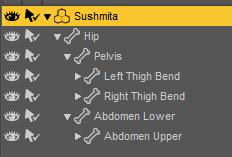

MRL D-S 4 10 Problem 01.jpg
700 x 700 - 17K
MRL D-S 4 10 Problem 02.jpg
232 x 157 - 14K
Post edited by dracorn on

Daz 3D is part of 
Connect
DAZ Productions, Inc.
7533 S Center View Ct #4664
West Jordan, UT 84084
Licensing Agreement | Terms of Service | Privacy Policy | EULA
© 2026 Daz Productions Inc. All Rights Reserved.
Comments
Have you tried uninstalling and reinstalling MLR Mutations?
Thanks, Bee. I just uninstalled and reinstalled MRL Mutations. I have the same problem.
Let me do a quick check for you.
Works fine with me in the current DS 4.10 Beta....
The instruction says:
03 Flaming Tattoos - Load the flame skin to the shell, then clear it (to make it invisible), then apply the tattoo (s) of your choice. This folder contains layered image materials. As the effect varies according to lighting there are two tattoo intensities (see 04 below) and an option to double the Flame brightness. Please note layered materials are complex and will take slightly longer to load.
So, you'd first select your G3F, then load the shell, select the shell and then load the flame material... then load "Clear", and after that the tattoo...
Well thanks, Bee. Looks like it was operator error on my part.
It works fine.
Okay it seems to be working on the plain Genesis 3 female. I loaded G3F, loaded the geo shell, applied the skin to the geo shell and then went to the part reveal tab and picked the tattoos that I wanted. But I realized there is no way to turn the legs off, which is super weird. Gonna have to see if I missed a setting when I did my custom category.