product promo question
 kksmith6515
Posts: 201
kksmith6515
Posts: 201
in The Commons
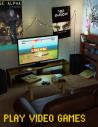
Does anybody know what interior scene was used in this image for this product? https://www.daz3d.com/play-video-games
00-main-play-video-games-daz3d.jpg
960 x 1248 - 284K

Daz 3D is part of 
Connect
DAZ Productions, Inc.
7533 S Center View Ct #4664
West Jordan, UT 84084
Licensing Agreement | Terms of Service | Privacy Policy | EULA
© 2026 Daz Productions Inc. All Rights Reserved.
Comments
Isn't that product the interior scene?
Pretty sure it's https://www.daz3d.com/small-room-kit
I think the video games product came out before the Small Room kit, judging by the dates on the readme's. Video games was 2016-02-19 and Small Room Kit was 2016-12-03 (i think i'm right there, i tend to get a bit confused sometimes with the way americans write dates).
But having said that, judging by the promo pics, the coffee table and lounge and tv etc is included in the product, so you're just looking for the room? The small room kit is good for that, but there are heaps of rooms in teh store that would work too.
maclean has some good rooms that are quite inexpensive: https://www.daz3d.com/maclean
I just looked at the file list for that product, and it looks like the room is included. There is a data file for the room, and texture files for carpet, ceiling, door frame, moulding and wall.
Rooms are props :D
It does say "ready 2 render" that would suggest complete interior scene. The description and info should definitely be clearer.
If it needed another product, that would have been noted in the "required product slot"
The readme says : “Environments:Architecture:Interior”
http://docs.daz3d.com/doku.php/public/read_me/index/24212/start
Thanks to all who left a comment. Yes, it should have been more clearer and it does indeed include the architectural element shown in the promo images. I just purchased it tonight. But something else is strange. In the promo images, it gives the impression that the scene can be rendered using a variety of different lighing settings, yet when I look under all the tabs, I see no presets for how to do this. Perhaps I'm missing something but it still doesn't make sense.
Looks to me like the majority of promo images are are 3Delight renders and the one dark image is the only Iay render. From the looks of it the Iray render is using only emissive light from the props.
Unless a product says it includes lights in the Details or What's Included and Features sections then it probably doesn't include any extra lights.