Winter Terrains For DAZ Studio (Commercial)
 Stonemason
Posts: 1,259
Stonemason
Posts: 1,259
DAZ Studio exclusive.. large scale mountain environment coming soon!
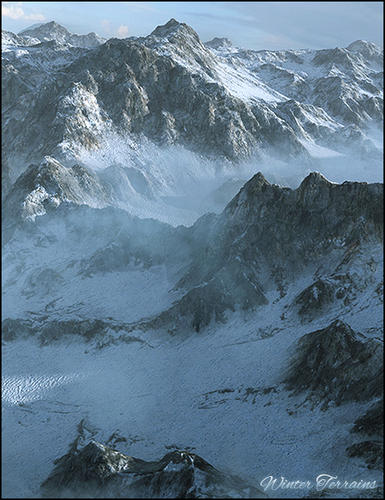
Main.jpg
500 x 650 - 194K
Post edited by Stonemason on

Daz 3D is part of 
Connect
DAZ Productions, Inc.
7533 S Center View Ct #4664
West Jordan, UT 84084
Licensing Agreement | Terms of Service | Privacy Policy | EULA
© 2026 Daz Productions Inc. All Rights Reserved.
Comments
pop1
pop2
pop3
I have been looking for something like this!!!...Has the exact look I am after.
Yes!
Now Genesis is gonna need some warmer clothes. I've been looking for that since the days of V&M3;
Oooh, nice - now, where did I put the Genesis bikini?
Looks great!
Lol...anyone know if there are any snowshoes?
And don't forget the high heels!
It is important to accessorize for winter weather.
~Bluebird
Oh yeah, right up my street, but uh oh, there goes the groceries budget (again!)...
...I better stock up some extra tins of beans to be on the safe side :)
I'm buying this. Saw it advertised yesterday and can't wait.
Damn those are sooooo realistic!!!
It looks great StoneMason.
Can a character be placed on the mountain or is this only good for shots at a distance?
Totally frosty ...
http://www.daz3d.com/new-releases/winter-terrains-for-daz-studio
Looks fantastic!
I'm interested in knowing this too. In a couple of the promo pics, the terrain looks very close and detailed, well enough for human-sized figures. Hope it is. :)
I don't think you'll have too much to worry about ;)
Here are some shots that show default scale. I've put a ring around Genesis so you can see it easier.
There are four separate terrain scenes, I've turned off the skydome so we could see from camera position...
Thank you very much for those. Could you perhaps show us one close up pic showing the area and the ground near a figure's feet just to see the texture detail at that close distance? Much appreciated!
There are also a couple of snow boxes that can be added to scenes as well as some billboard-style clouds that will be very useful (but not shown in close up below)
The skydome needs render shading rate to be 0.1 or higher quality (lower number) to avoid the "boxing" effect that can happen with UberEnvironment... I put image through Photoshop just to reduce to size appropriate for forum attachment, but did not alter in any other way.
i really like this product, at first i thought it was only background picts ^^
That's great, thank you very much for those pics. Was enough to convince me to buy when I can, I hope it does for others too. :)
I've been waiting for this product since stonemason showed us his initial screenshots. I love all snowy/frosty scenes and this has a very nice resolution which is the best of stuff I own for daz. Thanks stonemason!
Thanks for posting this. how big is the flat area, open area genesis is in, big enough for a vehicle or two? This looks great, but unless I can build a scene with an open area and the mountains as the immediate background, it won't be much use for me.
Also do the shaders/textures transfer over to Luxrender or are they DS specific?
Not sure if you know, but lowering the shading rate is not the only solution in that regard. Often applying subdivisions to the skydome helps and also certain shaders can be applied that allow disabling of occlusion on the skydome surface.
hey guys..
shaders are DAZ Studio specific and I don't think they transfer to Lux, Haven't tested that but I doubt they would as it's made with shader mixer.
for close up renders of the terrain there's a tile dial for the rock and another for the snow,so it could be as detailed as you want it.
also there is an uberlight preset included that has adjustments to the bias that should take of any grid patterns on the skydome,I didn't get any grids while rendering the promos.
thank's
Stefan
Thanks for those pics Jabba
I didn't even think to ask before, but can you hide the snow if you just want rocky terrain?
the terrain uses a mask to separate the snow and rock, so you could just apply another rock texture to the snow section of the material, not sure how cool that would look but it's there as an option
Any reason why no Poser version was included?
Your previous DS-only product was pretty easily adapted to Poser (apart from the texture assignement puzzle)?
Interesting, thank you for the information.
When you turn the TerrainMask image on the surface to complete black, you basically end up with the rock solely it seems. Not sure if that is already good enough for you.